• We’re currently investigating an issue related to the forum theme and styling that is impacting page layout and visual formatting. The problem has been identified, and we are actively working on a resolution. There is no impact to user data or functionality, this is strictly a front-end display issue. We’ll post an update once the fix has been deployed. Thanks for your patience while we get this sorted.

Help me take better portraits!! Please! The Big dance is Friday

ProfJohn

Lifer
My nieces winter ball is this Friday and I am taking pictures or her and her 4 best friends.

This will be her first big formal school dance and they have all bought dresses will be getting the hair done etc etc etc etc.

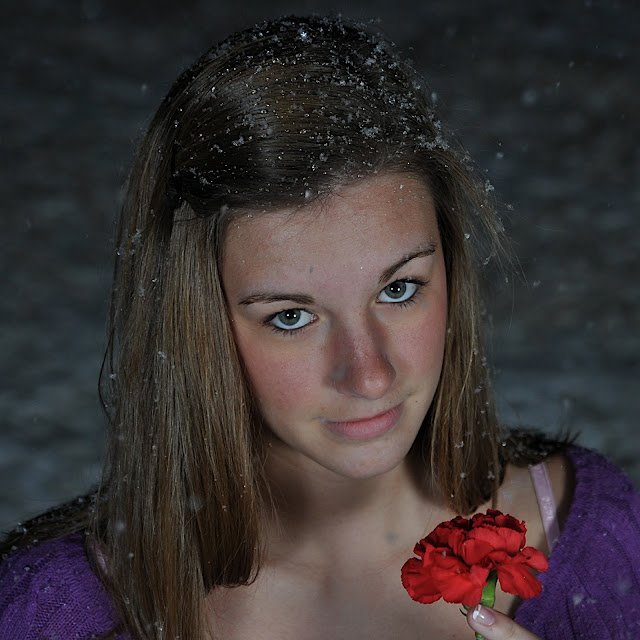
So I bought an Alien Bee set up so improve my lighting and below are my first pics using it.

In both photos I am using a silver umbrella as a reflector and shooting through a white umbrella.

Looking at the photos what kind of changes to my light settings would you advise.
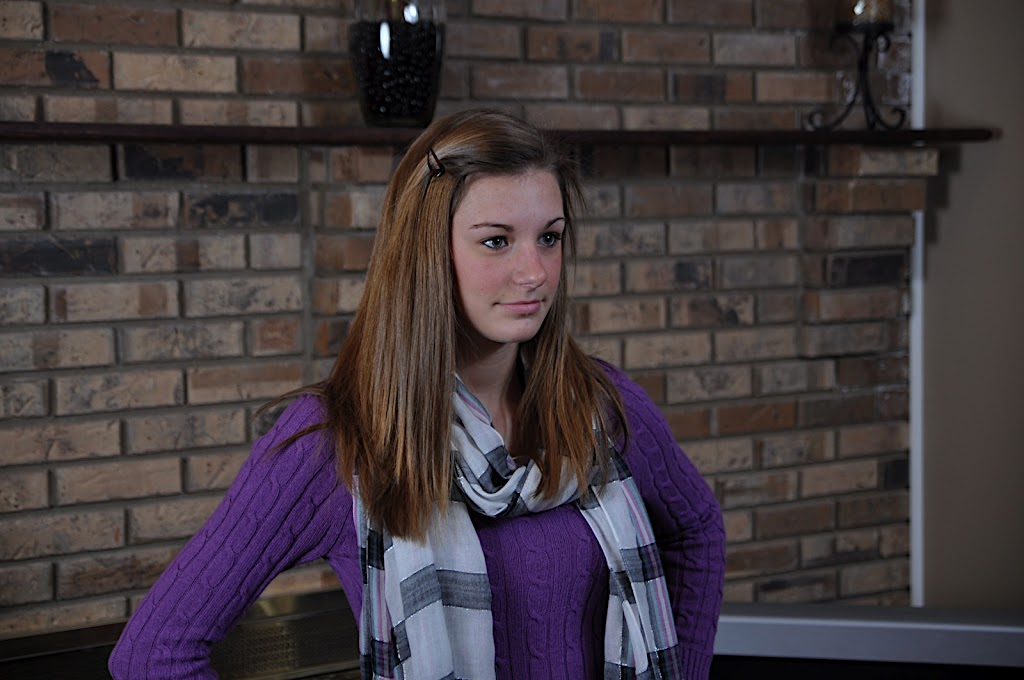


DSC_0051.JPG

DSC_0091.JPG

DSC_0058.JPG
 
Stop taking photos against a busy background and for pete's sake do some post-processing. Those photos just look so dead. Like I said in the other thread, they're underexposed. Open up your aperture or throw a little more light at her face.
 
The ap on the first and last was 2.8 while the middle was 3.5.

I have no control over the background for these pics, will hopefully be better for Friday.

I am guessing that I need to turn the reflector down a little and the shot through up a little.

Another idea might be to flip the reflector around from the silver backing to the white backing to get a softer light and bring out the features a little more.
 
Thanks for everything.

I am on an iMac with the glossy screen that I keep real bright so that might be part of my problem.

And then the white balance could really be a problem, might explain why it looks so bright but the colors are lacking.

I hope to get some more practice shots in tomorrow otherwise I might be taking photos friday and throwing them through iphoto or picasa to try and adjust the colors a little.
 
Ok... I just looked at the photos in raw format and now I can see just how dark they are.

The jpg makes them look lighter.

And I can see how the color is off a little. It is amazing how much of a change just clicking the white balance thing does to the photos.
 
Your placing your lights pretty far away. There's not a lot of depth or fluidity to it. Try bringing your light closer. If you want to really soften it up, then take the reflector off the AB before using your shoot-thru.

You're also crossing your lights, does weird things to noses. It's due to position and having both lights so close in ratio. Try seeing what a single light is doing first before bringing in your 2nd as fill. Watch where your shadows lay. And when you do use your 2nd, try being more subtle. Finesse the light.
 
you're also crossing your lights, does weird things to noses. It's due to position and having both lights so close in ratio. Try seeing what a single light is doing first before bringing in your 2nd as fill. Watch where your shadows lay. And when you do use your 2nd, try being more subtle. Finesse the light.

Don't cross the streams!
 
These are two JPEGs. One has been processed differently.
The second one is the raw converted to jpg mode by iPhoto.

It looks very similar to how the raw looks in iPhoto, much darker which is typical of raw files.

All I did to adjust it was click the color picker in the whites of her eyes and it adjusted the colors - white balance and it certainly seems to be a big improvement.
 
Your placing your lights pretty far away. There's not a lot of depth or fluidity to it. Try bringing your light closer. If you want to really soften it up, then take the reflector off the AB before using your shoot-thru.

You're also crossing your lights, does weird things to noses. It's due to position and having both lights so close in ratio. Try seeing what a single light is doing first before bringing in your 2nd as fill. Watch where your shadows lay. And when you do use your 2nd, try being more subtle. Finesse the light.
Great advice, thank you.

Am very new to the multi light set up and have had no time to play around with the lights at all.

I'll start with just the shoot-thru tomorrow and then see if I need the second light or not or just use it to light up the background etc etc. Or maybe even play with placing it behind them sans umbrella and go for the halo look.

I am sure I will get some good photos. The big question is whether I can get them good right out of the camera or if I have to do a lot work in the computer to get them right.
 
Thanks for everything.

I am on an iMac with the glossy screen that I keep real bright so that might be part of my problem.

And then the white balance could really be a problem, might explain why it looks so bright but the colors are lacking.

I hope to get some more practice shots in tomorrow otherwise I might be taking photos friday and throwing them through iphoto or picasa to try and adjust the colors a little.

You may want to check out this for quick monitor calibration: http://www.imaging-resource.com/ARTS/MONCAL/CALIBRATE.HTM
 
Give Prof John a break, tonight is Friday, aka the big night, and the only arbiters of the photo shoot will be his niece and her girl friends. If they are happy with the results, why should any of us second guess. Or say, if only I was there, I could do better. The point being, you are not there, and Prof John is.

Good wishes Prof John. And next step, post some of the photos you got.
 
Give Prof John a break, tonight is Friday, aka the big night, and the only arbiters of the photo shoot will be his niece and her girl friends. If they are happy with the results, why should any of us second guess. Or say, if only I was there, I could do better. The point being, you are not there, and Prof John is.

Good wishes Prof John. And next step, post some of the photos you got.


Very true...no insensitivities intended, John. Have fun and *experiment!* That was the biggest problem I had when I first started using off-cam lighting was that I was afraid to experiment.
 
Back
Top