
Clinteastwood1
Junior Member
Hi,
I'd like to repair my laptop's motherboard (UX305 i7 cpu). The laptop turned off abruptly when I was working on it and now it won't turn on again.
The charger is working fine (tested) and when I plug it nothing happens, no charging led, the laptop only vibrates slightly when I put my hand on it as usual meaning the current is passing through it. The laptop seems like dead though.
I tried:
- removing the battery and press the start button during one minute to drain out any current from the MB. No start up
- I tested the charger it's fine.
- I tested the charging connector it's fine.
The MB is faulty.
I've seen many videos and almost everytime the 2 mosfets which are near the charging connector and which play a safety role, are often the culprits
So I am planing to replace both. I don't know how to measure them to see if they are working or not (on the videos I've watched, it's not very clear to me) so nevermind I'll replace them straight away and hope I'll get lucky.
My question :
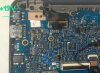
Could you please tell me if these 2 safety mosfets are the ones I circled in blue, or the ones in red? To be sure...
And can someone tell me the type/brand/model to buy as replacement.
Thank you very much for your help.
Best regards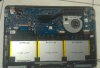
I'd like to repair my laptop's motherboard (UX305 i7 cpu). The laptop turned off abruptly when I was working on it and now it won't turn on again.
The charger is working fine (tested) and when I plug it nothing happens, no charging led, the laptop only vibrates slightly when I put my hand on it as usual meaning the current is passing through it. The laptop seems like dead though.
I tried:
- removing the battery and press the start button during one minute to drain out any current from the MB. No start up
- I tested the charger it's fine.
- I tested the charging connector it's fine.
The MB is faulty.
I've seen many videos and almost everytime the 2 mosfets which are near the charging connector and which play a safety role, are often the culprits
So I am planing to replace both. I don't know how to measure them to see if they are working or not (on the videos I've watched, it's not very clear to me) so nevermind I'll replace them straight away and hope I'll get lucky.
My question :
Could you please tell me if these 2 safety mosfets are the ones I circled in blue, or the ones in red? To be sure...
And can someone tell me the type/brand/model to buy as replacement.
Thank you very much for your help.
Best regards


