
• We’re currently investigating an issue related to the forum theme and styling that is impacting page layout and visual formatting. The problem has been identified, and we are actively working on a resolution. There is no impact to user data or functionality, this is strictly a front-end display issue. We’ll post an update once the fix has been deployed. Thanks for your patience while we get this sorted.

Question Heatsink/fan question

Jerethi

Member
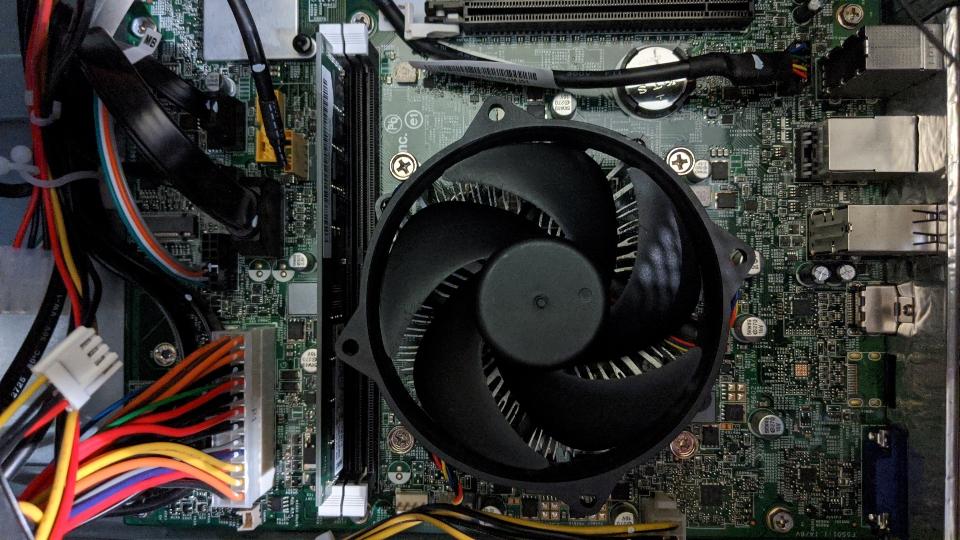
All of the instructional videos that I've seen on YouTube depict a fairly straightforward turn/click method for removing a cpu fan from recent Intel processors. I've attached a picture of the fan for my i5-7400, and it appears different from the ones I've seen on YouTube. Will the method still be the same for these, or is there anything I should be concerned about? Thanks in advance for any assistance!
1f4337269db424909f2364c1ef0603c7.jpg
 
Pretty sure your heatsink is not like those. You have to use a screwdriver (phillips number 2) and unscrew those 4..
 
This configuration is very common in prebuilt machines from OEMs like HP. The screws go through the board and directly into the motherboard tray instead of clipping into the board. This method is more secure/durable than the plastic clips the box cooler uses.

I believe the screws are captive so they won’t come out completely, gradually loosen them in an “X” pattern. There will likely be springs that provide the mounting pressure, so take care that the cooler does not “pop up” to one side due to the spring tension.
 
Looks like you only have one stick of memory too! Add another and get better performance from Dual Channel!
 
Back
Top