• We’re currently investigating an issue related to the forum theme and styling that is impacting page layout and visual formatting. The problem has been identified, and we are actively working on a resolution. There is no impact to user data or functionality, this is strictly a front-end display issue. We’ll post an update once the fix has been deployed. Thanks for your patience while we get this sorted.

HDD shows up in BIOS, but not in Windows - update bad sectors!

dmoney1980

Platinum Member
System:
ASUS z77 mobo
Crucial 64GB SSD
2TB Hitachi drive
DVD ROM
Win 7

I built the above pc for friend about a year ago. Everything worked fine until recently. The 2tb drive no longer shows up in windows. When I go into BIOS I still see it listed under boot options, but it's nowhere to be found in windows. I tried to look under disk manager and under device manager (under disk drives) but no luck. I even tried switching SATA ports on the mobo but got nuthin....

is the drive dead?
 
Last edited:
Go into Admin Tools and make sure the drive letter is different from any other.

Can you run it externally and hot plug it after the system has booted?
 
Last edited:
did it start giving some sign.

Not sure, he told me it just didnt show up one day

Go into Admin Tools and make sure the drive letter is different from any other.

Can you run it externally and hot plug it after the system has booted?

I looked into the admin tools but nothing shows up. I even tried scanning for new harware, no luck! I'll try to put it on an external case tonight when I get home. The weird thing is that I can hear the drive spin up when I hit the power button
 
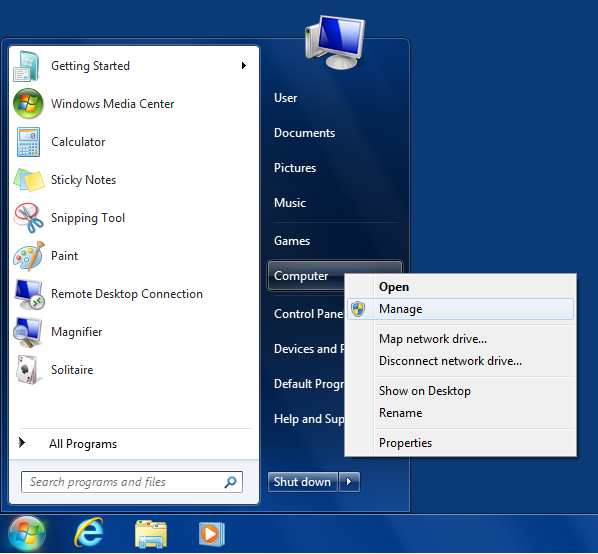
start-menu-manage-computer.png


Click on Manage as shown above.


That brings you to a screen like this:

windows_management_tool_partition_magic_norton.jpg


Does the drive show up anywhere in there?

At any rate, you may want to look at hotfix# KB977178
 
Last edited:
thanks sm265, I'll try that. one thing i forgot to mention earlier - when the HDD is connected to the mobo, it takes about 10 minutes to boot into windows, it hangs at the animated windows logo for a while. it boots fine with just the SSD
 
Hi gang, I got the drive to show up in windows. I did the hot fix mentioned above, upgraded intel drivers and the bios. Problem is the thing crawls and it had bad sectors according to the app I downloaded from the mfgr websites. I'm shipping this back since Its under warranty until 10/13. Thanks for the suggestions everybody!
 
Back
Top