• We’re currently investigating an issue related to the forum theme and styling that is impacting page layout and visual formatting. The problem has been identified, and we are actively working on a resolution. There is no impact to user data or functionality, this is strictly a front-end display issue. We’ll post an update once the fix has been deployed. Thanks for your patience while we get this sorted.

Question Have a problem with my PC I just built

ElectedMarmot42

Junior Member
I recently build a PC and it just doesn't work. As far as I'm aware, all the correct cables are in their correct places. The lights on the motherboard are lit, which makes me believe it is receiving power. However, none of the fans are spinning, including those on the GPU and CPU Cooler. Can anyone help me figure out what's wrong? The build is linked except I'm using an S3 instead of an S5 Case. https://pcpartpicker.com/list/RQL3Kp. Here's a picture as well https://imgur.com/a/AYFJUlU
 
It's hard to tell from the photo since it's in the case.

If the fans aren't spinning though it would indicate the system isn't actually powered on.

So, the PSU might be switched on but, the power button leads might not be connected correctly and powering on the system. Other things to look at are making sure the CPU is seated correctly / RAM is fully inserted.


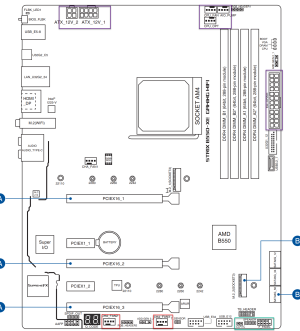
Looking at the manual you can find the headers for the fans
1686846509075.png


So, in the upper Right corner seems to be the most important headers for fans being the CPU/opt

For the power switch on the case the bottom Right pins

Main power ATX appear to be connected but, with some PSU's you have cables that fit the smaller connections on the top Left but are pinned differently depending on the label on the cables. Sometimes using the aux cpu cable connector is the same as a PCIE cable but, the power pins are different.

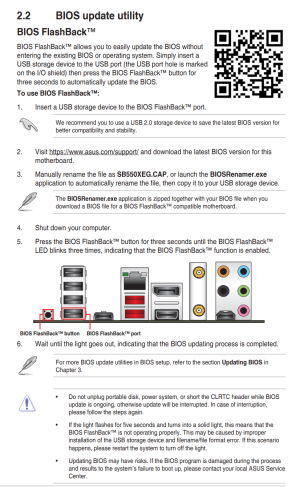
Another thing might be outdated BIOS/UEFI as noted on PCP.
1686846797094.png

Now the flashback doesn't state if you need a CPU inserted or not and varies by vendor but, some work w/o a CPU inserted and then you just drop the CPU in and it works.
1686847053463.png
 
Make sure you have the two CPU cables (ATX12V 1 & 2, top left on the board) connected correctly.

None of the motherboard LEDs are lit? (Top right--BOOT, VGA, DRAM, CPU) Those will often give you a clue where to start.

Another thing to check is whether the board might be grounded to the case...perhaps a standoff in the wrong place?
 
It's hard to tell from the photo since it's in the case.

If the fans aren't spinning though it would indicate the system isn't actually powered on.

So, the PSU might be switched on but, the power button leads might not be connected correctly and powering on the system. Other things to look at are making sure the CPU is seated correctly / RAM is fully inserted.


Looking at the manual you can find the headers for the fans
View attachment 81778


So, in the upper Right corner seems to be the most important headers for fans being the CPU/opt

For the power switch on the case the bottom Right pins

Main power ATX appear to be connected but, with some PSU's you have cables that fit the smaller connections on the top Left but are pinned differently depending on the label on the cables. Sometimes using the aux cpu cable connector is the same as a PCIE cable but, the power pins are different.

Another thing might be outdated BIOS/UEFI as noted on PCP.
View attachment 81779

Now the flashback doesn't state if you need a CPU inserted or not and varies by vendor but, some work w/o a CPU inserted and then you just drop the CPU in and it works.
View attachment 81781

Previously, I disassembled the computer and rebuilt it, in hopes to fix any mistakes I may have made the first time. So I'm fairly confident the CPU is seated correctly and the RAM is fully inserted. I also tried updating the BIOS just now. I changed it to version 1212, the one recommended by PCP, nothing changed.
 
Make sure you have the two CPU cables (ATX12V 1 & 2, top left on the board) connected correctly.

None of the motherboard LEDs are lit? (Top right--BOOT, VGA, DRAM, CPU) Those will often give you a clue where to start.

Another thing to check is whether the board might be grounded to the case...perhaps a standoff in the wrong place?
I believe both of the CPU cables are fully inserted and in the correct orientation. None of the diagnostic LEDs are lit, only the aesthetic lights. Finally, I disassembled and reassembled the whole thing, being much more vigilant for mistakes than the first time, so I'm pretty sure there are no standoffs loose in the case.
 
Is the power switch jumper connected to the case's power switch connector? You could try shorting the jumper pins, to rule out some problem in the case's power switch.
 
Take it out of the case. Put the plastic cover of the mobo on the box and place the mobo on that and try turning it on by shorting the power switch jumper pins of the mobo. If it still does not work, try a different PSU, if you have one lying around. Still does not boot? Maybe bad mobo. Are you sure that you installed the CPU correctly? There was no paste on the CPU underside pins? The CPU itself could be a dud too.
 
Take it out of the case. Put the plastic cover of the mobo on the box and place the mobo on that and try turning it on by shorting the power switch jumper pins of the mobo. If it still does not work, try a different PSU, if you have one lying around. Still does not boot? Maybe bad mobo. Are you sure that you installed the CPU correctly? There was no paste on the CPU underside pins? The CPU itself could be a dud too.
Already tried shorting the power switch, I don't have another PSU, and the CPU only fits it one way.
 
Back
Top