• We’re currently investigating an issue related to the forum theme and styling that is impacting page layout and visual formatting. The problem has been identified, and we are actively working on a resolution. There is no impact to user data or functionality, this is strictly a front-end display issue. We’ll post an update once the fix has been deployed. Thanks for your patience while we get this sorted.

Haswell and heatsinks and Lapping

tviceman

Diamond Member
Despite all the haswell overclocking guides I have combed through, none have went into detail on what effect the cache and input voltages have on overall temps. I have no desire to run my 4770k above 80 C, and right now my hottest core maxes out at 76 C @ 4.0ghz with 1.08 vcore fixed (1.075v will crash) with very high IBT loops. My cache and input voltages are currently still set to auto.

So while I fully realize that vcore is still the most important voltage for controlling temps and achieving higher operating frequencies, to what extent do the other two voltage adjustments affect temperatures and power use?

My goal is 4.4ghz under 80 C. Currently using AS5, but will be replacing with MX-4. Also not against lapping or delidding, but I want to get as far as I can before physically altering the chip.
 
Last edited:
AS5 is what 2 degrees hotter??? Haswell has awesome performance but runs hot, there's no other way to put it or defend.

tviceman what cooler are you running?
 
Last edited:
AS5 is what 2 degrees hotter??? Haswell has awesome performance but runs hot, there's no other way to put it or defend.

tviceman what cooler are you running?

Thermaltake trio currently with 1 fan. The second fan was so close to the 140mm rear exhaust fan on my case that it produced too much audible turbulence for me. I haven't tested to see what difference, if any, running the frio in push-pull would have with the 140mm rear exhaust removed vs. 1 fan in push with the 140mm rear exhaust sitting 1.5" off the back end of the heatsink.
 
Last edited:
Don't read into Haswell stress testing temperatures too much - keep in mind that AVX instructions (eg all stress test programs) will generally add +.1V as an auto adjustment so temps will be high. But you will never see these temps in real world use. If you can hit 4.4-4.6ghz at 1.25V and 92C or less i'd say you're good to go, but Haswell REALLY likes closed loop coolers such as the H100. Cheap stuff like the hyper 212+ aren't as good for Haswell. More or less if you want max overclocks on the Haswell, 95C or less is perfectly safe during stress testing but you'll want a really good cooler. H100, Noctua NH-D14, stuff along those lines. Not a hyper 212.

If you see 90C in stress testing, you'll probably never see higher than 65-70C in real world use. There's a large disconnect between stress test temps and real world temps with the Haswell, much more so than with prior IVB and Sandy Bridge CPUs.
 
The Frio is a decent cooler, even with one fan it will do the job. The extra fan would give maybe 2 or so degrees lower, which in my opinion is not a game changer.

My hottest core loaded (HT on) gets to 74 on a CM H100i but i'm already pushing 1.24v - 4.6ghz.

I'm still learning how to oc this thing myself. My vring is at 1.16v and i haven't messed with the rest.
 
Don't read into Haswell stress testing temperatures too much - keep in mind that AVX instructions (eg all stress test programs) will generally add +.1V as an auto adjustment so temps will be high. But you will never see these temps in real world use. If you can hit 4.4-4.6ghz at 1.25V and 92C or less i'd say you're good to go, but Haswell REALLY likes closed loop coolers such as the H100. Cheap stuff like the hyper 212+ aren't as good for Haswell. More or less if you want max overclocks on the Haswell, 95C or less is perfectly safe during stress testing but you'll want a really good cooler. H100, Noctua NH-D14, stuff along those lines. Not a hyper 212.

If you see 90C in stress testing, you'll probably never see higher than 65-70C in real world use. There's a large disconnect between stress test temps and real world temps with the Haswell, much more so than with prior IVB and Sandy Bridge CPUs.

Yeah I have read / seen this info. With my new set up, I went small (mini-ITX) and am running with silverstone's 450w SFX PSU. So while I am not giving up on overclocking and having a capable high end gaming setup, I do have to be mindful of power consumption and temps within the tighter environment of my case.
 
The Frio is a decent cooler, even with one fan it will do the job. The extra fan would give maybe 2 or so degrees lower, which in my opinion is not a game changer.

When I get the MX-4 paste, I will probably end up running tests to see how mx-4 vs. AS5 performs, then try running push-pull without the rear exhaust to see if that yields different temps. If mx-4 can net 3 degrees better than AS5, and if running push-pull can do bettter than the rear exhaust sitting off the heatsink, that may give me my thermal headroom I am looking for to push the clocks higher.

Here is a (probably dumb question): I can't use coollaboratory liquid ultra in between the hsf and frio heatsink, can I? Because it is an aluminum base?

EDIT: stupid autocorrect.
 
Last edited:
Here is a (probably dumb question): I can't use coollaboratory liquid ultra in between the had and trio heatsink, can I? Because it is an aluminum base?

Correct. There are allot of choices which are better than MX-4. I'm using PK-1 and I'm very happy with it. Search for IDK's TIM review for more info.
 
I Used Prime 95 with HT disabled for a stress test

it seems to crash faster than with HT enabled and generates less heat

although it generates less heat than HT enabled its is still 20+C lower than real world temps in games like Crysis 3 and BF3

as for vring and vrin override they didnt seem to push much noticable extra heat vs vcore and GHz bumps
 
AS5 is what 2 degrees hotter??? Haswell has awesome performance but runs hot, there's no other way to put it or defend.

tviceman what cooler are you running?

NT-H1 is to be prefered.

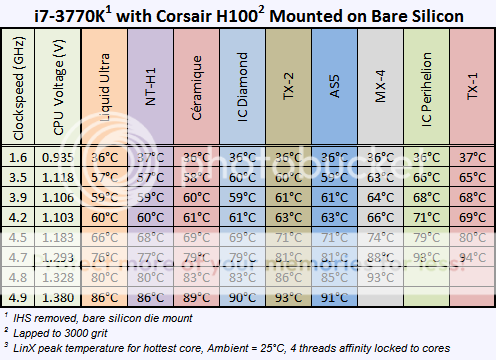
MasterChartforbare-dieTIMtesting.png
 
tviceman, I am currently using MX-2 and exhausted my entire tube of MX-4. I can honestly say that I prefer the MX-2 and MX-4 pastes because they apply extremely well on the half pea size method. I never had a bad mount with MX-2 or MX-4 and I can't tell the difference between the two pastes on a performance standpoint either. I have also used the Phanteks diamond and NT-H1 and they do offer excellent performance, I just feel they are more difficult to get a good spread on the CPU due to the viscosity.
 
In all fairness, that is directly on the silicon and bare-mounted by the heatsink with the IHS removed. Right now I'll I'm concerned with most is temps before any deliding modifications.

The relative performance of the cooling interface material would be unaffected by whether its lidded or delidded.

You are correct that it skews the numbers however the best will remain the best lidded or not.
 
The relative performance of the cooling interface material would be unaffected by whether its lidded or delidded.

You are correct that it skews the numbers however the best will remain the best lidded or not.

I would normally agree but in the analysis that graph was pulled from, IDK found that mx-4 peformed on par with NT-H1 on top of the IHS, but fell way behind when applied directly on the die.
 
Last edited:
So back on track, should I just leave the CPU input voltage and cache voltage at auto when trying to get the lowest temp / vcore voltage at a given operating frequency???
 
For the VRin, you can try setting it to about 0.5v above your VCore. It needs to be a certain amount above all the other voltages in your CPU but doesn't need to be more than about 0.5v greater either.
 
It is??????😱 AS5? That is what I have always used! Why is it bad, and even more important, what is good and why?

it's a small difference, under extreme and unrealistic conditions... basically irrelevant for most users, don't worry...


but maybe I'm the wrong user to talk about thermal paste, my generic as cheap as possible thermal paste works like a champ for the CPU, oh, and my 10 years old small tube of Céramique was also useful when I decided to clean my VGA recently
 
Back
Top