• We’re currently investigating an issue related to the forum theme and styling that is impacting page layout and visual formatting. The problem has been identified, and we are actively working on a resolution. There is no impact to user data or functionality, this is strictly a front-end display issue. We’ll post an update once the fix has been deployed. Thanks for your patience while we get this sorted.

Question Hard Drive at 100% usage

dmitriy1980

Junior Member
I'm very good around computers but lately I'm very stumbled with the new computers that are being sold. I have a couple of computers that are always at 100% usage for at least 10 minutes after boot up. I went through most of the things that I can think of, like checking antivirus, malware (not present), Search service, start up items, etc. The thing is there are other computes that are exactly the same don't have the same issue. They are all set up exactly the same. All have the latest drivers, Windows Updates, etc. I'm just stumbled why.
 
The issue is happening whether computer is SSD or HDD. I've checked everything I could and I can't determine what holds the disk. I did open task manager and resource manager. I also used Process explorer and can't figure it out. The issue is occuring with or without antivirus.
 
Interesting that this is common enough that it was an easy search with multiple solutions...


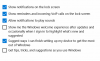
Odd that even disabling windows tips was a solution? Weird.

Start chipping away at options, one by one.

Very best,
 

This one has some truly dodgy suggestions, I'd recommend avoiding this one altogether. It reminds me of how a whole generation of computer users got the idea that they need to defrag their hard drive obsessively for maximum performance.

I'm curious about the Windows Tips one though, at least that one can't hurt to try. As opposed to messing with AHCI driver settings, that's a recipe for disaster.

The issue is happening whether computer is SSD or HDD. I've checked everything I could and I can't determine what holds the disk. I did open task manager and resource manager. I also used Process explorer and can't figure it out. The issue is occuring with or without antivirus.

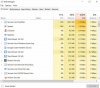
Can you supply a screenshot of Task Manager's processes tab, sorted by highest disk usage?
 
attached is a screenshot of Task Manager. As far as Windows Tips, I'm attaching a screenshot. I'm assuming it's the 4th option. It's already disabled.
 

Attachments

  • image.jpg
    image.jpg
    107 KB · Views: 5
  • options.png
    options.png
    72.6 KB · Views: 5
Back
Top