
Gtx 680 Tri fan cooler 1 fan twitching

hokies83

Senior member
Oct 3, 2010
837
2
76
Video of what is going on
http://s792.photobucket.com/albums/yy204/hokies83/?action=view&current=SAM_0953.mp4

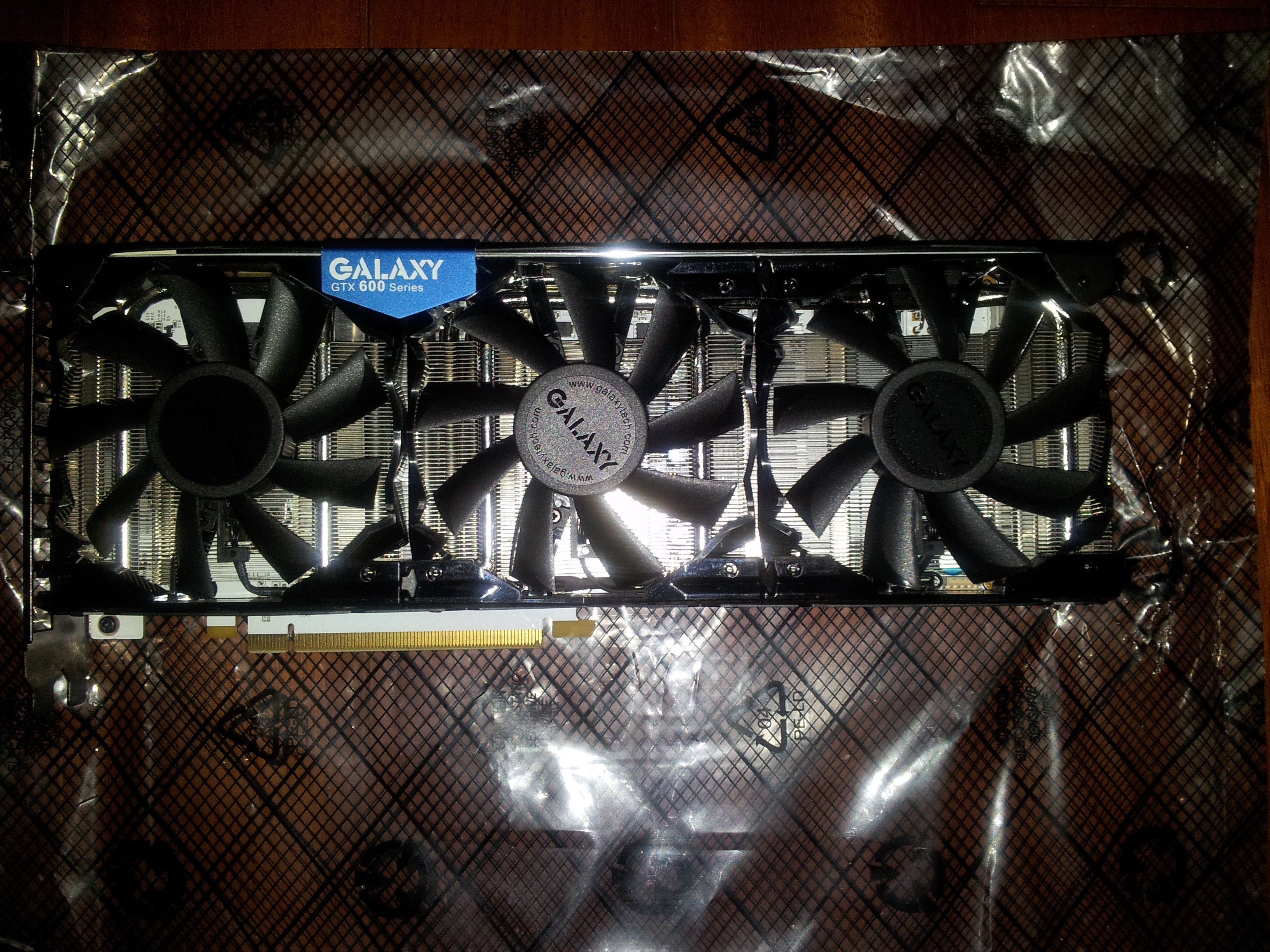
This is a 3 fan design GPU
1000


2 of 3 fans spin fine no issues the one just twitches..

Things i have tried so far..

1 . Made sure 8 pin pci-e connectors are secure Check.

2. Made sure fan was free of any obstruction of movement Check

3. Made sure the pin connector of fan was plugged in Check

4. Used air to make the fan move at fast speed to see if it picked up check

5. Removed Gpu from pci-e slot and put it back in Check


On the card i do see that the 2 working fans come in thru a splitter the connects to this fan then enters a 2 pin power connector
Beside this power connector there is a place for another 2 pin power connector.

The only other thing i can think of is.. Maybe the fans get there juice from the pci-e slot and not the 8pins.. and upping the voltage to the pci-e lanes will correct this issue..
As i have seen volt testing of fans in the past this looks like the fan is not getting enough power to start it's rotation.. why i do not know...
And why it works for others but to me i also do not know..
 

hokies83

Senior member
Oct 3, 2010
837
2
76
It is a 100% Asic card that will do 1350mhz stock volts.. that is why im trying to fix it lol
 

cmdrdredd

Lifer
Dec 12, 2001
27,052
357
126
And you can't get another one via RMA?

You could try rigging it to work then break something and really be out of luck.
 

hokies83

Senior member
Oct 3, 2010
837
2
76
Getting a card that clocks like this one is like winning the gpu lottery =/
 

cmdrdredd

Lifer
Dec 12, 2001
27,052
357
126
Well, the way I see it is you RMA the card because this one isn't working correctly or you keep it and ignore the non-working fan.

I don't think it will hurt anything.
 

cmdrdredd

Lifer
Dec 12, 2001
27,052
357
126
I'd be willing to bet temps would limit you anyway. Hard to keep it below 70c.

Have you checked the plugs with a voltmeter?
 

Grooveriding

Diamond Member
Dec 25, 2008
9,147
1,330
126
Something is wrong with the fan if it is twitching like that. I have seen that before. You could try disassembling it/cleaning its innards, but this can often throw it out of balance and cause it to make noise (if it even starts to work again).

I would replace the fan with something else if you can find a suitable replacement, or, if your temperatures are fine, just ignore it and continue on.
 

hokies83

Senior member
Oct 3, 2010
837
2
76
Meh think ima RMA it..

Running 3d mark it runs hotter then a REF card.. this in no way should happen..
 

shadow_k

Member
Apr 22, 2012
68
0
0
Getting a card that clocks like this one is like winning the gpu lottery =/

getting 2 fans to work out of 3 must also mean winning the lottery ^_^

If you have warranty use it if not fix it yourself or go to your local computer shop. its very easy to void warranty these days
 

The_Golden_Man

Senior member
Apr 7, 2012
816
1
0
4. Used air to make the fan move at fast speed to see if it picked up check

Try kickstarting it with your finger. Move it back and forth. Try knocking gently at the fanhousing with a screwdriver shaft or something. Do this when your system is running.

Also try to use MSI Afterburner or something, set the fans to 100% and apply. If it still twitches, continue to have them at 100% and do the same I mentioned over here.
 

jacktesterson

Diamond Member
Sep 28, 2001
5,493
3
81
4. Used air to make the fan move at fast speed to see if it picked up check

Try kickstarting it with your finger. Move it back and forth. Try knocking gently at the fanhousing with a screwdriver shaft or something. Do this when your system is running.

Also try to use MSI Afterburner or something, set the fans to 100% and apply. If it still twitches, continue to have them at 100% and do the same I mentioned over here.

This

I had this happen on a fan. It eventually worked and continued to work once it started. Locked up for some reason.
 

digitaldurandal

Golden Member
Dec 3, 2009
1,828
0
76
Honestly the difference in games from 1250 to 1350 is not that great, less than 5% frame increase. If you really like your current card, you could buy an aftermarket setup for it.
 

hokies83

Senior member
Oct 3, 2010
837
2
76
Honestly the difference in games from 1250 to 1350 is not that great, less than 5% frame increase. If you really like your current card, you could buy an aftermarket setup for it.

If you even touch a galaxy card it voids the warranty.. they also check to make sure the stock tim is on it..
 

hokies83

Senior member
Oct 3, 2010
837
2
76
4. Used air to make the fan move at fast speed to see if it picked up check

Try kickstarting it with your finger. Move it back and forth. Try knocking gently at the fanhousing with a screwdriver shaft or something. Do this when your system is running.

Also try to use MSI Afterburner or something, set the fans to 100% and apply. If it still twitches, continue to have them at 100% and do the same I mentioned over here.

Tryed this method for the better part of an hr.. No Go :\
 

cmdrdredd

Lifer
Dec 12, 2001
27,052
357
126
You can't tell what TIM is used by looking at it usually. If the color is the same, there's no way to tell except through a chemical test or something.

If I spread out some Noctua NT-H1, Arctic Cooling MX-4, and some Arctic Silver 5 you wouldn't know which is which from simply looking at it. Especially if it was used under a heatsink before you looked at it.

Now, if their TIM is applied like on a Corsair H100 or Intel's stock heatsinks then yes you could probably tell it was changed.