• We’re currently investigating an issue related to the forum theme and styling that is impacting page layout and visual formatting. The problem has been identified, and we are actively working on a resolution. There is no impact to user data or functionality, this is strictly a front-end display issue. We’ll post an update once the fix has been deployed. Thanks for your patience while we get this sorted.

GTX 680 SLI Questions

evilspoons

Senior member
Hello everyone,

I've had an EVGA GTX 680 2 GB since about the time it was released (replaced a GTX 285).

I recently bought a pair of extra monitors to do 2D surround. It works fairly well, but at 5760x1200 my frame rates are a bit pokey compared to before.

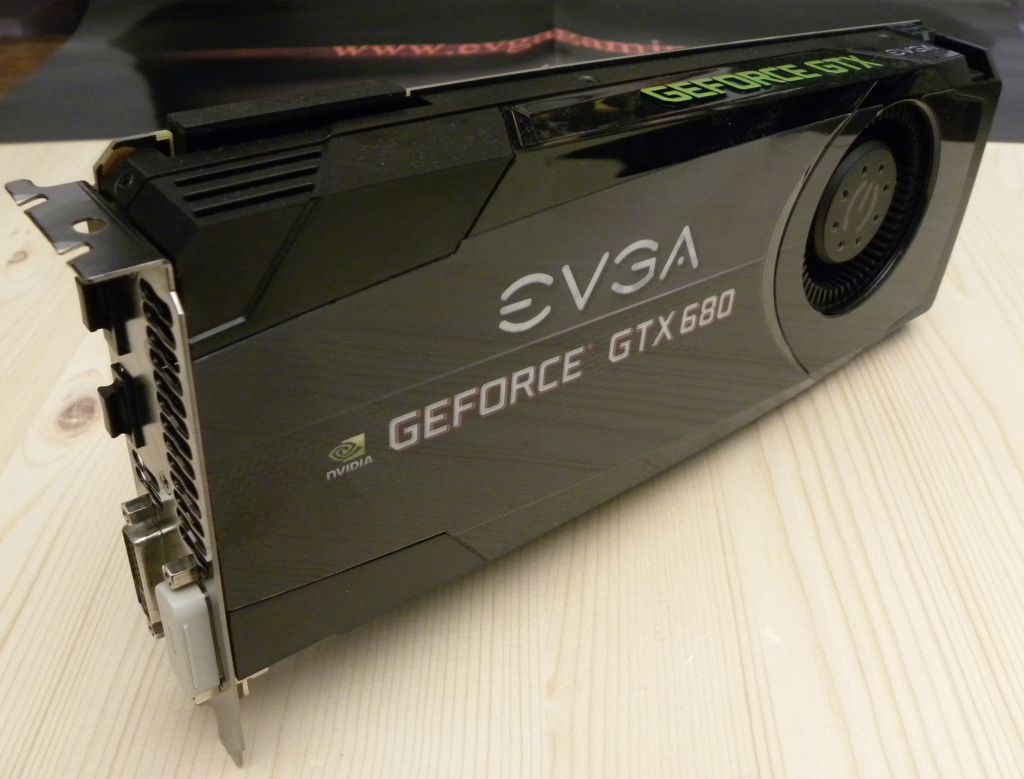
I'm guessing my cheapest way to improve performance is SLI. My card looks like this (not my picture):
evga-geforce-gtx680.jpg


That is a reference design GTX 680, right? I can buy a used Galaxy GTX 680 2 GB that is also supposedly reference design. I'm assuming there shouldn't be any SLI issues between these two cards, is that correct? (Or are there weird potential problems like BIOS versions?).

For what it's worth, I'm running a Asus P8Z68-V Pro with an i7-2600k at stock speeds. I have a beefy CPU cooler and I'm also considering doing some CPU overclocking. Is this worth the effort in terms of frame rate improvements with SLI 680s?

Thanks!
 
I have a Evga 680 and an asus 680 in SLI with no problems.

One of the issues you may run across is VRAM at that resolution and unfortunately going SLI may double your graphics processing capacity, it does not double up on the available VRAM
 
I have 2 EVGA GTX670 FTWs in SLI in rig 1 below. Before I bought my Achieva Shimian 2560 x 1440 27" monitor, I ran 3 1920 x 1080 Acer 24" monitors in Surround (5760 x 1080). It was VERY fast. The second card in SLI really helps the fps. I agree that you are limited by 2 G of vram but I never had a problem.
 
I had two 2GB GTX 680's in SLI running at 5040x1050 and I found my VRAM usage was getting maxed out quite frequently when playing BF3. Ended up changing to two GTX 680 FTW+ 4GB CARDS in SLI which solved the problem. However it all depends on what games you play and at what details.
 
I just water cooled my 4 gig 680's and my heat when stress testing at 100%
went from middle 60's to mid 20's on the bottom card and 28 on the top card.

I was very pleased as I have made a substantial speed increase and Im very happy !!!


iphone%20april%202015%20493_zpsl7jz0ftf.jpg
new wc gpu photo


gpuz%20validation%20shot_zpsqrmwddki.jpg
GPU-z validation


What I like is that these 26 month old cards have a lifetime warranty, the old KR's did that for ya. Now very few come with that kind of warranty.

I had to buy the second card as I wanted to run three monitors in 5670 x 1080 and Im glad I have the 4 gig cards !

IMG_12452_zpscc713904.jpg
 
Last edited:
Nice rig! Just curious as to your decision to watercool 680s as running them at mid-60s or even high-70s doesn't adversely affect their useful life. Wouldn't you have been better off just selling off your 680s and getting a pair of 970s instead of investing the $ into water blocks, pumps, etc.? Just wanted to know your reasoning. I guess if water-cooling makes you happier, then enjoy your awesome mid-life update on those 680s!
 
RS, you can pick up waterblocks and 680s for a very low price now. From the picture it looks like CT guy already had the cpu under water so the pump and rad/rads was/were already in place.

If he already owned the 4G 680s, 2 water blocks + fittings @$100 plus rad and fans @$75. Max $200. Buy 2 970s at $600 less the sale price of the 680s probably $400 in the least.

I love watercooling so I obviously have a bias. However, CTguy's move might make sense and cents. BTW, have you tried selling 680s lately? I might be high at $100 apiece on the used market.
 
I wouldn't bother with 2GB 680 SLI at that resolution. You'll run out of VRAM. Sell your 680 and maybe upgrade to a 980.
 
RS, you can pick up waterblocks and 680s for a very low price now. From the picture it looks like CT guy already had the cpu under water so the pump and rad/rads was/were already in place.

If he already owned the 4G 680s, 2 water blocks + fittings @$100 plus rad and fans @$75. Max $200. Buy 2 970s at $600 less the sale price of the 680s probably $400 in the least.

I love watercooling so I obviously have a bias. However, CTguy's move might make sense and cents. BTW, have you tried selling 680s lately? I might be high at $100 apiece on the used market.

Except you'd only need a single 980. $350 by selling both 680s, plus the $200 savings by not buying the WC components = $550 so he could have come out on top money and performance wise.
 
Except you'd only need a single 980. $350 by selling both 680s, plus the $200 savings by not buying the WC components = $550 so he could have come out on top money and performance wise.

Ya, that's my reasoning. Alternatively, dual 970s. Plus with newer NV cards you get TW3. I guess some people really like the idea of tinkering and building their custom loop with waterblocks. It does create a very unique and personalized system. I personally would have opted for next gen NV cards in SLI over custom WC but to each his own. Just wanted to see OP's reasoning.
 
Back
Top