Going 100% SSD

birthdaymonkey

Golden Member
Oct 4, 2010
1,176
3
81
With SSD prices sinking like the titanic, I think I'm finally ready to ditch magnetic storage on my main rig. I just got a 256GB m4 ($189 shipped!) that I'm going to use for OS and programs, and I'll be repurposing a WD SiliconEdge Blue drive (JMF618/612 controller...same as Kingston V+100, I believe. Picked this up when they were on crazy sale at newegg for $199 like a year ago) to use as a download/storage drive. I have a file server that will provide bulk storage.

My question: does anyone know whether this drive will be up to the task of handling moderate torrent downloads? I assume it'll be OK, but even though I've had SSDs in my machines for a while, I've always used HDDs for this task. I know the WD SSD isn't exactly cutting edge technology, but it seems to have a reliable track record at least.
 

ericloewe

Senior member
Dec 14, 2011
260
0
76
Why should you ditch hard drives completely? Your torrents won't magically improve (unless you torrent some stupidly popular stuff over a crazy fast network) just because you're using an SSD to store them.
 

BrightCandle

Diamond Member
Mar 15, 2007
4,762
0
76
The SSD will perform better than the HDD in all circumstances but its not like its going to be consistently writing at 100MB/s anyway. That is unless you are a lucky Fibre to the home user with 1 Gbit/s?!

Going all SSD is quite freeing, although I am not convinced 256GB is quite enough myself.
 

birthdaymonkey

Golden Member
Oct 4, 2010
1,176
3
81
I want to go HDD free to get rid of the extra noise and vibration in my case. I can keep all of my magnetic drives in the one server and the rest of my machines will be solid-state. I realize downloading onto an SSD won't make torrents faster; I'm just a little concerned about all the little writes and deletes of files over time. From what I've been able to glean, this JMicron controller has aggressive garbage collection. Hopefully the write amplification isn't too bad.

Agreed that 256 wouldnt be enough. 2x256 should do fine though.
 

kmmatney

Diamond Member
Jun 19, 2000
4,363
1
81
I'm starting to go all SSD at home as well. I still use random platter drives for mass storage and backups in a WHS server, but the other computers (wife and 3 kids) are almost all SSD now, as well as our laptops. I'm using the old version of WHS, so with drive extender I could potentially swap SSDs into the storage pool as well, but that's not practical yet. I've use mainly Intel drives, but also have 2 Samsungs at work, and one OCX Agility 2. Never had issues with any of them yet.
 
Last edited:

gevorg

Diamond Member
Nov 3, 2004
5,070
1
0
I'm just a little concerned about all the little writes and deletes of files over time.

If you have plenty of RAM, you can setup a RAMDisk for like 8GB or so, and use it as your torrent download folder. Once download completes, utorrent can automatically move the files to your main storage drive. The RAMDisk can also be used for internet cache folder that wipes itself on every boot.
 

Burner27

Diamond Member
Jul 18, 2001
4,452
50
101
I decided to go the route you are doing and found that I needed a minimum of of 1TB for downloading stuff. Working a ton of overtime I was able to move all HDDs out of my machine and run 5 SSDs in the following config:

256 Samsung 830 (OS/Apps)
4 x 256GB Crucial M4 in RAID 0

The HDDs I put in external enclosures and attached to one of these (yeah it would probably have been better to create another PC and run it as a file server but I didn't feel like working anymore OT):

http://cirago.com/wordpress/products/networking/ciragolink/
 

birthdaymonkey

Golden Member
Oct 4, 2010
1,176
3
81
That's a lot of m4s! Sure they're cheap(er) now, but 1TB worth is still beyond my budget. It will be a good day, however, when I can banish HDDs from my server too.

How many years I wonder until affordable 2TB SSDs? Based on how quickly the technology has developed (256GB was $600+ 1.5 years ago...now $200), I'm hoping I'll be able to do this in 3-4 years.

5400rpm drives are adequate for storage, but they're still big and noisy.
 

dma0991

Platinum Member
Mar 17, 2011
2,723
2
0
It is kinda depressing to see how fast SSD prices drop. I just bought my 128GB SSD a while back and now its price is cheaper. 256GB is now approaching the price I paid for my 128GB very soon.
 

Rvenger

Elite Member <br> Super Moderator <br> Video Cards
Apr 6, 2004
6,283
5
81
I will be doing this too as I have an extre external USB 3.0 external enclosure. Has to be a 512gb SSD though to hold my current steam collection.
 

paperwastage

Golden Member
May 25, 2010
1,848
2
76
I will be doing this too as I have an extre external USB 3.0 external enclosure. Has to be a 512gb SSD though to hold my current steam collection.

not sure if it's worth to put a SSD on a USB 3.0 connection ( USB has more latency than pure SATA when reading/writing... and note that a lot of USB 3.0 drives are simply USB 3.0->SATA 2 "converters", so don't waste too much money looking for a SATA 3 drive)

unless you're talking about a 512GB SSD and using a HDD on an external enclosure... can't tell
 

WhoBeDaPlaya

Diamond Member
Sep 15, 2000
7,415
404
126
Don't see the point in using SSDs for bulk storage and a good 7200rpm mechanical drive doesn't have vibration/heat/noise problems (eg. Spinpoint F3).

Hell, I have 15x Hitachi 7200rpms in a CM Stacker and can barely hear it in the living room, especially when the AC blower's running.
 

Old Hippie

Diamond Member
Oct 8, 2005
6,361
1
0
I decided to go the route you are doing and found that I needed a minimum of of 1TB for downloading stuff. Working a ton of overtime I was able to move all HDDs out of my machine and run 5 SSDs in the following config:

256 Samsung 830 (OS/Apps)
4 x 256GB Crucial M4 in RAID 0

http://cirago.com/wordpress/products/networking/ciragolink/

I was wondering what you did for a final solution. :)

I'd be making back-ups of those storage drives if there's anything on there you can't do without.
 

blastingcap

Diamond Member
Sep 16, 2010
6,654
5
76
What you are describing is not really 100% SSD, since you are still using HDDs for mass storage and backups. A lot of people have successfully done something like that for a long time now, myself included. So there are no worries. I would never use an SSD for mass downloads, though, as that would eat into their expected lifespan of the flash memory and not improve performance unless your internet connection's bandwidth exceeded the write speed of your HDD, which I consider extremely unlikely. Better to make more-expendable-and-equally-fast-for-the-purpose HDDs take the hit of mass download duties.
 

thelastjuju

Senior member
Nov 6, 2011
444
2
0
The prices aren't that low yet.. 256gb storage for $200? I bought a used WD 250gb HDD for $25 on ebay, and you can get 3 TERABYTES of storage for less than $200.

For STORAGE purposes, it makes no difference whether you launch say an MP3 from an old ass IDE hard drive or a spanking new SSD drive because the bandwidth is so small to begin with. The advantages of an SSD are completely insignificant in these cases.

Using SSDs for STORAGE purposes is just silly really, unless you have a RIDICULOUS amount of money to blow or you are okay with being limited to incredibly small amounts of storage. I'd suggest taking advantage of the fact that its 2012, and that we can have multiple TB's of data at your fingertips. There is really no reason to use an SSD drive as anything BUT the main drive.
 

bryanW1995

Lifer
May 22, 2007
11,144
32
91
What do you mean by "ridiculous"? A couple grand? 10k? How much is 5 minutes a day for the rest of your life worth?
 

Phynaz

Lifer
Mar 13, 2006
10,140
819
126
The prices aren't that low yet.. 256gb storage for $200? I bought a used WD 250gb HDD for $25 on ebay, and you can get 3 TERABYTES of storage for less than $200.

For STORAGE purposes, it makes no difference whether you launch say an MP3 from an old ass IDE hard drive or a spanking new SSD drive because the bandwidth is so small to begin with. The advantages of an SSD are completely insignificant in these cases.

Using SSDs for STORAGE purposes is just silly really, unless you have a RIDICULOUS amount of money to blow or you are okay with being limited to incredibly small amounts of storage. I'd suggest taking advantage of the fact that its 2012, and that we can have multiple TB's of data at your fingertips. There is really no reason to use an SSD drive as anything BUT the main drive.

Remux a 25GB video and tell me that SSD storage isn't worth it.
 

exdeath

Lifer
Jan 29, 2004
13,679
10
81
Welcome to the club. I got rid of all my HDDs the same way I got rid of all my audio cassettes and VHS tapes.
 

exdeath

Lifer
Jan 29, 2004
13,679
10
81
The prices aren't that low yet.. 256gb storage for $200? I bought a used WD 250gb HDD for $25 on ebay, and you can get 3 TERABYTES of storage for less than $200.

For STORAGE purposes, it makes no difference whether you launch say an MP3 from an old ass IDE hard drive or a spanking new SSD drive because the bandwidth is so small to begin with. The advantages of an SSD are completely insignificant in these cases.

Nobody puts a single MP3 on a SSD. Backup or restore 500,000 files from your HDD let me know how that works. Better yet do a text search and let me know when the horrible crunching noises stop.

Using SSDs for STORAGE purposes is just silly really, unless you have a RIDICULOUS amount of money to blow or you are okay with being limited to incredibly small amounts of storage. I'd suggest taking advantage of the fact that its 2012, and that we can have multiple TB's of data at your fingertips. There is really no reason to use an SSD drive as anything BUT the main drive.

The opposite is people who spend $5,000+ on some incredible build only to cripple the thing cheaping out with a $50 hard drive so you have a 50+ GB/sec CPU and main memory bus mated to a 1 MB/sec HDD...

Some of us aren't hoarders that have random crap back to 1979, nor do we have to download and save every gif, jpg, mp3, avi, etc that we have ever seen on the internet, drivers dating back to GeForce 3, etc.

My entire personal data backup set, INCLUDING three whole partition backups redundantly containing some of the in use data that is backed up on it's own, is around 130 GB. This includes video, music, high res personal photos, etc.

My laptop which is insufficient for gaming anyway, has a Chronos Deluxe sitting at 15 GB out of 240GB.

I have a desktop with 4 x 240GB Wildfires = 960 GB of SSD but only 150GB or so used due to game installs. Only have 240s for their tier 1 speed, couldn't care less about capacity.

Another desktop with a 120GB Vertex 3 with 22 GB out of 120 GB.

I have no idea WTF people do that requires 4+ TB of storage besides download raw BluRay rips day and night. How long does it take to read/write 4+ TB of data at 1-100 MB/sec anyway?
 
Last edited:

blastingcap

Diamond Member
Sep 16, 2010
6,654
5
76
Lmao at the smug people talking about transfers as if they sit in front of their computers waiting for such transfers. Please tell me you aren't serious? Do mass-transfers and backups overnight or other similar times.

Now, if you do a lot of editing with massive files then massive SSDs may be worth it, particularly if you are a professional videographer or something, but what about archives? My setup is sort of like: SSDs for OS and "hot" files + massive HDDs for cold storage of files that are unlikely to need a lot of editing anymore.
 

thelastjuju

Senior member
Nov 6, 2011
444
2
0
Nobody puts a single MP3 on a SSD. Backup or restore 500,000 files from your HDD let me know how that works. Better yet do a text search and let me know when the horrible crunching noises stop.

Who said anything about a single MP3? I'm saying when you launch something as minimal as an MP3, regardless of how many there are, SSD benefits are absolutely nonexistent. It doesn't matter if you have the fastest SSD drive, or the slowest IDE hard drive from a decade ago. The MP3 file will launch in a millisecond either way. Even AVI's will launch without hesitation. From my experience, as a general rule the only things that an SSD benefits are things that open WITH delays.. not things that already open WITHOUT delays.

.. and I cloned a 640gb drive just yesterday actually. Not 500,000 files.. but 70,000 .. Took about 2 hours and everything went perfectly while I did other things in the meantime. What exactly are you expecting to go wrong here? Transferring files in the background isn't that intense of a task.

The opposite is people who spend $5,000+ on some incredible build only to cripple the thing cheaping out with a $50 hard drive so you have a 50+ GB/sec CPU and main memory bus mated to a 1 MB/sec HDD...

Some of us aren't hoarders that have random crap back to 1979, nor do we have to download and save every gif, jpg, mp3, avi, etc that we have ever seen on the internet, drivers dating back to GeForce 3, etc.

My entire personal data backup set, INCLUDING three whole partition backups redundantly containing some of the in use data that is backed up on it's own, is around 130 GB. This includes video, music, high res personal photos, etc.

My laptop which is insufficient for gaming anyway, has a Chronos Deluxe sitting at 15 GB out of 240GB.

I have a desktop with 4 x 240GB Wildfires = 960 GB of SSD but only 150GB or so used due to game installs. Only have 240s for their tier 1 speed, couldn't care less about capacity.

Another desktop with a 120GB Vertex 3 with 22 GB out of 120 GB.

I have no idea WTF people do that requires 4+ TB of storage besides download raw BluRay rips day and night. How long does it take to read/write 4+ TB of data at 1-100 MB/sec anyway?
I do have a lot of bluray rips on my hard drive. You might get by with 130gb and that's fine.. but for example.. my "Planet Earth" series BluRay rip weighs in at about half that, and its compressed! :whiste:

I love being able to launch hundreds of movies, tv series, and thousands of audio files at the power of my fingertips, without having to insert discs. Nothing is more obsolete to me than ejecting the damned optical drive. I also keep an absolutely massive amount of games installed, even back to the classics, ready to launch as well. Probably even to an obsessive degree, but its something I always wanted to be able to do since I was a kid, and now that I actually can so easily, I sure as hell will do so. I remember back in the day I'd HATE having to make room for new games by uninstalling old ones, which is now a thing of the past.

Also great knowing I have this stuff backed up for life and it isn't going anywhere. If anything, this is one of the greatest things about today's age of technology and I'm simply taking advantage of it. The real question is why one wouldn't be taking advantage of such modern day luxuries.
 

BFG10K

Lifer
Aug 14, 2000
22,709
3,007
126
Nobody puts a single MP3 on a SSD. Backup or restore 500,000 files from your HDD let me know how that works.
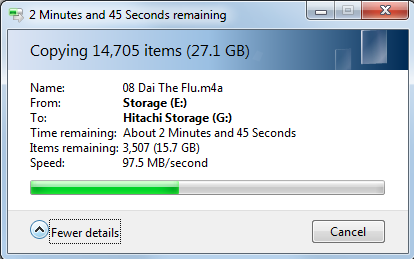
I took these the other day when I ran a backup of my 378GB worth of games from a Caviar Black to a Hitachi. This is the performance at the half-way point:

Untitled.png


Over 185,000 files of hugely random sizes, and it never budges from that number for the entire transfer (it might go 1MB up or down). I suspect the Caviar Black is actually holding things back somewhat because it isn’t as fast as the Hitachi for sequential transfers (2x500GB vs 1x1000GB).

Here’s where it’s passing over my “MP3” folder (actually they’re 320K AAC). It’s a little slower than above because the data partition starts at 500GB. But again, it pretty much never budges from that speed for the entire transfer.

Untitled_2.png


Will an SSD be faster? Yes, but at what cost? Even 600GB isn’t enough to comfortably fit all my stuff, and I can’t get a 1TB SSD for 6c per GB. Will the SSD be 16x or even 10x faster? I don’t think so, no single SSD would get 1GB/sec above.

Yeah, no thanks, those sacrifices aren’t worth it. It’s not like I sit on the edge of my seat when these transfers are running anyway.

Some of us aren't hoarders that have random crap back to 1979, nor do we have to download and save every gif, jpg, mp3, avi, etc that we have ever seen on the internet, drivers dating back to GeForce 3, etc.
You don't have to be a hoarder to have legitimate uses for data. I have many games customized in such a way that would be impossible or extremely difficult to replicate if I lost them. Storage should work for me, not the other way around.
 

KingFatty

Diamond Member
Dec 29, 2010
3,034
1
81
For myself, I could see wanting to keep photo albums on an SSD for rapidly flipping through full-resolution pictures in a speedy full-screen slideshow. Same with videos.
On a laptop connected to the TV running a Hitachi 7200 RPM 500GB 2.5" hard disk, there are times where I'm wishing it would hurry up. However, usually you'd flip through the pictures slowly to enjoy them or use something like Picasa to flip through smaller versions. But still, I'd like to keep all my photos/videos on an SSD if they would come down in price, perhaps a nice 1 TB SSD for future needs as I accumulate more/larger pictures/videos (probably going to get the HTC Evo 4G LTE Android phone that has a decent camera, probably going to fill up on bigger pictures/videos so need to think about how much more space is needed for future).