• We’re currently investigating an issue related to the forum theme and styling that is impacting page layout and visual formatting. The problem has been identified, and we are actively working on a resolution. There is no impact to user data or functionality, this is strictly a front-end display issue. We’ll post an update once the fix has been deployed. Thanks for your patience while we get this sorted.

Flight Sim 2020 technical analysis: no ray tracing

BFG10K

Lifer
The game boasts some of the most advanced graphics ever seen (especially lighting & shadowing), but doesn't even use ray tracing. Heck, it's DX11.

It also demonstrates nVidia still has lower CPU overhead in the driver compared to AMD, up to 20% faster in the 540p comparison (14:30 timestamp) .

 
Part of me is tempted, but am not sure I want to deal with the Learning Curve. It's a good excuse to upgrade to 32gb of RAM though, although I probably need a better VidCard to make that useful.
 
I saw this on someone else's PC and it does look amazing. Not many fancy effects but just very high resolution textures and models. It seems like it would be especially great on VR.
 
I think they are in the process of porting it to DX12. Why they didnt just do that in the first place is beyond me, I'm guessing the development time predates DX12 perhaps.
 
The game looks amazing. We are running it on a first gen Threadripper 1900X, 32GB of RAM, and an aftermarket Vega 56. It runs well on High settings at 1440P since the game is playable between 30-60FPS. Ultra settings are iffy.

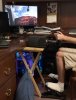
My son bought the game. He asked for a yoke, throttle and pedals from his grandparents. It’s a nice setup.
EAE02367-974F-4DC6-AD29-8F37EFD33CAD.jpeg
 
This game appeals to 2% of gamers. I happen to fall into that 2% for what it's worth. The problem with FS2020 is that they started the game at levels that are way to high for advancement in flight simulators. Now they have 2 or 3 years to iron out the kinks. You don't need 60fps in a flight sim. 30-45fps is more than enough. X-plane flying physics are better but you can't see your house in X-plane 11 like you can in FS2020.
 
The game looks amazing. We are running it on a first gen Threadripper 1900X, 32GB of RAM, and an aftermarket Vega 56. It runs well on High settings at 1440P since the game is playable between 30-60FPS. Ultra settings are iffy.

My son bought the game. He asked for a yoke, throttle and pedals from his grandparents. It’s a nice setup.
View attachment 29970

oh shoot that little table in front is a great idea

my normal computer desk is too thick for the clamps and too slick for the suction mount

i need to try something like that ASAP
 
I'm flying on my 9900k@5Mhz rig with a 2080TI. I'm using an Acer 43" 60Mhz 4k monitor. I have 32 g of DDR4-3200 ram.

Loads of fun for flying. I'm using a Logitech flight yoke with Saitek rudder pedals.

Sandorski the learning curve is easy.

I would recommend 32g of ram. I specked out all of my rigs below with 32 gigs of ram. Next is monitor resolution. Keep MSFS at 1920x1080 if you have a lower amount of ram and a lesser gpu.

My 2700x/5600XT - 32G DDR4-3200 uses an Acer Nitro 24' 1920x1080 monitor that goes to 75Mhz and is freesysnc capable, MSFS runs well on it medium and even high setting.

My 3900x/RadVII combo has 32G DDR4-3600 ram and uses a BenQ3501R 35" widescreen at 3440x1440 p at 100Mhz freesysnc. Also great flying.

You need to make some downward adjustment to keep the frame rate up on some gpus.

It also helps that I have Comcast gig speed internet.

There are YouTube Tutorials on MSFS by a poster know as Flying Squirrel which are EXCELLENT.

In addition the flight training component built into MSFS isn't bad.
 
The game looks amazing. We are running it on a first gen Threadripper 1900X, 32GB of RAM, and an aftermarket Vega 56. It runs well on High settings at 1440P since the game is playable between 30-60FPS. Ultra settings are iffy.

My son bought the game. He asked for a yoke, throttle and pedals from his grandparents. It’s a nice setup.
View attachment 29970
Paratus, What yoke is he using?
 
It also demonstrates nVidia still has lower CPU overhead in the driver compared to AMD, up to 20% faster in the 540p comparison (14:30 timestamp)
That has nothing to do with mythical "CPU driver overhead". It's caused by HW scheduler which is not able to saturate CUs at this extremely low resolution.
 
oh shoot that little table in front is a great idea

my normal computer desk is too thick for the clamps and too slick for the suction mount

i need to try something like that ASAP
It’s just a small TV tray we had. I used to use it with my steering wheel for GrandTurismo 5
Paratus, What yoke is he using?
looks like a honeycomb alpha

It’s the honeycomb alpha yoke, and I think the Logitech G Saitek Pro Throttle, and Logitech G Pro flight rudder.
 
That has nothing to do with mythical "CPU driver overhead". It's caused by HW scheduler which is not able to saturate CUs at this extremely low resolution.
It still shows that software might be better as it can adapt with games and code being used in games.
 
Back
Top