

EVGA GeForce GTX 460 (Fermi) heating issues and eventual breakdown

seaduck13

Member
Jul 19, 2007
36
0
0
So I recently got the EVGA GeForce GTX 460 (Fermi) for my newer build to replace an aging EVGA GeForce 8800 GT as my primary video card. Beside some heating issues I had in my smaller case, it doesn't seem to show significant performance boosts, especially in Diablo 3 or Tera. Anyone know why this would be?

In addition has anyone had any major issues with this card? I've heard that there were some heat problems with the card, and after about 2 months of use the card pretty much crapped out and now I have to RMA it.
 

RussianSensation

Elite Member
Sep 5, 2003
19,458
765
126
It's possible you are CPU limited in those games.

1) What is your CPU and its clock speeds?
2) What resolution do you game at?
3) Do you use any Anti-aliasing? With AA on, it was still not much faster than your 8800GT?

Did you send the card for RMA yet? EVGA may send you a different card since it's hard to get a hold of 460s now. Maybe you'll get a GTX560 as an RMA.
 

seaduck13

Member
Jul 19, 2007
36
0
0
1) Currently I have an i7-875k 2.93GHz
2) I game at the 1680x1050 resolution that my screen can handle
3) Not sure about the Anti-aliasing, I was under the impression that using it caused frame rate drops (not positive about that)

For both games I'm using the default settings from in game, not changing anything in the nVidia settings.

I'm going to send in my card sometime this week or next, I wouldn't mind too much if they gave me a later generation card.
 

RussianSensation

Elite Member
Sep 5, 2003
19,458
765
126
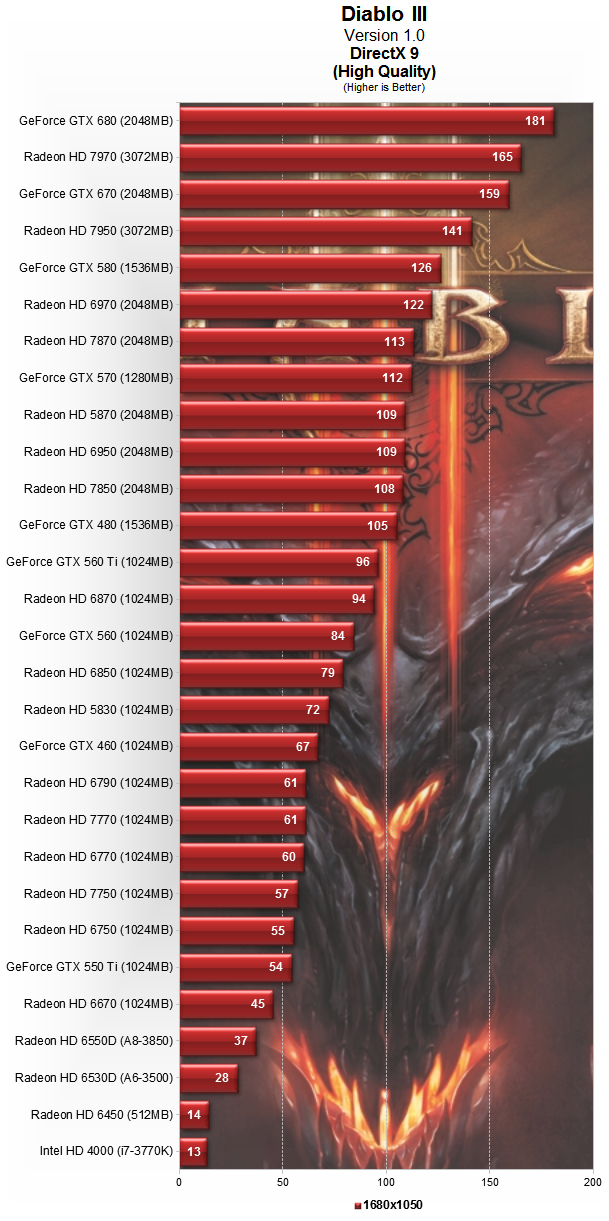
Games such as Diablo 3 in general are not very GPU demanding. GTX460 gets > 60 fps at your resolution:

1680.png


I don't have Diablo 3 so not sure what the default settings are. Are you sure you are comparing apples-to-apples? Maybe the default settings for 8800GT are Medium and High for the GTX460?

You should enable Ambient Occlusion in the NV control panel and Anti-aliasing to 4AA in the game (if not available through the NV control panel). Your card can handle both of those settings and it will make the game look less jagged/darker.

Here I found a benchmark with GT440. This card has similar performance to the 8800GT.

high%201680.png


It's also possible that your GTX460 was overheating and dropping its GPU clocks from 675mhz stock. You can download MSI Afterburner and launch the game and check the GPU clocks to see if the card was thermal throttling. Since you are going to RMA it, it doesn't matter now, but for the future it's a neat program to have to check for GPU temperatures, GPU clock speeds and any abnormalities for GPU % Load.

There should have been a performance difference unless you just don't notice a difference between 25 fps and 60.
 
Last edited:

Termie

Diamond Member
Aug 17, 2005
7,949
48
91
www.techbuyersguru.com
I don't recommend RMA'ing the card based on the evidence you've collected so far, which is basically that you've heard other peoples' cards broke. In fact, EVGA likely wouldn't accept the RMA.

Do a run of 3dMark11 to get a baseline of performance. I can compare that to my HTPC system, which is nearly identical. You shouldn't be held back by your CPU.

My guess is that you'll score around 3300.
 

RussianSensation

Elite Member
Sep 5, 2003
19,458
765
126
I don't recommend RMA'ing the card based on the evidence you've collected so far, which is basically that you've heard other peoples' cards broke. In fact, EVGA likely wouldn't accept the RMA.

I read the sentence differently :). I think he says he has heard that this particular SKU has had problems with overheating in the past, and then what he read came true with his own card 2 months later. It sounds like his card actually broke though.

I've heard that there were some heat problems with the card, and after about 2 months of use the card pretty much crapped out and now I have to RMA it.
 

seaduck13

Member
Jul 19, 2007
36
0
0
@Termie, yeah my card is done, approximately Sunday at 9pm or so, my monitor suddenly was shifting horizontal lines alternating left and right. As soon as I removed my GTX 460 and replaced it with the 8800GT I still had laying around, it went back to normal. (Also note, i tried the output on another monitor with the same result so I know it wasn't the monitor).

@RussianSensation, most of my issues with Diablo are in the opening few seconds whenever I start a game and a number of other characters are moving on screen. The FPS dropped down way low, then after a few seconds its like the card picked up and then things were fine. In TERA (and I'm not sure if this is just a software design flaw on their part) but whenever I went into an area with a large number of players the FPS would drop to as low as 2-7. I haven't played it in a while so I don't know if that still occurs. I'll have to see when I get a new card back.
 

RussianSensation

Elite Member
Sep 5, 2003
19,458
765
126
Try disabling Hyper-Threading for your CPU and see if that issue is resolved. Sometimes Hyper-threading causes games to run worse. Also make sure the CPU fan is free from dust and the CPU itself is functioning well in terms of temperatures (<70*C at load).

HWiNFO64 is a neat program that lets you monitor GPU, CPU temperatures and voltages and the important 12V rail power supply rail performance (should be as close as possible to the 12.0V value).

Ya, if the new card runs just as slow, you can check to see that the CPU is boosting properly to its rated clock speed + CPU Turbo is enabled.
 

Termie

Diamond Member
Aug 17, 2005
7,949
48
91
www.techbuyersguru.com
@Termie, yeah my card is done, approximately Sunday at 9pm or so, my monitor suddenly was shifting horizontal lines alternating left and right. As soon as I removed my GTX 460 and replaced it with the 8800GT I still had laying around, it went back to normal. (Also note, i tried the output on another monitor with the same result so I know it wasn't the monitor).

@RussianSensation, most of my issues with Diablo are in the opening few seconds whenever I start a game and a number of other characters are moving on screen. The FPS dropped down way low, then after a few seconds its like the card picked up and then things were fine. In TERA (and I'm not sure if this is just a software design flaw on their part) but whenever I went into an area with a large number of players the FPS would drop to as low as 2-7. I haven't played it in a while so I don't know if that still occurs. I'll have to see when I get a new card back.

Oh, in that case, definitely RMA the card. When you get the replacement card, I'd still recommend running 3dMark11 on a fresh install of the drivers to get a baseline score. Should be twice as fast as the 8800gt.
 

seaduck13

Member
Jul 19, 2007
36
0
0
Termie said:
Oh, in that case, definitely RMA the card. When you get the replacement card, I'd still recommend running 3dMark11 on a fresh install of the drivers to get a baseline score. Should be twice as fast as the 8800gt.

RussianSensation said:
Try disabling Hyper-Threading for your CPU and see if that issue is resolved. Sometimes Hyper-threading causes games to run worse. Also make sure the CPU fan is free from dust and the CPU itself is functioning well in terms of temperatures (<70*C at load).

HWiNFO64 is a neat program that lets you monitor GPU, CPU temperatures and voltages and the important 12V rail power supply rail performance (should be as close as possible to the 12.0V value).

Ya, if the new card runs just as slow, you can check to see that the CPU is boosting properly to its rated clock speed + CPU Turbo is enabled.

Yeah, I will definitely check these things out when I get the new card and report back. Thanks
 

seaduck13

Member
Jul 19, 2007
36
0
0
Hey guys, just wanted to let you know I finally got the RMA back. Still a GTX 460, but my score was 3660 combined. Does this sound right to you guys?
 

ViRGE

Elite Member, Moderator Emeritus
Oct 9, 1999
31,516
167
106
Hey guys, just wanted to let you know I finally got the RMA back. Still a GTX 460, but my score was 3660 combined. Does this sound right to you guys?
What was the graphics score? That's going to be the more important score in this case.
 

RussianSensation

Elite Member
Sep 5, 2003
19,458
765
126
Hey guys, just wanted to let you know I finally got the RMA back. Still a GTX 460, but my score was 3660 combined. Does this sound right to you guys?

In 3dMark11? Sounds right. My stock GTX470 was getting 4200 combined and that card is about 15-20% faster than yours. That's in-line.

How is the performance in Diablo 3 and Tera though? Is that fixed now? Keep in mind you can overclock GTX460 safely to 800mhz at least using voltage of 1.087V in MSI Afterburner.
