• We’re currently investigating an issue related to the forum theme and styling that is impacting page layout and visual formatting. The problem has been identified, and we are actively working on a resolution. There is no impact to user data or functionality, this is strictly a front-end display issue. We’ll post an update once the fix has been deployed. Thanks for your patience while we get this sorted.

EaseUS todo system clone not working?

Gizmo j

Golden Member
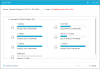
I am trying to system clone my hdd to my ssd for my laptop and I can't select any hardrive for the clone, I press it and it does nothing.

The "clone" one works but I need the "system clone" one.

Is there any alternative system cloning programs?

And would the "system transfer" delete the programs on my current drive?
 
System cloning is best done from bootable clone media - not from within Windows. Yes, there are alternates in cloneware. Macrium Reflect is a good free one, and True Image is a good pay one.
 
Clone should be fine. Last time I used it I do not believe using System clone was actually necessary. Just make sure that when you select the source drive, all of the partitions are chosen as well.
 
What SSD brand did you buy? Many brands come with free cloning software that is pretty good doing what you're looking to accomplish.
 
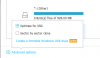
When you click system clone it selects the entire drive and all the partitions automatically. Be sure the Target Drive is connected already otherwise it may not show up. Also click Advanced options and choose optimize for SSD.

62.png

63.png


To be honest I prefer Macrium Reflect since it will finish the clone job outside of Windows.
 
Back
Top