• We’re currently investigating an issue related to the forum theme and styling that is impacting page layout and visual formatting. The problem has been identified, and we are actively working on a resolution. There is no impact to user data or functionality, this is strictly a front-end display issue. We’ll post an update once the fix has been deployed. Thanks for your patience while we get this sorted.

Question DVD won't auto start in Windows 11

ingeborgdot

Golden Member
I get this message when trying to play a video I had from several years ago. It is not a movie, but a homemade one.

the file does not have an app associated with it for performing this action. Please install an app or, if one is already installed, create an association in the default apps setting page.

This is Windows 11. What can I do. I have been looking on Google but have not found anything to help.
 
I have VLC. It will play, but if I click on the Drive G icon for the drive and the DVD, it gives me that message. I can play it if I open up the DVD, but not unless I do that. Nothing is auto.
 
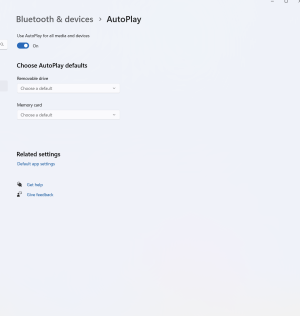
I have tried that. I put the removable drive to ask me every time and that didn't work. I put it on open folder to view files and that didn't work. Hey, I guess it is what it is. Thanks.
 
I have tried that. I put the removable drive to ask me every time and that didn't work. I put it on open folder to view files and that didn't work. Hey, I guess it is what it is. Thanks.
Did you associate the file type you're trying to run with VLC?
 
I don't think that you are going to get a DVD to autorun in Win 11 w/o buying an app. As far as I know, VLC doesn't support autorun and Win 11 doesn't support DVDs natively.

A work around is to open the file through VLC's command line interface via a batch file and put the batch file or a shortcut to it on the desktop.

See:
 
Click the Win11 magnifying glass icon to open the search bar and search for "Control Panel" to get the old version of Control Panel opened up. It is still present in Win10, and so far as I know, it is also still present (at least for now) in Win 11 as well.

Run the old Autoplay app there. Try to change the settings for your CD/DVD drive there to see if you can make it autorun by selecting the application that should open it.

 
That error message usually pops up when Windows doesn't know which app to use to open the file. Since it's a homemade video, the file type might not have a default program associated with it.Right-click on the file - Choose "Open with," then select "Choose another app."
Pick a media player - VLC Media Player if you have it installed. If not, try with the default Windows Media Player or Movies & TV.
Check the box that says "Always use this app to open files" if you want to set it as the default app for that file type in the future.
If you still can’t open it, you might want to download VLC Media Player. It can handle tons of different video formats that other players might struggle with.
 
Back
Top