• We’re currently investigating an issue related to the forum theme and styling that is impacting page layout and visual formatting. The problem has been identified, and we are actively working on a resolution. There is no impact to user data or functionality, this is strictly a front-end display issue. We’ll post an update once the fix has been deployed. Thanks for your patience while we get this sorted.

Question Drive dying?

IBMJunkman

Senior member
Samsung 860 EVO 4TB

Getting this in my event log:
An error was detected on device \Device\Harddisk1\DR1 during a paging operation.

Another error was:
{Delayed Write Failed} Windows was unable to save all the data for the file Y:\Outlook\MyMail20212022.pst. The data has been lost. This error may be caused by a failure of your computer hardware or network connection. Please try to save this file elsewhere.

Yet another error:
The system failed to flush data to the transaction log. Corruption may occur in VolumeId: Y:, DeviceName: \Device\HarddiskVolume4.

Failure status: A device which does not exist was specified.

Device GUID: {a11ec1c4-a25b-de57-c7a0-41b9c4010fea}
Device manufacturer:
Device model: Samsung SSD 860 EVO 4TB
Device revision: RVT04B6Q
Device serial number: S5B0NW0N902897M
Bus type: SATA

Adapter serial number:

First time when I was testing a powershell script copying large amount of data to it. Did 3 or 4 copy commands then the next one gave an error about device does not exist.

Then I got error 51 trying to copy data off the drive using Windows Explorer.

Is this puppy dying?
 
There could be an issue with it. What does SMART say, when loading up something like crystaldiskinfo or HWinfo64?
 
Please post a CrystalDiskInfo screenshot. It's possible that the writes are close to being exhausted, particularly if heavy database activity or some other continuous writing activity was the norm for it.

Seems like a SATA drive so try changing both SATA data and power cables if the writes aren't the issue.
 
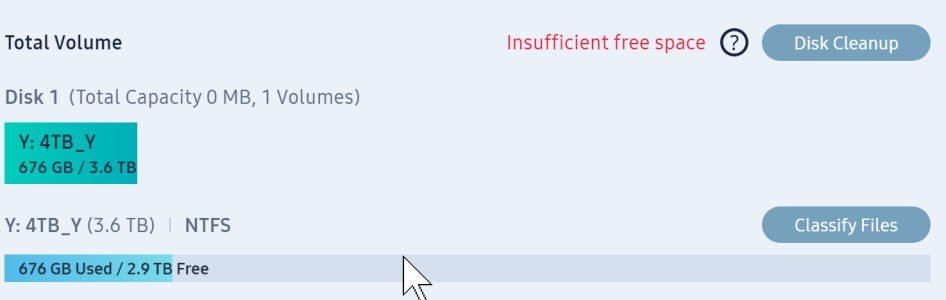
When I fired up PC Samsung Magician had an update. Did it. Now drive shows as Unknown Drive. It says this:
SamsungMagician_9CF0H0QvLo.png

It is a 4TB drive. Windows reports the size correctly.
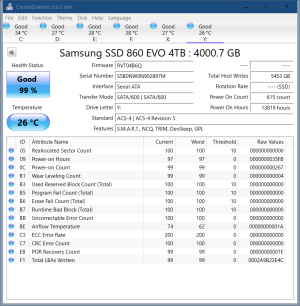
CrystalDiskInfo says this:
DiskInfo64_P9Jsf1pXnT.png

Not sure how to do a Firmware check if drive not recognized by Magician.
 
The written bytes are really low (roughly 5.4TB). So seems like a firmware or chipset issue. Unfortunately, looks like you may need to contact Samsung support on how to revive the drive from a possibly failed firmware update. It is also possible that the new firmware detected a serious problem and it has taken the drive offline and doing some sort of internal repairing. I would leave it connected and turned on for a day or two.
 
The written bytes are really low (roughly 5.4TB). So seems like a firmware or chipset issue. Unfortunately, looks like you may need to contact Samsung support on how to revive the drive from a possibly failed firmware update. It is also possible that the new firmware detected a serious problem and it has taken the drive offline and doing some sort of internal repairing. I would leave it connected and turned on for a day or two.
I have not done a firmware update. And now I can't even try, as Magician does not recognize either of the 4tb drives.
I opened up the case and took a quick look. Seems the 2 drives are plugged into a PCIe card that also gives me 2 USB-C ports. I will try moving the 2 drives to mobo SATA ports.
 
Could've been a cable, too, if you didn't use the same cable it was originally connected to. It's always amazed me how a cable can just stop working correctly when it just sits in a case. The flat ribbon SATA cables in MacBook Pros were notorious for failing.
 
Yeah I was going to suggest that due to the age of your motherboard, make check which ports your SSD was plugged into, and that the controller is in AHCI mode. If plugged into a PCIe SATA card, that could also complicate things for sure.
 
Looking at Device Manager it appears the driver for the card is dated 2006. The setup is not 18 years old. And I was mistaken. This card is just SATA for drives and a front panel memory card reader, which includes a e-SATA port. Now the card is just controlling the DVD\CD drive. No big deal.
The USB-C ports are on another card.
 
Could've been a cable, too, if you didn't use the same cable it was originally connected to. It's always amazed me how a cable can just stop working correctly when it just sits in a case. The flat ribbon SATA cables in MacBook Pros were notorious for failing.
Out of dozen or so “bad hdd/ssd” scares I’ve had over the years it was bad cable all but one time.
 
Back
Top