• We’re currently investigating an issue related to the forum theme and styling that is impacting page layout and visual formatting. The problem has been identified, and we are actively working on a resolution. There is no impact to user data or functionality, this is strictly a front-end display issue. We’ll post an update once the fix has been deployed. Thanks for your patience while we get this sorted.

Question Does AMD ryzen 7 3700X support 2 Nvidia GEFORCE GTX 1050 ti or not ?

cedrix2001

Junior Member
I have installed two GPU: AMD Radeon R7 200 series and NVidia GEFORCE GTX 1050 ti, when I make videos I notice that the videos stutter or fail, so I decided to substitute the AMD Radeon GPU for another GTX 1050 ti (I use an SLI bridge), the computer crashed and it forced me to back to the previous setting. Does AMD ryzen 7 3700X support 2 Nvidia GEFORCE GTX 1050 ti or not ? if yes , it must be a correct installation procedure, any advice or help ?
 
Are you using a certified SLI-supporting mobo with the 3700X CPU? You can't just use any old mobo with two PCI-E slots for SLI.

Have you done a comprehensive RAM test? Sounds like you need to.
 
the Mobo I am using is MPG X570 gaming Edge Wifi (MS-7C37) , as far I know is compatible with the GPU above mentioned
 
the Mobo I am using is MPG X570 gaming Edge Wifi (MS-7C37) , as far I know is compatible with the GPU above mentioned
It's compatible with that GPU, but NOT SLI.

Edit: Let me elaborate. SLI requires x8, x8 lanes. So unless the board supports evenly splitting the x16 GPU lanes, you're out of luck. Plus, even so, the mobo mfg has to pay the "SLI tax" to NVidia. This is a firmware marking that the driver looks for, before enabling SLI. (Unless you're using hacked drivers, which I won't get into because I've never tried them.)

This doesn't mean that you can't run multiples of your favorite card, SLI or no. It just means that you can't actually use them in "SLI mode" or with a bridge. (Cryptominers run arrays of the same card off one mobo, x1 PCI-E lane to each card.)
 
Last edited:
The problem could be many things, such as a driver issue when switching the 2nd card, or unstable hardware, possibly the 2nd card added. But to start with, I would ditch the SLI bridge to see if that helps with the crash/instability. As mentioned earlier, you don't need SLI, and cannot use it anyway with your current setup.
 
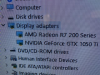
I unistalled and installed thru the DDU App and it didn't work, but I notice that The Device Manager - Display and the two GPU shows some little orange marks in the bottom center of each icon, I don't know what it is , what could this mean? 1664670714053.png
 
Back
Top