
21stHermit
Senior member
I have a Media Center PC an Acepc T11 (came with Win 10 Pro), which worked great out of the box connected to a TCL 4K TV via HDMI. Except the pointer was so small I could barely see it across the room. My laptop has Win 10 Home and both the pointer size and color are adjustable. So I installed Win 10 Home. Good news the pointer issue was solved, bad news the screen was clipped on both right and left sides.
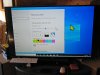
So I reinstalled Win 10 Pro but the screen is still clipped. The image is clipped about 2" on each side. If I move the task bar to the left, it completely disappears into the left black area. Any ideas how to solve this?
So I reinstalled Win 10 Pro but the screen is still clipped. The image is clipped about 2" on each side. If I move the task bar to the left, it completely disappears into the left black area. Any ideas how to solve this?


