thepaddler
Junior Member
Hiya - I've been trying to setup Wake on Wireless LAN (WoWLAN) in my flat to no avail. I'm running Windows 11 on an Asus Zenbook (processor Intel(R) Core(TM) Ultra 7 155H; network adapter Intel Wi-Fi 6E AX211 160MHz; router supplied by BT Broadband). Basic home WiFi setup - nothing complicated. I took the following steps:
- enabled IPv4 PXE magic packets in BIOS (but not IPv6)
- enabled Wake on Magic Packet & Wake on Pattern Match on Windows network adapter settings
- turned off Fast Startup in system settings
- enabled 2x ICMPv4-In rules in firewall settings (after which pinging tests worked)
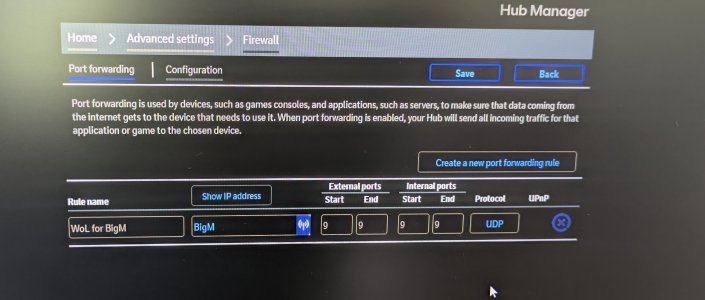
- setup Port 9 forwarding for my laptop in router (atter which port tests worked - pic attached); also given laptop static IP. (Not sure if either of these were necessary?)
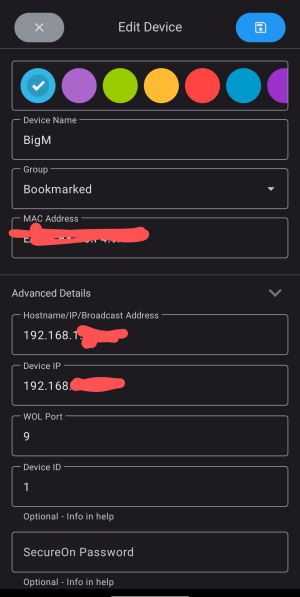
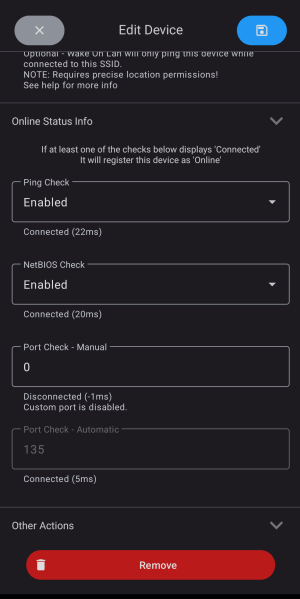
I'm using the 'Wake on Lan' mobile app by MR-Webb - pics attached. The laptop device has a green circle next to it when switched either on or off, indicating partial success with the setup. When latop is switched on: Ping Check always shows connected; NetBIOS Check says connected as long as firewall is turned off (but 'disconnected / poll timed out' when firewall is on); Port Check Manual says disconnected ('custom port disabled'); and Port Check Automatic says connected as long as my firewall is turned off (but 'disconnected / no response from [device IP]' when firewall is on).
When laptop is in sleep mode: only Port Check Automatic shows connected.
If I could isolate the problem to being a firewall setting that'd be great, as presumably that would be an easy fix within Windows Defender. However, under all scenarios (including when I leave the firewall off) WoWLAN simply doesn't work in the app. Hitting wake device does nothing.
Can anyone please advise next steps? Is there a way I can do some diagnostics to see what's happening with the magic packet & why it might not be working? (I can follow step-by-step instructions but I'm not very techy I'm afraid.) WoWLAN isn't massively essential for me, but I've come this far so I don't want to give up now xD
- enabled IPv4 PXE magic packets in BIOS (but not IPv6)
- enabled Wake on Magic Packet & Wake on Pattern Match on Windows network adapter settings
- turned off Fast Startup in system settings
- enabled 2x ICMPv4-In rules in firewall settings (after which pinging tests worked)
- setup Port 9 forwarding for my laptop in router (atter which port tests worked - pic attached); also given laptop static IP. (Not sure if either of these were necessary?)
I'm using the 'Wake on Lan' mobile app by MR-Webb - pics attached. The laptop device has a green circle next to it when switched either on or off, indicating partial success with the setup. When latop is switched on: Ping Check always shows connected; NetBIOS Check says connected as long as firewall is turned off (but 'disconnected / poll timed out' when firewall is on); Port Check Manual says disconnected ('custom port disabled'); and Port Check Automatic says connected as long as my firewall is turned off (but 'disconnected / no response from [device IP]' when firewall is on).
When laptop is in sleep mode: only Port Check Automatic shows connected.
If I could isolate the problem to being a firewall setting that'd be great, as presumably that would be an easy fix within Windows Defender. However, under all scenarios (including when I leave the firewall off) WoWLAN simply doesn't work in the app. Hitting wake device does nothing.
Can anyone please advise next steps? Is there a way I can do some diagnostics to see what's happening with the magic packet & why it might not be working? (I can follow step-by-step instructions but I'm not very techy I'm afraid.) WoWLAN isn't massively essential for me, but I've come this far so I don't want to give up now xD