IBMJunkman
Senior member
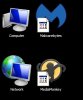
Windows 7 Pro 64bit. This months Tuesday update terminated with failed update due to lack of space. At that point most of my desktop icons had the simple white box icon overlaid on top of the correct icon.
I can't fix them through the Properties box. It lets me select a new icon but the overlay stays on top.
I have deleted the iconcache.db from both my user and the administrator. I noticed the Desktop folder under both was marked ReadOnly. I undid that but no change.
The built in Windows icons (RecycleBin, Computer, Network, etc) are fine.
I did clear space and re-did the updates just fine.
Help!
Oh, and the first person that says re-install Windows will have the worst possible karma wished upon them! 🙂
I can't fix them through the Properties box. It lets me select a new icon but the overlay stays on top.
I have deleted the iconcache.db from both my user and the administrator. I noticed the Desktop folder under both was marked ReadOnly. I undid that but no change.
The built in Windows icons (RecycleBin, Computer, Network, etc) are fine.
I did clear space and re-did the updates just fine.
Help!
Oh, and the first person that says re-install Windows will have the worst possible karma wished upon them! 🙂