
Hey everyone. So i'm having a weird issue with my Dell Latitude E5470 Windows 10 laptops' video, but i have a theory or idea on what the issue is.
So randomly, after several months of using it, the video started going haywire with geometric distortions that make the screen mostly unreadable.
I did some troubleshooting and found that the issue only occurs when booted to an OS that has the official Intel Display Drivers actively running.
The video is fine in safe mode, normal mode when updated Display drivers aren't installed, and other bootable live OS's that don't use the Intel drivers.
I've already tried doing a fresh reinstall of Windows 10 to rule out any OS issues and the issue is still ongoing.
I've also gone through the Dell Onboard Preboot Diagnostics and ran the screen and CPU tests and they've both ran fine.
There are cracks in the screen bezel at the top left and right corners, so i thought it might be a screen issue, but the screen test ran fine like i said. And the screen works fine in other modes like i said above.
I also found the Windows Update will automatically install the Dell display driver as soon as it gets an internet connection, so i've had to keep the internet off while troubleshooting sometimes.
My only conclusion is that, since knowing that the graphics processing is done on the CPU, the GPU/CPU is malfunctioning and somehow causing this.
Now this is only a theory, but this is the only one i can come up with know the symptoms.
Now i'd rather not buy another CPU and rip open the laptop to replace it, but it's the only options I can see right now.
Is this theory sound? Or am i missing something?
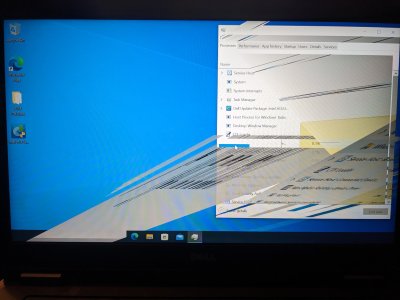
So randomly, after several months of using it, the video started going haywire with geometric distortions that make the screen mostly unreadable.
I did some troubleshooting and found that the issue only occurs when booted to an OS that has the official Intel Display Drivers actively running.
The video is fine in safe mode, normal mode when updated Display drivers aren't installed, and other bootable live OS's that don't use the Intel drivers.
I've already tried doing a fresh reinstall of Windows 10 to rule out any OS issues and the issue is still ongoing.
I've also gone through the Dell Onboard Preboot Diagnostics and ran the screen and CPU tests and they've both ran fine.
There are cracks in the screen bezel at the top left and right corners, so i thought it might be a screen issue, but the screen test ran fine like i said. And the screen works fine in other modes like i said above.
I also found the Windows Update will automatically install the Dell display driver as soon as it gets an internet connection, so i've had to keep the internet off while troubleshooting sometimes.
My only conclusion is that, since knowing that the graphics processing is done on the CPU, the GPU/CPU is malfunctioning and somehow causing this.
Now this is only a theory, but this is the only one i can come up with know the symptoms.
Now i'd rather not buy another CPU and rip open the laptop to replace it, but it's the only options I can see right now.
Is this theory sound? Or am i missing something?
Last edited:


