• We’re currently investigating an issue related to the forum theme and styling that is impacting page layout and visual formatting. The problem has been identified, and we are actively working on a resolution. There is no impact to user data or functionality, this is strictly a front-end display issue. We’ll post an update once the fix has been deployed. Thanks for your patience while we get this sorted.

Question Crystal Disk Info - Accurate?

Hulk

Diamond Member
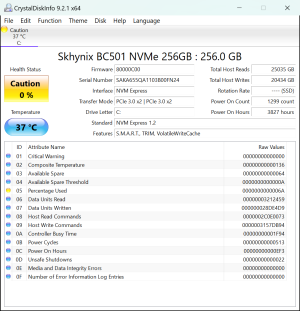
Lunar Lake can't come fast enough for me. My MS Surface Laptop 2 SSD. Don't know if I believe it though as it look like I only have 80 or 90 drive writes.CrystalDiskInfo_20240608151017.png
 
Percentage used = 6Ah = 106%. I don't think this is accurate. The BC501 doesn't have a set TBW as far as I know, but ~20TB of host writes even with high write amplification isn't close to that flash's endurance. Which makes sense as available spare is still 64h = 100%.
 
I encountered a 0% health SSD last week, ADATA SP550. I double-checked the reading with ADATA's own toolkit and got the same result. Does SK Hynix have a similar toolkit?
 
It could be drive firmware bug. I wouldn't worry unless available spare starts dropping from 64 (100%) or media/data integrity errors start being logged.

The available spare being at 100% means the drive hasn't started to remap sectors yet, which means the in-use cells are still operating normally.
 
Is the laptop having problems? The laptop with the 0% SSD I encountered was regularly BSOD'ing and pausing intermittently. Surprisingly there wasn't a tonne of disk related entries in event log and the BSOD's weren't the usual storage suspects e.g. NTFS_FILE_SYSTEM / UNMOUNTABLE_BOOT_VOLUME; there were a handful of storahci errors, same again for disk errors.

That's odd - in your screenshot there's no indication of reallocated sector count etc. The SSD I encountered logged a load plus uncorrectables.
 
I've updated a number of SSD's and HDD's lately, it was probably not 100% needed but it certainly feels better reading the changelogs with fixes, and reading accounts from search results of the (few?) people who got into trouble with older firmwares. Just googling your model returns some results with a more recent firmware version. So it exists, but its preferable that you find one published by your laptop vendor. Although at this stage, I'd probably just back up my data, and then flash regardless, not much to lose really.

 
Back
Top