
I just built a AMD Ryzen 5 3600 computer and the SSD speeds (Crucial MX 500-500gb) were great.
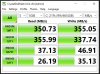
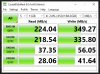
I also built a machine 5-6 years ago and installed the same Crucial SSD's on it this week and the SSD speeds are much slower, in the 200-300 meg range.
The machine has a i7-4790k and a Gigabyte GA-Z97-D3H. I double checked and the motherboard has all SATAIII 6gbs connections. - https://www.gigabyte.com/Motherboard/GA-Z97-D3H-rev-10/sp#sp
I am using 2 Crucial SSD's, one 500gb for the system and one 2tb for work files.
I tried different SATA ports but nothing changed.
All the cables are Sata6gbs.
I upgraded From Windows 8.1 to Windows 10 with full updates. Nothing changed.
BIOS are updated for the board. Last Bios were from 2015?
I went into the BIOS and the SATA Mode Selection was set to IDE. I changed it to AHCI and restarted. It would crash and refuse to load Windows. "Stop Code-Inaccessible Boot Device."
When I set it back to IDE the computer would load again.
Is that the problem or something else?
System Drive Disk Mark - Crucial MX500 500gig drive
Brand new Work Files Drive - Crucial MX500 2tb drive
Thank you!
I also built a machine 5-6 years ago and installed the same Crucial SSD's on it this week and the SSD speeds are much slower, in the 200-300 meg range.
The machine has a i7-4790k and a Gigabyte GA-Z97-D3H. I double checked and the motherboard has all SATAIII 6gbs connections. - https://www.gigabyte.com/Motherboard/GA-Z97-D3H-rev-10/sp#sp
I am using 2 Crucial SSD's, one 500gb for the system and one 2tb for work files.
I tried different SATA ports but nothing changed.
All the cables are Sata6gbs.
I upgraded From Windows 8.1 to Windows 10 with full updates. Nothing changed.
BIOS are updated for the board. Last Bios were from 2015?
I went into the BIOS and the SATA Mode Selection was set to IDE. I changed it to AHCI and restarted. It would crash and refuse to load Windows. "Stop Code-Inaccessible Boot Device."
When I set it back to IDE the computer would load again.
Is that the problem or something else?
System Drive Disk Mark - Crucial MX500 500gig drive
Brand new Work Files Drive - Crucial MX500 2tb drive
Thank you!


