#VRML V2.0 utf8

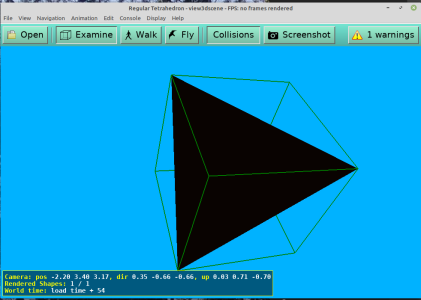
# A regular tetrahedron
# Edge length ≈ 2 units, centered at the origin

WorldInfo {
  title "Regular Tetrahedron"
  info ["Generated for you by Grok"]
}

Background {
  skyColor [0.0 0.7 1.0]
}

Shape {
  appearance Appearance {
    material Material {
      diffuseColor 0.9 0.3 0.1    # nice orange-red
      specularColor 0.9 0.9 0.9
      shininess 0.8
    }
  }
  geometry IndexedFaceSet {
    solid FALSE                 # set TRUE if you don’t want back-face culling
    coord Coordinate {
      point [
        # Four vertices of a regular tetrahedron (edge length ≈ √8 = 2√2)
        1.0  1.0  1.0,
       -1.0 -1.0  1.0,
       -1.0  1.0 -1.0,
        1.0 -1.0 -1.0
      ]
    }
    coordIndex [
      0, 1, 2, -1,   # face 1
      0, 2, 3, -1,   # face 2
      0, 3, 1, -1,   # face 3
      1, 3, 2, -1    # face 4
    ]
    color Color {
      color [
        1.0 0.3 0.1,   # each face can have its own color if you want
        0.2 0.8 0.3,
        0.1 0.4 1.0,
        0.8 0.8 0.2
      ]
    }
    colorPerVertex FALSE
    colorIndex [0, 1, 2, 3]
  }
}

# Optional: add a little rotation animation so you can see all sides
Transform {
  children [
    DEF Tetra Shape { }   # reference the shape above
  ]
  rotation 0 1 0  0
}

DEF Clock TimeSensor {
  cycleInterval 12
  loop TRUE
}

DEF Rotator OrientationInterpolator {
  key      [0.0, 0.5, 1.0]
  keyValue [
    0 0 1 0  0,
     0 1 0  3.1416,
     0 1 0  6.2832
  ]
}

ROUTE Clock.fraction_changed TO Rotator.set_fraction
ROUTE Rotator.value_changed TO Tetra.rotation




 Discussion Zen 5 Speculation (EPYC Turin and Strix Point/Granite Ridge - Ryzen 9000)
 Discussion Intel current and future Lakes & Rapids thread
