Core2Quad 9450/7870 & ultra hd playback

TechyGeek

Member
Feb 23, 2015
108
9
81
Hey guys,


Long time lurker here. Have been looking at my dad's pc for a whole day, and can't figure out why youtube cannot play ultra hd videos smoothly on 9450 7870 hardware, with ssd. He's using win 7 64 bit with latest amd driver.

The connection is vz fios and no issues with hitting 25mbps (58mbps here)

The task mgr shows 99% cpu usage, and gpu using amd's ccc program shows almost no activity. I double checked to make sure chrome & ie have gpu acceleration turned on. Is the cpu simply inadequate for this task? This is not a gaming pc.
 

Burpo

Diamond Member
Sep 10, 2013
4,223
473
126
With that kind of CPU usage, you've got other issues. Something's eating up resources. How much ram does it have?
 
Last edited:

Deders

Platinum Member
Oct 14, 2012
2,401
1
91
Are the Utube video's HTML5 or Flash? What browser are you using?
 

TechyGeek

Member
Feb 23, 2015
108
9
81
Are the Utube video's HTML5 or Flash? What browser are you using?

This is using html 5 and IE and Chrome.

Both have severe slowdowns. I'm thinking of reflashing the bios on ASUS P5E MB it's version 1201.

Along the other strange things I see is in AHCI mode the POST will freeze at AUTO Detecting AHCI disk [X], the onboard gigabit network card is missing in windows too. In Enhanced IDE mode all seem to be ok.

So, Flash bios?
 

Hitman928

Diamond Member
Apr 15, 2012
6,754
12,500
136
I could be wrong, but I don't think the 7870 supports 4k video decoding and it wouldn't surprise me if the 9450 doesn't cut it either for what you're trying to watch.
 

coercitiv

Diamond Member
Jan 24, 2014
7,485
17,886
136
I could be wrong, but I don't think the 7870 supports 4k video decoding and it wouldn't surprise me if the 9450 doesn't cut it either for what you're trying to watch.
It seems 4k h264 video decoding was introduced with later chips.

OP, you might want to disable hardware acceleration and see what happens during 4k video playback.
 

mikeymikec

Lifer
May 19, 2011
21,543
16,781
136
With that kind of CPU usage, you've got other issues. Something's eating up resources.

I think the OP meant that CPU usage is 100% during attempted playback.

If not (ie. CPU usage is 100% when the system is supposed to be idle), then it ought to be a simple job of opening taskmgr while the system is idle, processes tab, show processes for all users, sort by CPU usage and find out which process is sabotaging the system's performance.

Along the other strange things I see is in AHCI mode the POST will freeze at AUTO Detecting AHCI disk [X], the onboard gigabit network card is missing in windows too. In Enhanced IDE mode all seem to be ok.

So, Flash bios?

You can try, but it's the latest BIOS for your board apparently and I can't see it helping.

However, it might help explain your CPU usage (if it occurs when the system is meant to be idle) - I've seen it before on Intel systems that if the wrong storage mode is selected, the system still boots and works, but CPU usage is crazy when the system is meant to be idle.
 
Last edited:

Falcon98

Junior Member
Aug 12, 2011
6
0
0
7870 video decoder doesn't kick in at 4k (nor at a 1080 when vp9 is used). That leaves your CPU to do the work. I'm in the same position in that way, but instead with an x4 955 which always has trouble with 4k on any browser.
 

Deders

Platinum Member
Oct 14, 2012
2,401
1
91
Check to see what exactly is using all the CPU in Task manager, if it is purely the video/Browser then try using Firefox with Flash (The new Beta uses HTML5).

Flashing the bios most likely won't make a difference.
 

ShintaiDK

Lifer
Apr 22, 2012
20,378
146
106
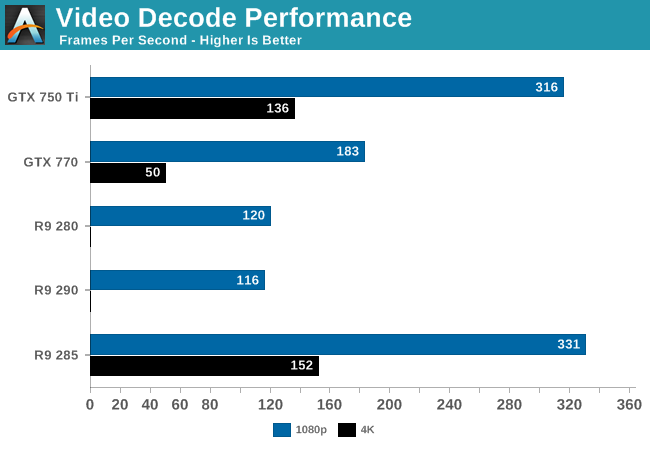
Only R9 285 supports 4K decoding on the AMD side. The reason is the UVD is broken in previous versions.

67598.png


With this newest generation of UVD, AMD is finally catching up to NVIDIA and Intel in H.264 decode capabilities. New to UVD is full support for 4K H.264 video, up to level 5.2 (4Kp60). AMD had previously intended to support 4K up to level 5.1 (4Kp30) on the previous version of UVD, but that never panned out and AMD ultimately disabled that feature. So as of GCN 1.2 hardware decoding of 4K is finally up and working, meaning AMD GPU equipped systems will no longer have to fall back to relatively expensive software decoding for 4K H.264 video.

http://www.anandtech.com/show/8460/amd-radeon-r9-285-review/4