• We’re currently investigating an issue related to the forum theme and styling that is impacting page layout and visual formatting. The problem has been identified, and we are actively working on a resolution. There is no impact to user data or functionality, this is strictly a front-end display issue. We’ll post an update once the fix has been deployed. Thanks for your patience while we get this sorted.

cooling advice for 3930k, rosewill m2x

schwett

Member
i'm currently running a 3930k 3.2ghz, 16gb ram (4x4), OWC pciE SSD, GTX 770, seasonic 550W PS, and two seagate 3tb 7200rpm drives in a rosewill m2x-s (also jonesbo m2xs) case with asus rampage iv gene m-atx mobo.

i migrated some of these components from a prebuilt HP rig. in that rig, the CPU was cooled by a closed loop liquid cooler OEM'd from asetek. it had a nonstandard 80mm fan/radiator setup.

i put a corsair H90 in the new case. i don't really like it. it's kind of noisy, making a funny wobbling sound from the pump, and the only place to mount the radiator is in line with the TOP case fan, which is a 140mm exhaust (labeled C in my doodle). there are two 120mm intake fans at the bottom (A and B) and spaces for two 80mm fans at the back (D and E).

the best approach from a cooling standpoint would seem to me to be to put two 80mm fans as intake on the back side of the case, add an 80x2 radiator, and run that to the cpu. the hot air coming "off" the radiator would be directly in the path of the exhaust fan, so the amount of hot air recirculating would be small and the air going over the rad would be cold outside air.

however, there don't really seem to be closed loop solutions like this. i'm not into a custom water cooling loop. so my choices are:

1. stick with the corsair and it's 140mm radiator which is on the inside side of the case's main exhaust fan at top.
2. replace with a similar 140mm unit that isn't as noisy. (?)
3. find a closed loop 80x2 configuration. i see lots of 80x2 radiators and lots of 80 fans, but no AIO solution.
4. stick a giant passive heatsink on the processor and put two 80mm intake fans in the back of the case, which would blow cool air right into the path.
5. stick a fan and heatsink on the processor.
6. mount the nonstandard HP 80x100ish radiator on the back of the case where the two 80x80 go. this actually works with a little modding, but in my quick tests showed higher temps than the corsair by 10C at full load.

is that confusing enough!? thanks in advance for any advice. the rig is mostly used for modeling, rendering (3ds max), cad work, and lots and lots of photo editing in CC. i won't OC it except to screw around.
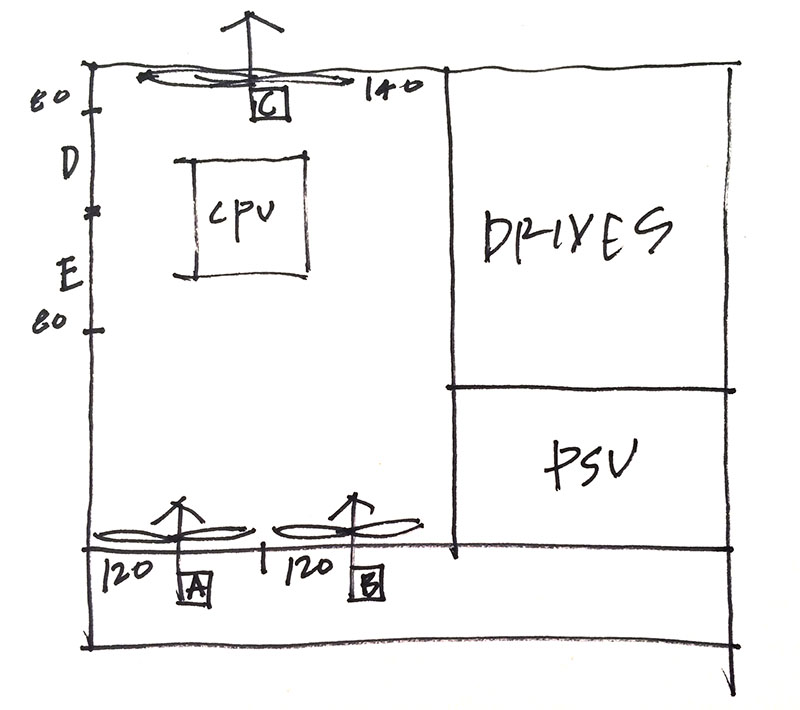
sketch.jpg


thanks in advance! it's been a long time since i did a build. things have really improved.
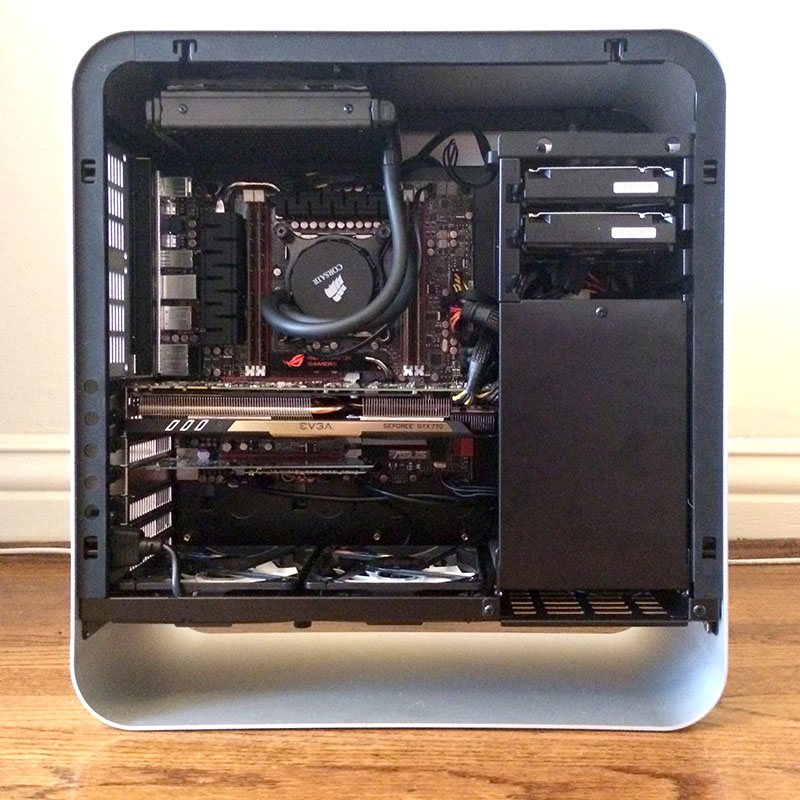
 
here's a few pics of the build with the corsair radiator temporarily installed under the top 140mm exhaust fan.

20140304-newCase01.jpg


20140304-newCase02.jpg


20140304-newCase03.jpg
 
Well, Schwett, I'm hoping you get some good advice with this, and you might not find this worth anything.

At first, I wished you hadn't bought the Rosewill case. The reason I say that -- I've avoided water-cooling for the nine or ten years I've been building, overclocking and tweaking my thermal strategy. I think there's a 50-50 chance that I'll swing to water-cooling either late this year, or well into next year when I hope to build a Haswell-E system. I don't "Need" it; I do this for fun, and have a variety of things I do with my computer, but your list seem a tad more precocious than mine now. 15 years ago, I did tons more with my computer than I really do now. But now, it would be hard to live without it.

The cooling strategy needs to vary somewhat between water and air-cooling. But the main point of it isn't lost: one defines a path for air throughput in the case such that the air is channeled through more narrow apertures covering warm components, with an optimum really depends on the effective cooling you'd get in a path with wider apertures, and the cost and trouble of forcing air at a higher pressure so that it crowds the warm components on its way to further use or final exhaust. The idea is to pick up as much thermal energy from all components exposed to the airflow as possible and exhaust it right away.

Personally, I'm waiting to see comparison reviews on another Noctua heatpipe cooler after its release sometime between April and August. The cooler capitalizes on a single tower design, using the same number of heatpipes but double the fin area of the NH-U14S which is now currently available. Instead of a solid copper base, the cooler's base plate will be fabricated from a composite of copper and diamond, forged by some sort of special process of extreme pressure. It will increase the thermal conductivity of the base by some 25%. How that translates into an overall thermal transfer through exhaust is probably a basis for placing some sporting bets.

The thing I didn't like so much at first about your case are the 80mm fans. I had long ago consigned 80mm fans to the parts locker for no foreseeable use but likely discard -- perhaps cut up to use in building ducts.

But now that i think of it, there may be a role for the 80mm fans if their total air throughputs are either proportionate or comparable to input or exhaust 140mm fans -- one or the other.

If you can pressurize the case, you can do it in stages as the air moves from entry to exit. If the sequence of fans in the strategy results in cooler, denser air passing over hotter components at higher pressure, the ouput can be both concentrated and efficient at removing heat from the case or its components. These components might include collection points for thermal energy, such as radiators.

So the trick is the third part of an optimization problem: How to reduce the number of fans in the case while increasing airflow and pressure and the control of its concentration, at the same time reducing the dBA of motor noise or air-turbulent white noise in that order. For all available fans of various sizes, you can live with more air-turbulence if you can attenuate the motor noise.

I'm surprised you're not going to try overclocking that sucker. I'll bet you can squeeze more than a few hundred Mhz out of those cores while remaining within the old Intel TCase thermal spec, because the spec still suggests a pattern of core temperatures in samples of four, six or eight. And I believe it could be done well within the voltage spec for that processor, because we pretty well know what that spec is even as Intel stopped publishing it with those SB-K or SB cores. The cores are still a 32nm lithography, so they would have the same voltage spec as the Nehalem, or about 1.38V.

But with six cores as you would have in the SB-E, all of the benefit to overclocking would be in the "safe" ranges all the way around. No need to void your longevity, even if you void the warranty in a technical "violation." And no need to test the limits for "bragging rights," lie to yourself and believe you weren't choosing greater uncertainty or shorter expected life for your processor investment.

Yet it doesn't really matter. If you want to optimize cooling, noise -- even electrical energy -- there are probably several things you can do with that case. The way it looks, you don't need to add wheels to elevate the two bottom 140's above the floor. It at least has that going for it. On the down side, you can't easily fit a Coolermaster Nepton 280L in that case, but if you have a tape-measure, there may be some promise for the bottom of the case -- even in the area between the base and those two fans. You'd have to route the hoses to the CPU, and so the tubing would have to reach that far. You would be constrained for not being able to disassemble an all-in-one or ready-made water-cooler so you could route the tubing.

What I think it may boil down to: You could spend a tad more, buy the essential components and build something with a comfort margin over the Nepton. But it would be "custom." The rest of it could just be "hybrid air cooling," and it would depend on the tedium you'd face constructing panels out of foam art-board or Lexan.
And actually -- that gives me an idea for my Haswell-E system next year.

One more thing: Nice work with the case, system components and cable management. It's almost an art masterpiece but equally practical and meticulous design.
 
Last edited:
By the way. You don't really need to use all the fan ports in any given case design. You may find -- looking at N of fans, optimal cooling and low noise -- that you might actually want to "board up" some intake or exhaust port to keep them closed.

I'd be more inclined to think the 80mm ports -- at least one of them, possibly both -- can be useful. But not just for blowing more cold air into the case if it isn't part of a directed airflow.
 
Bonzai, thank you for the replies. I agree that the case is probably not the best thermal choice - especially if one were overclocking. I have a lot of experience with pc hardware and software, but I have never even dabbled in OC.

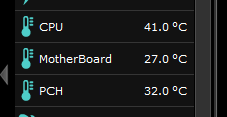
what I'm seeing with the setup as is now is peak temperatures of about 60C on the CPU, 38C on the chipset, and 60-70 on the GPU. the obvious problem here is that the video card almost completely divides the lower, fresh air intake side of the case from the upper, exhaust air side. if I closed up those two back 80mm ports, the only air moving over then CPU radiator would have already moved over then video card. Doesn't seem good to me.

if I simply put two more intake fans in the 80mm ports, the case would end up with a lot of positive pressure. given that the radiator/exhaust fan is pull only, that might be a good idea, actually.

what would you think about ditching the liquid, putting two small quiet 80mm fans on the back ports, and switching to a conventional - but small - air cooler for the CPU?
 
Bonzai, thank you for the replies. I agree that the case is probably not the best thermal choice - especially if one were overclocking. I have a lot of experience with pc hardware and software, but I have never even dabbled in OC.

what I'm seeing with the setup as is now is peak temperatures of about 60C on the CPU, 38C on the chipset, and 60-70 on the GPU. the obvious problem here is that the video card almost completely divides the lower, fresh air intake side of the case from the upper, exhaust air side. if I closed up those two back 80mm ports, the only air moving over then CPU radiator would have already moved over then video card. Doesn't seem good to me.

if I simply put two more intake fans in the 80mm ports, the case would end up with a lot of positive pressure. given that the radiator/exhaust fan is pull only, that might be a good idea, actually.

what would you think about ditching the liquid, putting two small quiet 80mm fans on the back ports, and switching to a conventional - but small - air cooler for the CPU?

You mean -- a heatpipe cooler? If you mean "peak temperatures" on the CPU are under stress-test load or other software-generated load, those aren't bad temperatures. If those are idle temperatures, I'd focus initially on the water-cooler and water block to see if something isn't amiss, but so far, if those are load temperatures, they are good.

You could choose a heatpipe cooler to avail of all these other considerations, or particularly the exhaust/intake fan ports. But the biggest concern would be the use of the 80mm fans in those ports. I'd run a thorough web-search of Frozen-CPU, SidewinderComputers, CrazyPC, Performance-PCs, CoolerGuys and HeatsinkFactory to find really quiet 80mm fans. Thought I said so, but 80mm fans can generate noise.

On the OC'ing front, if your water-cooling block leaves you with only 60C at load, you can pick up 2C here, 2C there and probably reduce that to 50C -- even with a top-end heatpipe cooler. I'd investigate the NH-U14S, since it's a single tower unit. The double-tower with the copper-diamond composite heatsink base is due for release after April. The double-tower may "fit," but its size may deter you. Either way, you can install the heatpipe cooler at a 90-degree angle that departs from the conventional approach with the broad side of the fins facing the back of the case. This would present the fins for exhaust from the top air vent.

I just think there's a lot you can do with that stylish case for either air or water. The worst difficulty is finding low-noise 80mm fans if you want to use those vents.

On the OC front, if you're using the system for serious work, the rule of thumb is "don't." But I'd taken a "walk on the wild side" with this issue. If the resulting clock speed and settings are not only stable but within stock Intel specs, you should be able to do that and it would still be within heatpipe cooler range.

Suppose (voiding your Intel warranty) you lapped off the nickel from the processor cap and made the perfunctory lapping for the waterblock or heatpipe cooler base. And suppose you used either diamond paste or a "liquid metal" TIM: you might trim your current stock temperatures anywhere from 5C to 10C. If the Intel thermal guideline for "TCase" is about 73C, and the difference between an unmeasured / unmeasureable TCase is approximately 5 to 10C below the core values, there's a lot of room there for upping the voltage a bit and increasing the speed.

With my SB-K chip, I can get to around 4.2 or 4.3Ghz on "auto" settings. But if you haven't done this sort of thing before, you would need to move with some caution. The Rampage IV motherboard most likely has two voltage settings: the offset voltage, and an "Extra voltage for turbo" -- maybe in a different menu under "CPU power management." And like I may have said, the "safe" limit on load vCORE should be about 1.38V. With an SB-K chip, I can reach 4.5Ghz with around 1.28V vCORE as measured under load.

If you decide to experiment, get a collection of web-links to over-clocking guides for Sandy Bridge, Sandy Bridge E and the Maximus IV motherboards (and regardless of which variant of that board the guide addresses.) Actually, any of the ASUS models for SB_K Z68 and SB-E (X79 chipset) would offer insight and a basis for your trouble.
 
Last edited:
good sites. will do some research. two 80mm fans may in fact be beyond my noise threshold.

the temps i quoted are in fact under full load; with the GPU doing one of the recent nvidia demos with 3d studio rendering and the prime95 program trying to use all cores.

casual is, like right now, web, email, messenger, backing up hd, etc is lower:

casualUse.PNG


good sites for the fan and cooling reference. will spend some time poring through them.

i don't quite understand how intel's turbo boost works exactly. will have to research that. my cpu is topping out at a sustained 3.5ghz (it's labeled 3.2) which i assume is the turbo boost since i haven't put any OC multipliers in.
 
Turbo boost will "OC" your chip to a pre-determined speed depending on how many cores are being stressed. You can adjust these in the advanced area of your cpu within your bios.

When first testing, I set all my cores to "turbo" to 4.0 on the stock voltage to see what the MB actually set. It ended up being in the low 1.4's...the point I'm making is be careful if you want to play around, especially on air!
 
Turbo boost will "OC" your chip to a pre-determined speed depending on how many cores are being stressed. You can adjust these in the advanced area of your cpu within your bios.

When first testing, I set all my cores to "turbo" to 4.0 on the stock voltage to see what the MB actually set. It ended up being in the low 1.4's...the point I'm making is be careful if you want to play around, especially on air!

thanks. I haven't seen it go past 3.5ghz yet. I assume the clock reported by the mobo's monitor utility would show the boost? it seems to either show a very low speed when idling - 1.1ghz, or 3.5ghz on all 6 cores. haven't seen anything in between.

I fiddled a tiny bit with the multipliers to go from 3.5 to 3.6. not much difference in anything.

n00b question on fans:

if I go the route of putting two 80mm fans on that rear intake to provide cool air for the top mounted exhaust and radiator, how would I control the pair? I have one more fan header on the motherboard for cpu cooling, but is it possible to connect a single header to a pair of fans? how is the tach signal split?
 
a little more detail on the current results I'm seeing from a cooling standpoint.

ambient temperature is around 18C. the case is under a desk, in the corner of a room, so airflow is probably not optimal.

with the stock 120mm fans at bottom for intake, 140mm fan at top for exhaust with the 140mm rad of the corsair h90 inside of the exhaust fan, I saw the following:

ambient temperuate 18C
cpu temp during light usage 32C
cpu temp after 10 minutes of prime95 61C
cpu temp after another 15 minutes of prime95 plus NVidia gpu demo 76C
cpu temp after the above and putting hand on exhaust grill 😉 78C

here's the chart:
20140306temp.jpg


these seem like decent results to me for a case that doesn't seem to have been designed with thermal performance in mind. my only beef is, as noted above, that the pump on the H90 is louder than I'd like. I'm going to put two small 80mm intake fans on the rear ports, which would blow towards the inlet side of the rad, and see what that does. if it makes a huge difference, I may try a passive heat pipe cooler. everything I read suggests that will not work very well, but with the extra cool air supplied downstream of the GPU - whose exhaust air is obviously heating the CPU up - perhaps it'll work.

any other suggestions for reduced noise with similar or better cooling? I realize there's no such thing as a free lunch, and the case won't accommodate any more/larger fans. it will not accomodate a tower style cooler with fans attached (about 150mm max from CPU to side panel), but it would accomodate a low profile one like the noctua NH-L12. the performance of that cooler does not look very good.

I don't mind modding the case a little, but it's nice and clean now and any mods need to be as clean as that.
 
Last edited:
drivesCompared.jpg


if anyone is interested, the above are attobench low level disk benchmark results for the pciE ssd vs the pair of 3tb barracudas. interesting how much faster the drives are for very small files...
 
a little more detail on the current results I'm seeing from a cooling standpoint.

ambient temperature is around 18C. the case is under a desk, in the corner of a room, so airflow is probably not optimal.

with the stock 120mm fans at bottom for intake, 140mm fan at top for exhaust with the 140mm rad of the corsair h90 inside of the exhaust fan, I saw the following:

ambient temperuate 18C
cpu temp during light usage 32C
cpu temp after 10 minutes of prime95 61C
cpu temp after another 15 minutes of prime95 plus NVidia gpu demo 76C
cpu temp after the above and putting hand on exhaust grill 😉 78C

here's the chart:
20140306temp.jpg


these seem like decent results to me for a case that doesn't seem to have been designed with thermal performance in mind. my only beef is, as noted above, that the pump on the H90 is louder than I'd like. I'm going to put two small 80mm intake fans on the rear ports, which would blow towards the inlet side of the rad, and see what that does. if it makes a huge difference, I may try a passive heat pipe cooler. everything I read suggests that will not work very well, but with the extra cool air supplied downstream of the GPU - whose exhaust air is obviously heating the CPU up - perhaps it'll work.

any other suggestions for reduced noise with similar or better cooling? I realize there's no such thing as a free lunch, and the case won't accommodate any more/larger fans. it will not accomodate a tower style cooler with fans attached (about 150mm max from CPU to side panel), but it would accomodate a low profile one like the noctua NH-L12. the performance of that cooler does not look very good.

I don't mind modding the case a little, but it's nice and clean now and any mods need to be as clean as that.

"modding" -- pick the right tools, like Javier Bardem "Anton Chigur" says in "No Country for Old Men."😀

Surely there must be a tower heatpipe cooler that will fit. Maybe I'm wrong, but I've used several cases, and I can fit at least a CM Hyper 212+ or EVO in all of them. Sad to say, if the case doesn't allow you to do that, you'll be stuck with the low-profile options which are understandably less effective.

For the closed loop cooler you were using, the temperatures under load look pretty darn good. The only question I'd have: "Which program or utility gave you those readings and the graphs?" The available software can report temperatures for all cores (in your case -- six), or a single value. There is usually a discrepancy between the single value reported and the temps for all cores. It often seems like some software follows an algorithm for averaging the core values, but I've seen some examples where the result is a couple C degrees low. Or -- one might imagine that proprietary motherboard software attempts toe estimate "TCase" from the core values -- which might be 5C to 10C lower than the core average.

However, I always compute my own average from the cores at a point in time. There has traditionally been a margin of error in the Tj sensors for intel processors -- about +/- 5 to 6C degrees. This would make the highest core temperature less valuable as a measure and the average more valuable.

Check to see if you can find a tower heatpipe cooler with a spec in mm that is equal or less than your case permits. There should be detailed specs for the height from base-bottom to heatpipe tips. Frankly, if your choices are limited by the case-width, you may not be able to use a top-performing cooler. If you can't do that, you would be limited in any over-clocking prospects (even if you never considered it before).

Otherwise, given the caveats I cited on temperature measurement, those temperatures look good for a six-core SB processor under extreme load.
 
Last edited:
I used open hardware monitor. http://openhardwaremonitor.org/

it does have the six cores listed separately, but I never saw a meaningful variation between them.

a cooler like the 212 is about 160mm tall - the case has about 150mm of room. I don't think any tower cooler with a 120 or 140mm fan will fit. the low profile ones do, but the performance of those seems like it'll be worse than what I have going now.

so I guess I just have to live with the noise unless someone knows of a closed loop AIO 140mm single rad solution that's a lot quieter than the corsair.... ?
 
I used open hardware monitor. http://openhardwaremonitor.org/

it does have the six cores listed separately, but I never saw a meaningful variation between them.

a cooler like the 212 is about 160mm tall - the case has about 150mm of room. I don't think any tower cooler with a 120 or 140mm fan will fit. the low profile ones do, but the performance of those seems like it'll be worse than what I have going now.

so I guess I just have to live with the noise unless someone knows of a closed loop AIO 140mm single rad solution that's a lot quieter than the corsair.... ?

You'll either live with the all-in-one closed loop cooler of any type, or go "custom." Like I said, if it wouldn't bother you to have a radiator "outside" the case (in that space on case-bottom but above the stylish panel that supports the case on the floor), the double-140mm bottom fans seem perfect for it. But there's the matter of routing the hoses -- minor mods to the case itself.

Did we talk about thermally controlling the fans to that cooler? Can't remember everything I said . . . In principle, you could run a PWM pump and string of PWM fans that are powered by the PSU but controlled from the CPU_FAN (PWM) header. Look into the Swiftech 8W-PWM-SPL-ST device for $10. If the fans can be made quiet when they don't need to spin at top-end, you eliminate most of the noise. Or-- see about getting a better fan with higher airflow, and then follow through with thermal control from the motherboard. At this point, I'm really sold on PWM fans with the Swiftech device. But mobos also provide thermal control for 3-pin fans.

Hopefully you could do this in BIOS together with proprietary motherboard software for your X79 board. There are built-in "fan profiles," and you can customize fan profiles.

The only other thing I could think of: a case mode. You cut a hole in the case side-panel and use perf-steel ("modder's mesh") to make a vented protrusion from the side-panel that would accommodate the cooler. I don't think you're going to be eager for something like that . . .
 
For what it's worth, here's the comparison review of the NH-C14 "low-profile" Noctua cooler compared to my NH-D14 and others:

http://www.frostytech.com/articleview.cfm?articleid=2562&page=5

At this point, you then address the problem of how to exhaust the air from the NH-C14 -- possibly through your case top-panel vent. This is not an insurmountable or difficult problem, but there is some tedium in the mix. The result could be fairly elegant. If that cooler performs as well or even better than my D14, it might be the answer to your problem -- possibly even better. . .
 
the results from that cooler are pretty impressive for a low profile unit. doesn't look like it supports lga2011, but there are probably similar ones that do. i'm also wondering if i just have a slightly bum h90; the warbling noise of the pump doesn't sound quite right to me.
 
here's a crummy iPhone recording of the cooler pump sound. it's obviously greatly exaggerated here with a ton of background noise, but you can hear the sort of gravelly, scratchy sound that's bugging me.

corsairCooler.m4a
 
the results from that cooler are pretty impressive for a low profile unit. doesn't look like it supports lga2011, but there are probably similar ones that do. i'm also wondering if i just have a slightly bum h90; the warbling noise of the pump doesn't sound quite right to me.

I didn't look at that, but there should be a skt-2011 bracket kit for it. It could be $5 -- or it could be offered for free. Here . . .

http://www.noctua.at/main.php?show=productview&products_id=40

It's about $8 through Amazon and probably other resellers if you look:

http://www.amazon.com/Noctua-NM-I201.../dp/B00632D5W4
 
Last edited:
i added a pair of 80mm intake fans to the rear of the case; above the GPU, below the radiator.

about 8 degrees C cooler with full gpu and cpu load, and a less noticeable increase in temp when the GPU load goes up. this make sense. i'll call corsair and see what they say about the noisy pump, and if they say it's the way it's supposed to sound try a low profile air cooler like the one suggested by bonzai above... i say "like" because i do'nt think i can stomach the beige and brown of the noctua fans!

rosewillmx2s-corsairh90.jpg
 
i added a pair of 80mm intake fans to the rear of the case; above the GPU, below the radiator.

about 8 degrees C cooler with full gpu and cpu load, and a less noticeable increase in temp when the GPU load goes up. this make sense. i'll call corsair and see what they say about the noisy pump, and if they say it's the way it's supposed to sound try a low profile air cooler like the one suggested by bonzai above... i say "like" because i do'nt think i can stomach the beige and brown of the noctua fans!

rosewillmx2s-corsairh90.jpg

If you found quiet 80mm fans, that's an accomplishment by itself.

You can choose your own cost-accounting and decision practice for your computer. Some of us are judicious shoppers, but more flexible when it comes to meeting our own performance requirements. I would recommend the high performing Noctua coolers again and again, but I disparage their fans. Perhaps the only heatpipe cooler I ever purchased without replacing its bundled fan was my NH-D14, and it was a matter of sheer laziness and not the extra money.

These were among my latest discoveries for use with the D14 cooler:

http://www.frozencpu.com/products/1...WM_Fan_w_Hydro_Dynamic_Bearings_AK-FN063.html

http://www.sidewindercomputers.com/ak14virfan.html

They also make 120mm models. The airflow on "high-performing" Noctua fans can be about 55+ CFM, at least according to Noctua's own tests and ratings -- no less reliable than for any other fan maker. [You have to trust some things, unless you get the test results from comparison reviews.] The Viper 140R fan has an output of 103 CFM, and the square model offers 110 CFM. But -- oh! So quiet! Relatively speaking . . .

Of course, if it's the color of things that matters, the AKASA fan blades are something between a puddle of up-chuck and scrambled eggs. But how they look doesn't have anything to do with their performance . . . . jus' sayin' . . . .
 
Last edited:
so i've been experimenting a bit.

performance with the corsair h90 has been best with the radiator attached to the inboard side of the 140mm top fan operating as an intake. (out of the box, it's exhaust.) the corsair fan also seems to be a bit higher performance than the rosewill one. and a bit louder, although that's uncertain since i also changed the orientation.

when i switched this one, i also switched the bottom pair of 120s to exhaust. i think this works better with the acx cooler on my gtx 770 board. it doesn't exhaust all that much heat out the "side" and the airflow isn't particularly good in the area between the psu, case back, bottom, side, and the video card. pretty much boxed in.

here are typical numbers:
corsairH90intake.png


after some research i stopped by my local shop today and picked up a noctua C14. i don't think i can live with the fan color, so they'll have to be replaced. it fits with the "lower" fan just fine, no memory clearance issues:

clearance.jpg

noctua.jpg


it will also fit with the upper fan... but that fan would be 20mm from the solid side panel of the case, and blowing air right at it. doesn't seem at all helpful.

so far, results are not very good: 10C higher on the CPU, significantly more GPU throttling. it is quieter, which was my goal, but clearly the combination of confused airflow in the case and heatsink/fan mounted parallel to motherboard is not good:

noctuaC14-oneFan.png


it also turns out that some tower style coolers will actually fit. the distance from the motherboard to the inside of the side panel of the case is 162mm. take out 8mm for the motherboard to top of IHS and you have 154mm. the bigger ones won't, but there are some out there in the 145-152 range. i may try the zalman 9900 max. i like the design and reviews/performance looks good. it would also be a much clearer airflow path directly from the intake fan at top into the heatsink.
 
Back
Top