• We’re currently investigating an issue related to the forum theme and styling that is impacting page layout and visual formatting. The problem has been identified, and we are actively working on a resolution. There is no impact to user data or functionality, this is strictly a front-end display issue. We’ll post an update once the fix has been deployed. Thanks for your patience while we get this sorted.

Question Converted to gpt now can't boot

CU

Platinum Member
I converted my C: drive to gpt with the command mbr2gpt. I restarted and changed my bios to boot UEFI. Now it doesn't load windows. I just get a flashing curser. Booted into rescuezilla and ran gparted and disks. I can see the efi partition. Should it be the first partition? Does anything look wrong? How can I fix it? I did make an image with macrium reflect before I ran the command. But I really need to convert it to gpt so a restore just lets me start over.IMG_20220121_233445.jpg
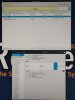
 
Two comments. I don't like the no automount description on the EFI partition , I'd research that, and secondly I think there should be no more than 1data partition and this drive has two.
 
So, the large data partition is the windows and application install, ie. "C: drive" The smaller one is the system reserved partition. Not sure why it is flagged msftdata. As for no automount on the EFI partition. I don't see that as a flag I can give to the drive in gparted.
 
I don't think I need the system reserved partition for a GPT boot drive. I think it should only have the EFI, data, and recovery partitions. Maybe I should delete the system reserved one, and maybe move the EFI one to the front of the disk.
 
If you have your data backed up, just wipe everything and re-install Windows. Way easier that mucking about and potentially creating an unstable system.
But, I would still need to install and configure all my apps. Or, are you saying I can just restore my windows data partition after a fresh install.
 
But, I would still need to install and configure all my apps. Or, are you saying I can just restore my windows data partition after a fresh install.
Apps are easy to install. To me, that is one of the benefits of starting over fresh: you can install the newest versions of your apps fresh, plus it allows you to reconsider what you are installing. What’s most important is your data.
 
I was under the impression that you had to tweak some windows / bootcfg settings too, besides just changing the partition type over from MBR to GPT, as well as telling your BIOS to boot UEFI.
 
No config changes. Just mbr2gpt. I have used it before without issue. Trying to use diskpart and bcdboot to create a new efi partition now.
 
That worked. I have one efi, data, and recovery partition now. And windows loads. Reagentc is disabled and will not enable though. So I do need to figure that out.
 
How my partitions look now.
1642887062935.png

Got reagent working also. Seems it had the wrong guid. Here is what it looked liked before my fix.
1642887327325.png


Found the correct guid by doing this.
1642887149652.png

Then I used the one I circled like this.
1642887210348.png

1642887249195.png
 
Oh, and when I was poking around in the BIOS I noticed my drives were set to IDE and not AHCI. Going to look into changing that next.
 
Back
Top