• We’re currently investigating an issue related to the forum theme and styling that is impacting page layout and visual formatting. The problem has been identified, and we are actively working on a resolution. There is no impact to user data or functionality, this is strictly a front-end display issue. We’ll post an update once the fix has been deployed. Thanks for your patience while we get this sorted.

Question Changing CSM to UEFI for Windows 11 (secure boot)

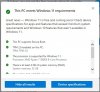
Installed Windows 10 a couple of years ago when I built my AMD rig. Didn't know all the changes with bios' since my previous build was in 2009. So I installed Windows 10 from a USB media stick. Apparently CSM was enabled and it's stopping the option to upgrade to Windows 11. I'd like to have the option to upgrade if I want to. All other requirements pass. I have a 5800X with TPM 2.0 enabled in bios; the only thing is I can't change over from CSM to UEFI and boot, I just reboot back into the bios. Is there an easy way to get this to work or am I looking at an entire OS reinstall?


W11 secure boot.jpg


Thanks for your time
 

The above article roughly explains the problem which appears to be that the OS must run on an GPT formatted disk using an UEFI bios. This combination supports Secure Boot. It may be that your system employs the aged CSM to operate on an MBR disk which combination is security deficient.The below article describes the command to change the disk from MBR to GPT which will use UEFI instead of CSM but without a full reinstall. The result should be a disk formatted in GPT using an UEFI bios and support for Secure Boot will magically appear.


The above article roughly explains the problem which appears to be that the OS must run on an GPT formatted disk using an UEFI bios. This combination supports Secure Boot. It may be that your system employs the aged CSM to operate on an MBR disk which combination is security deficient.The below article describes the command to change the disk from MBR to GPT which will use UEFI instead of CSM but without a full reinstall. The result should be a disk formatted in GPT using an UEFI bios and support for Secure Boot will magically appear.


Wow, big thanks!
 
Wow that was super easy. Opened up Windows Powershell as admin and ran it from there:

MBR2GPT /allowFullOS /convert, successful, rebooted, switched from CSM to UEFI in bios, booted into Win10, checked disk volume, it said GPT, yay

Success.jpg
 
Back
Top