
• We’re currently investigating an issue related to the forum theme and styling that is impacting page layout and visual formatting. The problem has been identified, and we are actively working on a resolution. There is no impact to user data or functionality, this is strictly a front-end display issue. We’ll post an update once the fix has been deployed. Thanks for your patience while we get this sorted.

Question Can't Access Files On Another Computer In Windows 10

geokilla

Platinum Member
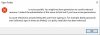
I can't for the life solve this issue. I finally managed to get my PCs to see one another in File Explorer > Network, but now I'm getting the attached error. The Internet says I need to do some changes on gpedit.msc but and even though I installed that program, I can't use it properly due to missing functionality. All I want to do is watch anime on my TV through my laptop without having to use a USB drive to copy and paste files from my desktop, which is where I store them. How can I view these files?

It used to be so easy and convenient with Homegroup in Windows 7...
 

Attachments

  • Untitled.jpg
    Untitled.jpg
    33.9 KB · Views: 3
The spring 2018 update for Windows 10 got rid of the HomeGroup. Here is an overview/troubleshooting guide.

I had to manually adjust some folders per drop-down 2. For some reason, I had to stop sharing to start the service up again. No problems since then.
I followed that site but still getting the same issue trying to share files and folders.

Edit: Finally solved it by turning off password protected sharing and then mapping a network drive. Jeeeeez.
 
Last edited:
Back
Top