• We’re currently investigating an issue related to the forum theme and styling that is impacting page layout and visual formatting. The problem has been identified, and we are actively working on a resolution. There is no impact to user data or functionality, this is strictly a front-end display issue. We’ll post an update once the fix has been deployed. Thanks for your patience while we get this sorted.

Question Can't access Anandtech or the forums via wi-fi

BoomerD

No Lifer
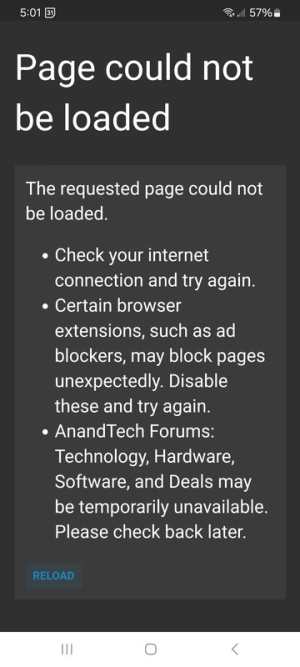
All o f a sudden starting this morning, I've lost the ability to connect to AT and the AT forums via wi-fi. ALL other sites work just fine on wi-fi and I can connect to AT/forums on my PC which is hardwired to my modem...it's just AT and wi-fi.

I've cleared the cache in both the Samsung browser and android Chrome as well as the iPad versions of Chrome and Firefox...no luck. I've rebooted my router, no luck...again, this seems to ONLY be affecting anandtech forums and the main site connecting via wi-fi. If I turn wi-fi OFF, I can connect..

Any ideas/suggestions?
 
Last edited:
Check your MTU/MSS. Try setting MTU to 1492 or even 1400.


Also check "Jumbo Frames", turn them off.
 
Last edited:
OK, talk to me like I'm stupid...because I am...more info on how to do those. Samsung Galaxy S21 Ultra and 2017 iPad. (and Netgear router)

Again, this...glitch only affects the Anandtech site and forums, no other site seems to be affected.
 
Anandtech site and forums
It could be a poisoned DNS server depending on which one you're using. I use Pihole for my clients but, on the server itself it's using at least 2 servers for this reason. I'm using 8.8.8,8/1.1.1.1 and haven't seen any issues with the forum.

In android you just go into settings and then the network connection and set the DNS manually. Not sure about IOS but it should be similar.

The other issue with non-PC devices and/or browsers is that they're starting to use their own built in DNS to circumvent what's supplied by DHCP options from your server/router. I disable it on my devices since it's defeats the purpose of pihole blocking all of the junk from pages. There's 2 places this setting is found in both the system and the browser settings. It's kind of a PITA unless you're not into digging deeper into making your devices more efficient.
 
OK, talk to me like I'm stupid...because I am...more info on how to do those. Samsung Galaxy S21 Ultra and 2017 iPad. (and Netgear router)

Again, this...glitch only affects the Anandtech site and forums, no other site seems to be affected.
That's pretty bizarre. For starters, you should explain exactly what happens when it doesn't work. Is there a long timeout? A browser error message that offers any clues?

Even if a consumer router allows you to change the MTU, don't mess with that. It is highly unlikely that MTU is the root cause in a consumer setting.
Can you test with more WiFi devices besides these two?

DNS may or may not be relevant, but you can easily change this on the device as a test. You can manually set the device to use public DNS servers: 1.1.1.1 and 8.8.8.8

 
That sure looks like DNS if everything else is working. Another trick to check would be opening it in "private" mode which bypasses normal settings.
 
Just checked with my wife's S21 ultra and her iPad...neither will connect to AT.
Did you manually configure the DNS servers on one of your devices to test if the behavior changes?

If the problem persists, it could be useful to test your PC with WiFi instead of Ethernet. If that also fails, you'll be able to run ipconfig as @ch33zw1z suggested and paste the output here.
 
Did you manually configure the DNS servers on one of your devices to test if the behavior changes?

If the problem persists, it could be useful to test your PC with WiFi instead of Ethernet. If that also fails, you'll be able to run ipconfig as @ch33zw1z suggested and paste the output here.
Hmmm...the pc DOES have wifi...when I get home I can try that.

Don't forget the old standby, "when in doubt, disable IPv6".

No idear how to do that.

Boomer isn't a network guy.

So, I'm at one of the local watering holes using their wifi...working just fine.
 
What's your router model? Disable it's support of IPv6 as suggested and change DNS to
1.1.1.1 / 4.2.2.1 / 8.8.8.8 / 9.9.9.9
 
Well…for whatever reason, the problem resolved itself overnight.
Thanks to all who chimed in with possible fixes.

(it makes me nervous…and suspicious when stuff like this happens…and fixes itself.)
 
Just do a hard reset on your modem and router (hold the reset button on all the things for 10 seconds) and then set-up your network again.
 
Most likely your router, or upstream DNS acting weird. Don’t be surprised if it returns
It did... 😡

Just do a hard reset on your modem and router (hold the reset button on all the things for 10 seconds) and then set-up your network again.
I generally just unplug everything for 30 seconds...reset will be a PITA, but that might be the "needful."

Can anyone explain why this ONLY affects the AT sites...and ONLY on MY wi-fi, but works fine on my PC's ethernet connection or wi-fi when I'm out of the house?

If it affected ALL my connections, that would be one thing, but just one group of specific sites?

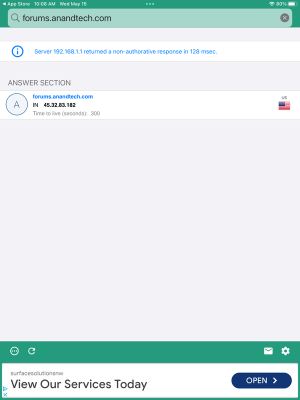
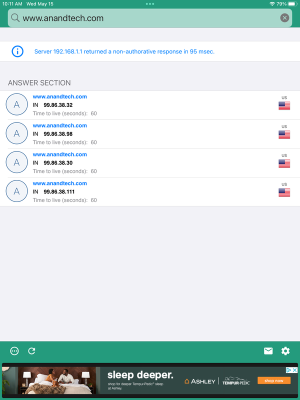
I did a DNS query on the ipad, here's the results of that:

1715794165878.png

1715794134429.png
 
Lordy, look at that response time

Try manually setting a device to aim for a dns provider, examples:

1.1.1.1 - cloudflare
8.8.8.8 - google
9.9.9.9 - quad9 (currently what I use)
 
Code:
 nslookup
> forums.anandtech.com
Non-authoritative answer:
Name:   forums.anandtech.com
Address: 45.32.83.182

> www.anandtech.com
Non-authoritative answer:
Name:   www.anandtech.com
Address: 18.161.134.18
Name:   www.anandtech.com
Address: 18.161.134.91
Name:   www.anandtech.com
Address: 18.161.134.87
Name:   www.anandtech.com
Address: 18.161.134.15

Obviously the WWW side is load / location balanced yet the forums is the same across the board.

So, your devices are seeing the correct info from DNS but being blocked somewhere else. Rebooting the ISP/router fixes things but then it comes back. Android / IOS so it's not OS dependent just connection dependent / WIFI only

Are you using the same browser on both devices? Chrome?
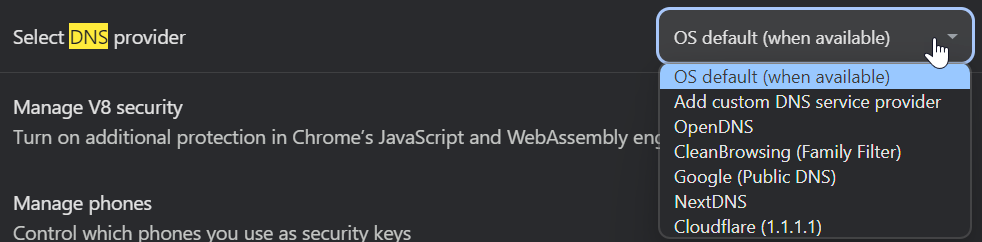
chrome://settings/security?search=dns
1715797160434.png

This is what I was talking about for the browser side. The device side has a DNS option as well.

Another thing that might pose an issue with the page coming up is if you have JS disabled. I block it by default on portable devices and enable it only for sites I want to visit. It keeps the fluff factor down when it comes to data / ads / tracking.
 
Switching to good DNS resolvers is sound advice, but some folks seem content to recommend a "nuke and repave" option. 😛

OP, how old is your router? How often are you resetting it? If often, or your router is older than say WiFi 5, then it could be time to replace it.


Lordy, look at that response time

[snipped]
Isn't that the caching nameserver on the router? (AT's TTL is fairly short, but not relevant.)

WTH, why does Chrome have its own DNS settings lol.
 
Back
Top