• We’re currently investigating an issue related to the forum theme and styling that is impacting page layout and visual formatting. The problem has been identified, and we are actively working on a resolution. There is no impact to user data or functionality, this is strictly a front-end display issue. We’ll post an update once the fix has been deployed. Thanks for your patience while we get this sorted.

Question Can you explain what's wrong with my PC?

Ruger22C

Golden Member
I already know how to solve my problem, but I'm posting because I don't understand why it solves anything.

For quite a while, my PC has been turning itself on immediately after I put it to sleep -- even if I'm not touching it. After putting it to sleep multiple times, sometimes it would stay asleep -- until I touched some component, e.g. my metal mouse pad (which my mouse was on top of).

When I used the switch at the back and set my PC to off, it did of course go off. But if I set it to on, my computer would turn itself on, even without pressing the power button.

Lately, my PC has been locking up. Even task manager would crash.

Today, it finally died. I turned it on, went into bios, and my screen flashed a bunch of times. Then the video signal almost entirely locked up. I pressed a bunch of buttons, and it updated one time and was distorted. Then it went blank entirely.

From that point forward, I had no video signal. It didn't matter whether I used onboard on my GPU. Despite this, it did seem that my PC was loading into windows, though I can't be sure of that.

I swapped RAM, RAM slots, removed my GPU, removed storage devices, and nothing helped. It still gave me a blank screen when I tried to turn it on. Sometimes I'd get a screen for a short time before it went blank, but usually not.

... Then I switched from my onboard-driven DVI monitor to my DP monitor. Since then, I haven't had a problem. I've even put all of my RAM and my GPU, etc. back into my PC.

I went back to onboard DVI a couple of times, and I had problems right away.

Also, the weirdness with my PC turning itself on without my permission, and having it visibly discharge when I press the power button when the power switch is off (I didn't mention this previously), those problems are solved too.

And I am now using that same DVI, but with my external GPU. If I plug it into my onboard, I'll have problems.

My onboard drives DP without any problems. It's only when it tries to drive DVI that it has any problems.

What caused this? I am extremely curious. A short related to the DVI port? A defect within my CPU that's activated only when that port is being used?
 
Update: It just crashed again. Whatever is wrong, it seems that using onboard DVI just exacerbates it severely. I'll be testing my RAM soon.
 
That weird things are happening when you touch the PC or connected components sounds like a ground fault to me. This can also match with DVI exacerbating the problem, as DVI has a higher operating voltage than DP, and a higher voltage shorted to ground will (likely) cause more issues. It could be worth going through the PC and checking for pinched wires or other possible sources of this. If you can't find anything the fault is likely caused by something internally in a component, in which case you'll need to swap components one by one to check them. Once the culprit is identified it will need a permanent replacement.
 
That weird things are happening when you touch the PC or connected components sounds like a ground fault to me. This can also match with DVI exacerbating the problem, as DVI has a higher operating voltage than DP, and a higher voltage shorted to ground will (likely) cause more issues. It could be worth going through the PC and checking for pinched wires or other possible sources of this. If you can't find anything the fault is likely caused by something internally in a component, in which case you'll need to swap components one by one to check them. Once the culprit is identified it will need a permanent replacement.

The comments about DVI apply even though it works properly when connected to my external GPU?
 
The comments about DVI apply even though it works properly when connected to my external GPU?
If there is a ground fault somehow related to your motherboard's DVI output (which, depending on how the ground planes of your motherboard are laid out and connected, can be difficult to pinpoint) then yes, it would work entirely normally if connected to a discrete GPU's DVI port. On the other hand if there was a ground fault in the monitor, this would not be the case. As such I guess we can eliminate the monitor being faulty from the equation, at least if we are indeed looking at a ground fault. As I said, the first step here would be checking the PC for any pinched wires or anything else that might cause a short circuit.
 
If there is a ground fault somehow related to your motherboard's DVI output (which, depending on how the ground planes of your motherboard are laid out and connected, can be difficult to pinpoint) then yes, it would work entirely normally if connected to a discrete GPU's DVI port. On the other hand if there was a ground fault in the monitor, this would not be the case. As such I guess we can eliminate the monitor being faulty from the equation, at least if we are indeed looking at a ground fault. As I said, the first step here would be checking the PC for any pinched wires or anything else that might cause a short circuit.

Thank you.
 
How old is the wiring in your residence? Are you sure the outlet you are using with your machine is properly wired with an acutal ground wire (lots of older houses may not be even if they have a three prong plug)? Also, your signature shows you are using six monitors with your system which is overclocked. How are you powering all of this equipment? If you are using power strips, you might consider trying to replace them in case one is going bad.
 
How old is the wiring in your residence? Are you sure the outlet you are using with your machine is properly wired with an acutal ground wire (lots of older houses may not be even if they have a three prong plug)? Also, your signature shows you are using six monitors with your system which is overclocked. How are you powering all of this equipment? If you are using power strips, you might consider trying to replace them in case one is going bad.

There may not be a ground. And I'm renting, so I can't change that. But once I find my device, I can use my outlet checker so that I at least have that information. What would be my best option if there isn't a dedicated ground?

I'm using a UPS, not a power strip.
 
There isn't a way to mitigate not having a ground other than installing a circuit with a ground wire. The easiest way to tell is to take the cover plate off an outlet and look in (no touching anything in it, just shine a flashlight in). If it is grounded, there will be a bare copper wire (may also rarely have green insulation) attached to the receptacle in addition to the hot and neutral (usually black and white) wires.

Even a circuit tester isn't foolproof, as some versions of the code allow owners to "cheat" by installing ground fault interrupter circuit breakers in the box. Doing that allows them to install three prong outlets which may test as being grounded, but GFI breakers aren't a substitute for true grounds. You can see GFI breakers in the breaker box as they usually have a test/reset push button visible on them in addition to the normal flip switch. You can also see the bare copper grounds leaving the breaker box as well, though that doesn't mean every outlet is grounded.

If you check the outlet and find it is not grounded, visually check the other outlets in the residence by removing the face plates as you may find one that actually is grounded (especially on internal walls with no internal insulation where it was easier to fish a wire). You may also ask your landlord if there are any grounded outlets and, if not, would it be possible for him/her to install one for you for use with your sensitive electronics.
 
Last edited:
There isn't a way to mitigate not having a ground other than installing a circuit with a ground wire. The easiest way to tell is to take the cover plate off an outlet and look in (no touching anything in it, just shine a flashlight in). If it is grounded, there will be a bare copper wire (may also rarely have green insulation) attached to the receptacle in addition to the hot and neutral (usually black and white) wires.

Even a circuit tester isn't foolproof, as some versions of the code allow owners to "cheat" by installing ground fault interrupter circuit breakers in the box. Doing that allows them to install three prong outlets which may test as being grounded, but GFI breakers aren't a substitute for true grounds. You can see GFI breakers in the breaker box as they usually have a test/reset push button visible on them in addition to the normal flip switch. You can also see the bare copper grounds leaving the breaker box as well, though that doesn't mean every outlet is grounded.

If you check the outlet and find it is not grounded, visually check the other outlets in the residence by removing the face plates as you may find one that actually is grounded (especially on internal walls with no internal insulation where it was easier to fish a wire). You may also ask your landlord if there are any grounded outlets and, if not, would it be possible for him/her to install one for you for use with your sensitive electronics.


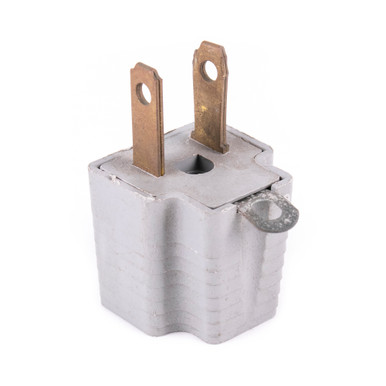
Thoughts on using this and wiring it to a water pipe?
 

Thoughts on using this and wiring it to a water pipe?

None whatsoever - I wouldn't even consider doing it. That type of ground isn't the same thing as a bonded ground. And, even so, if your metal pipes have dialectric unions in them to prevent corrosion, you have to install an electrical jumper around any such unions. Plus, there is no guarantee that your entrance water line is metal and not some form of pvc/pex that transitions into whatever is run in your residence.

If the outlets you are using are two prongs only at the wall (no three prong outlets, requiring you to use that adapter with your UPS), you definitely have electrical issues without even checking and there are no solutions without wiring modifications. Otherwise, remove the cover and check to be sure.
 
Update: It just crashed again. Whatever is wrong, it seems that using onboard DVI just exacerbates it severely. I'll be testing my RAM soon.
To be certain I got this part right, you have not reproduced the issues with DP only DVI correct? If so, try a different DVI cable.
 
(I was under the impression that using a standard-type consumer UPS, without a grounded outlet was somehow a BAD IDEA. I can't explain why, though.)
 
Back
Top