• We’re currently investigating an issue related to the forum theme and styling that is impacting page layout and visual formatting. The problem has been identified, and we are actively working on a resolution. There is no impact to user data or functionality, this is strictly a front-end display issue. We’ll post an update once the fix has been deployed. Thanks for your patience while we get this sorted.

Question Can I run a PC fan with only the yellow and black wires?

What voltage does your fan run on? Yellow is 12VDC and if your fan is 12VDC you are good. On the other hand if it is 5VDC you'll smell it burning out.
 
PC fans come in two varieties: 3 pin and 4 pin.

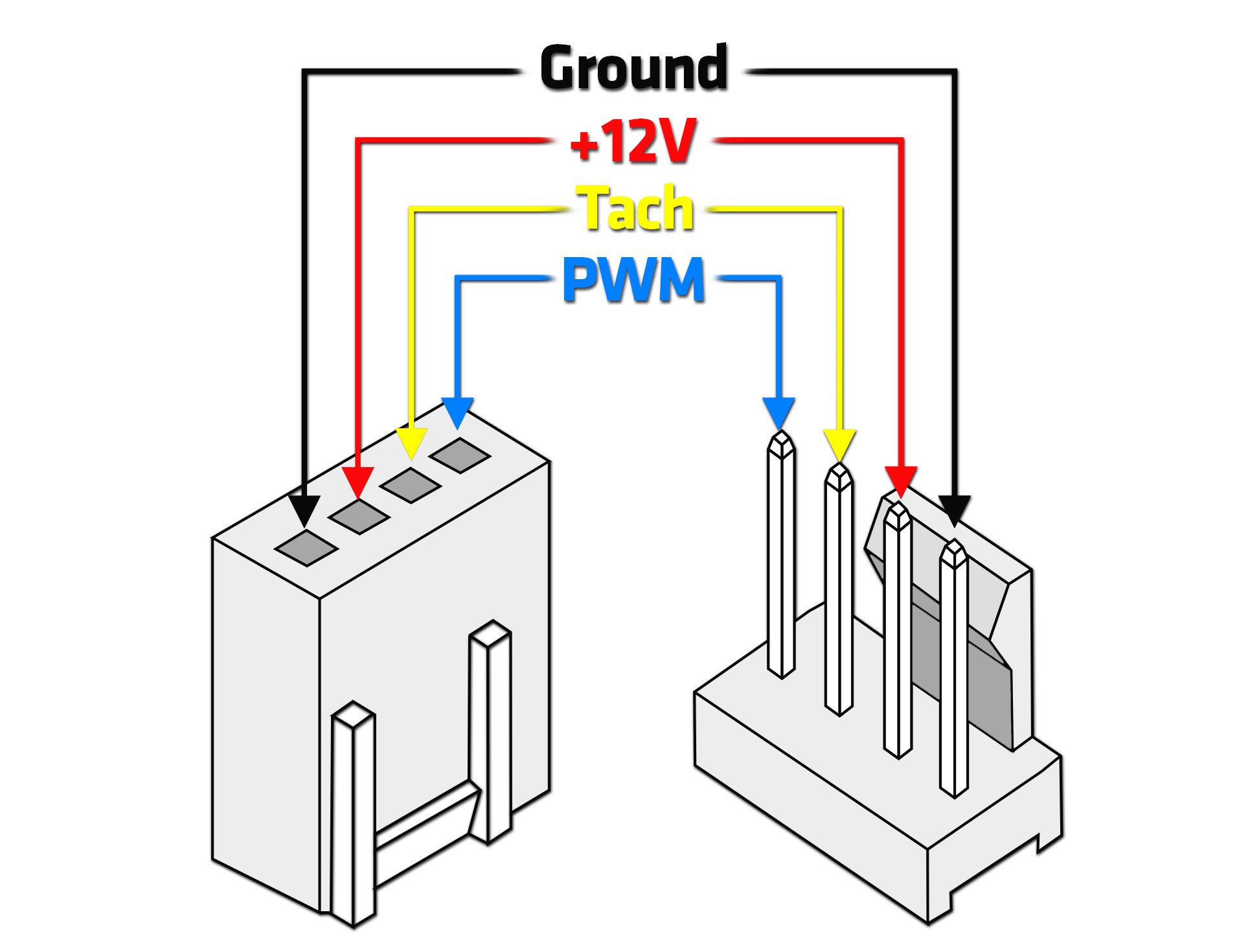
The 3 pin has live(12v), ground, and an RPM reporting wire. The reporting wire is optional and simply tells your computer what RPM it is spinning. These fans can only have speed controlled by reducing voltage below 12v.

The 4 pin has the same 3, plus a PWM speed control wire. All PWM PC devices (fans, water pumps, etc) run at full speed if there is no PWM signal to tell them to reduce speed.

If you only provide live and ground any PC fan should run at full speed.
 
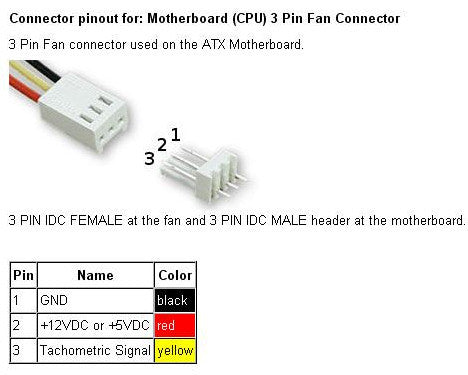
The comments above presume that OP means connecting the fan's power input leads to the Yelow and Black wires of a 4-pin Molex power output connector from the PSU. Fair enough. But you MUST connect those two to the correct leads of the FAN, and do NOT just match colours! On an older 3-pin fan, the wire colours always are Black on Pin #1 for the Ground supply (Black of the Molex source connector), Red on Pin #2 for the +Volts supply (Yellow from the Molex connector), and Yellow on Pin #3 for the fan's speed signal being sent back to the fan header. If you are powering this fan from a PSU output, OP, do NOT connect the FAN's YELLOW to anything.

If you are making connections to a 4-pin fan, the colour codes of the fan wires are DIFFERENT from this, so post back here for details if you need them.

 
Black on Pin #1 for the Ground supply (Black of the Molex source connector), Red on Pin #2 for the +Volts supply (Yellow from the Molex connector), and Yellow on Pin #3 for the fan's speed signal being sent back to the fan header.

i was gonna comment on this and im glad you caught it.

Yes you do not want to connect that RPM Sense wire (usually yellow) on a 3 wire header.
A 4 wire header which is PWM will be Green and yellow.

PWM:
02-1.jpg


3 Pin
4_c1b98c50-e3b0-42e4-bfbc-997e13c55998_1800x.jpg


You want to make sure "+" is going to + and "-" is going to allign.
If polarity is flipped, the fan will spin backwards and not as intended.
If you connect the tach or pwm signal, you can blow out the header or the fan motor especially if you have a faulty ground somewhere.

Of course directly connecting to the 12 source will make the fan run full boat.
You can use a tach or a rheobus to control voltage.
But some fans will also not start spin cycle @5V.
 
mindless1 above is RIGHT! the OLD computer fans - say, before 2000 approx - did have brushes and commutators, and THEY would run backwards if wired backwards. BUT today's fans are brushless, meaning they have little boards with active circuit elements that do all the switching of current to field coils to keep the field rotating, causing the magnets on the central rotor to follow. Those little circuits NEED to have their power fed in the correct polarity.
 
Back
Top