• We’re currently investigating an issue related to the forum theme and styling that is impacting page layout and visual formatting. The problem has been identified, and we are actively working on a resolution. There is no impact to user data or functionality, this is strictly a front-end display issue. We’ll post an update once the fix has been deployed. Thanks for your patience while we get this sorted.

C Drive Full - 1 TB SSD clone to 4 TB M.2?

I have ordered a 4 TB M.2 drive and a 4 TB 2.5 inch internal SSD drive. All Samsung, as is my current C drive and a 1 TB SSD drive I use as a Photoshop Scratch drive. RAW and DNG photo files are huge, I have a lot of drives in my DIY PC plus a DAS.

What is the best software to clone my C drive to a new drive? I assume the M.2 SSD is the fastest option. Should I just use Samsung's? I'd like to remove the current C Drive with all current OS, Programs and Data and keep as a backup.

The Samsung Data Migration Tool (Samsung Magician Software) can be downloaded from here.

Windows. I move most images and videos to other drives but my 1 TB SSD C drive is full. I have added a lot of editing programs but still not sure how I've filled the drive up. My signature below is not current equipment.

Thank you.
 
1TB being full means you need to purge files. I run a 1TB and limit Windows to 125GB and then partition off the rest for storage. Apps and OS don't take up 1TB of space!

I use clonezilla and just do a complete image of the drive/partitions and then if needed resize things using Linux GParted or some windows partition manager program.

For cleanup though IOBit has some options that scan things and remove wasted junk like updates.

My signature below is not current equipment.
Then update it!
 
As long as the new drive is larger, just use the built in "back up and restore" . Create an image, and apply it to the new drive, go into disk management and resize the partition after. Don't overcomplicate it.

I agree with Tech Junky about having a separate partition for Windows and programs. Makes it quick and easy to create monthly images. So maybe do as above, and shrink the windows partition after you move the files to a new location/partition.
 
Last edited:
Oh, and as far as why the drive is still full, have you ran a disk cleanup, and the "clean up system files". And turn off system protection if it's on. Sucks up tons of space eventually.
 
The free version of DiskGenius is also very good for cloning. I've used it to clone drives many times, including one situation on a system where both Macrium Reflect and Acronis couldn't clone the partitions.

 
This program (run with admin privs) will analyse a whole drive and tell you where the usage is in a handy format:

Samsung Data Migration has been replaced with Samsung Magician. I've used both many times without issue. I've also used EaseUS ToDo Backup Free many times.
 
After using some of the recommendations' to clean up my C drive I used Samsung Magician to clone the Samsung 850 PRO 2.5" 1TB SATA III SSD to a new Samsung SSD 870 EVO 4 TB. Everything went smoothly other than needing to reactivate DxO PureRaw. I submitted a support request since they think I've used all my licenses already. Microsoft Office 2016 also required me to activate it but I was able to without any problems. I hope I don't find too many others.

I used the 870 EVO 2.5 SSD for the OS swap instead of the M.2 SSD 990 Pro.

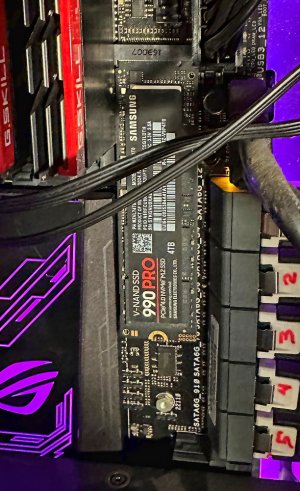
The M.2 SSD 990 Pro installed OK but I don't have the locking clip I see in some installation videos nor do I have any screws small enough to fit my ASUS ROG Rampage V Edition 10 Motherboard. With the older motherboard I don't think there would be much performance difference between the 990 Pro and the 870 EVO and I read some concerns about heat without a heat sink on the 990.

Any suggestions on what size or type of screw would work on my Rampage V? What if I just leave it installed as is? The support is blocked from view in the attached picture but is the same as the silver one a little below it. Thanks.ASUS ROG RAMPAGE V EDITION 10 M2 SSD 1000p.jpg
 
You would move the support from 22110 to 2280 and then put the screw in. The screws are pretty generic and you might have one you can use from somewhere else. Otherwise you can order them and pay way more than they're worth.
 
You would move the support from 22110 to 2280 and then put the screw in. The screws are pretty generic and you might have one you can use from somewhere else. Otherwise you can order them and pay way more than they're worth.

There is a support, you just can't see it in the picture. My motherboard came with no screws that small and I don't know what size I would need to order. Thanks.
 
With the older motherboard I don't think there would be much performance difference between the 990 Pro and the 870 EVO and I read some concerns about heat without a heat sink on the 990.
The 870 has a max speed of 560/530 MBps, the 990 in the PCIe 3x4 slot is probably closer to 4,000/4,000 MBps. So there would be quite a bit of difference. Since you would be relegated to the Gen 3 speeds on the 990 heat likely wouldn't have been an issue either although an inexpensive heat sink would be sufficient.
 
The 870 has a max speed of 560/530 MBps, the 990 in the PCIe 3x4 slot is probably closer to 4,000/4,000 MBps. So there would be quite a bit of difference. Since you would be relegated to the Gen 3 speeds on the 990 heat likely wouldn't have been an issue either although an inexpensive heat sink would be sufficient.

Thanks. The 990 Pro is now secure with the screw kit I bought but my ASUS ROG Rampage V Edition 10 no longer recognizes it. It did at one time. I cloned my c drive to the 870 and it is working well. I could clone that to the 990 if I felt the need but first I need to find out how to get it recognized.

I read one forum note that mentioned it could have conflicts because the M.2 slot shares SATA port 1. I have the 870 EVO on SATA port 1. I would need to research how to move my 870 to a different SATA port and have it boot, than clone from the 870 to the 990 if changing ports gets my motherboard to recognize the 990.
 
There might just be a UUID conflict since it doesn't change with a clone.

The block diagram for your MOBO should tell you if there's a conflict or something gets disabled when using as specific slot/socket.

My pref would be using the fastest drive as your OS drive and use the others as storage,
 
There might just be a UUID conflict since it doesn't change with a clone.

The block diagram for your MOBO should tell you if there's a conflict or something gets disabled when using as specific slot/socket.

My pref would be using the fastest drive as your OS drive and use the others as storage,

But wouldn't the UUID conflict be between the 870 and the 850 I cloned from? I never tried to clone the 990. All I did was install and initialize it. I removed the 850 from my PC that had my OS on it after cloning. Isn't it possible the 990 just failed since it initially worked and was recognized and now nothing I do gets it recognized. Thanks.
 
initialize
That is a potential issue depending on if both machines are uefi or bios. Uefi drives won't show in a bios machine. A MBR drive won't boot a uefi machine.

I find easiest method is to boot from a Linux USB and check from disks as this rules out most OS issues.
 
At this point I just want to confirm the 990 is good. I built my current PC in early 2017 and plan a new build in a couple months and will move the 990 to the new build anyway. This PC will be moved to my basement printing office. It worked when I first installed it so I will RMA it and test the replacement but it could just as easily be a motherboard issue. Thanks.
 
Thanks. The 990 Pro is now secure with the screw kit I bought but my ASUS ROG Rampage V Edition 10 no longer recognizes it. It did at one time. I cloned my c drive to the 870 and it is working well. I could clone that to the 990 if I felt the need but first I need to find out how to get it recognized.

I read one forum note that mentioned it could have conflicts because the M.2 slot shares SATA port 1. I have the 870 EVO on SATA port 1. I would need to research how to move my 870 to a different SATA port and have it boot, than clone from the 870 to the 990 if changing ports gets my motherboard to recognize the 990.
I pulled up the manual for your motherboard and I don't see anything about the M.2 conflicting with SATA 1. The only thing I see is that the M.2 and U.2 ports would share bandwidth with the PCIeX8_4 slot if you had it populated, but it looks like you only have 1 GPU and no other cards installed. You could check the BIOS settings to see if it got disabled there somehow but again that only looks like it would happen if you had something plugged into multiple PCIe slots. But check BIOS > Advanced > Onboard Device Configuration > PCIex8_2 PCIex8_4 and U.2 M.2 Configuration.

Seems odd that installing the screw caused this issue. Maybe reseat the drive?
 
Back
Top