Buying new card, asking for opinions GTX 780 vs R9 290

Page 6 - Seeking answers? Join the AnandTech community: where nearly half-a-million members share solutions and discuss the latest tech.

TreVader

Platinum Member
Oct 28, 2013
2,057
2
0
You're going to focus on specification sheet arbitrary numbers without looking at the context behind them?

Your original context was in relation to memory bandwidth. Fact of the matter is, the Hawaii doesn't have vastly greater memory bandwidth than the 780 reference. They're pretty close, and since most custom 780s overclock the VRAM anyway, some 780 models are closer to even. Meanwhile, the 780ti - The 780ti actually has greater memory bandwidth. Does the Hawaii have 33% greater memory bandwidth than the GTX 780 reference, though? No. It does not. The 780ti has greater memory bandwidth than Hawaii.

Overall this means little if anything. It's absurd to focus on one detail on a specification sheet and make sweeping assumptions or implications based on that. It isn't a situation where you can say "oh, 512 bit bus" and state that a card is better than everything as a result. Prime example being the 2900XT. If GPUs always boiled down to specification sheets, things would be oh-so SO SO SO different. The 2900XT would have been such a better performer than it was. Same for the 7970. Comparing the GTX 770 and 280X specification sheets heavily favors the 280X. But architecturally, the Kepler is better and performs as well or better in some cases. (referring to the 770 here) Overall, the 770 and 280X are roughly at parity give or take depending on title despite the Kepler GPU having a lower memory bus. Specification sheet figures mean little without complete context and consideration of the architecture behind it.

So your statement was something along the lines of "Buy the 290 because it has a 512 bit bus" Uh. As if that means much of anything. It really doesn't. I'm sure railven is intelligent enough to figure these things out though, and look at meaningful considerations in his GPU purchase. Instead of something listed on a specification sheet. I'm not saying the 290 isn't worth consideration, certainly railven will think that over. Custom 290s are quite fast GPUs and competitive - now I prefer NV of course due to software, but not everyone sees things as I do. Railven may well get a 290 and that's great. However, trying to state "290 has a 512 bus, that makes it a better GPU". Uhm. You can cite other reasons to make a case for the 290, but bus width isn't one of them.
I'm not sure what all this is. All stated was that quality memory was more important on the 780 because you have to clock the 780 memory 33% higher than the 290 to achieve the same result.


I made no qualitative judgments about either card, but it's interesting to watch somebody try to make an argument for a 384 bit bus being just as wide as a 512 bit bus.
 

Capt Caveman

Lifer
Jan 30, 2005
34,543
651
126
That Gaming 290 is a good price at $429.00 AR. :) The one negative for me imo from previous research on this card/cooler is this cooler running on a 290, this cooler works great on Nvidia cards/gpu's but not as good on the 290 gpu cards when overclocked. If looking for big oc's of 1150-1250 be prepared for GPU temps of 85-94c under load/gaming and VRM temps in 90-110c+ range from forums of guys overclocking this card. While some guys here will say its not a problem I don't want VRM's running that hot imo. If your not going to overclock its a great price for a 290 or run mild oc's around 1100 not bad. If your going for 1150-1250 oc's I look at other 290's imo.

I ordered it tonight. I'll use the preset oc options but don't plan on trying to manually oc it anymore.

Thanks everyone for the feedback. Haven't had an AMD card since my HIS X1900XT.
 

Fastx

Senior member
Dec 18, 2008
780
0
0
I ordered it tonight. I'll use the preset oc options but don't plan on trying to manually oc it anymore.

Thanks everyone for the feedback. Haven't had an AMD card since my HIS X1900XT.

Congrats, you got a nice price on that 290 card! I have that preset app with my GTX 770 Gaming card and its a very simple/quick app to use. I believe the oc preset on your 290 card is around 1005, so you have room to go if you ever decide to manually take it higher up to around possible 1100-1150 depending GPU, temps and what gpu/vrm temps your comfortable with. But in any case enjoy your new 290 card, that was a nice bang for the buck card at that price imo. :)
 

guskline

Diamond Member
Apr 17, 2006
5,338
476
126
Railven, reread your original post. Obviously I won't comment on the R9 290 because I don't own one. In the rig below I had 2 EVGA GTX 670 FTWs in SLI, water cooled and Overclocked. I wanted to go to a single card and when the gift cards for Christmas all came in I had a choice between a R9 290 and GTX 780. The problem was the R9 290 prices shot through the roof so fast I decided to up it a little and buy the EVGA GTX780 Classified. It is a GREAT overclocker, built like a tank. I then waited and snagged a EVGA Hydro Copper water block and EVGA Classified backplate (yes they are out there if you look hard enough) and I was off to the races.

My 2 670s have a slightly higher score in 3D Mark (11,200 vs 11000) BUT the single 780 is a BEAST.

I hope for your sake you get a decent Lightning.
 

tolis626

Senior member
Aug 25, 2013
399
0
76
I'm not sure what all this is. All stated was that quality memory was more important on the 780 because you have to clock the 780 memory 33% higher than the 290 to achieve the same result.


I made no qualitative judgments about either card, but it's interesting to watch somebody try to make an argument for a 384 bit bus being just as wide as a 512 bit bus.

You're right in what you said in your previous posts. One only has to look at the 290x Lightning, that actually has proper high-clocking memory. I don't remember the exact bandwidth it could achieve, but with 6.4GHz or something like that on a 512 bit bus it was extreme. In fact, I think it was over 400GB/s, but I could be wrong. When it comes to memory, I don't think GK110 cards can touch Hawaii, especially when it's coupled with high quality memory modules (Let's all raise a middle finger to Elpida). If Hawaii was even close to GK110 in efficiency, it would be a no brainer for me.
 

RussianSensation

Elite Member
Sep 5, 2003
19,458
765
126
Hope that RMA goes well for you! Let us know about the overall experience & the time it takes. Hope you get a screaming overclocker :)
 

Attic

Diamond Member
Jan 9, 2010
4,282
2
76
I ordered it tonight. I'll use the preset oc options but don't plan on trying to manually oc it anymore.

Thanks everyone for the feedback. Haven't had an AMD card since my HIS X1900XT.

With a bit of an OC it's going to match the 290x. The preset OC's get ya within whispering distance.

The MSI gaming line is great and the big fans do a good job of keeping Hawaii cool. Just be aware there have been some consistent fan issues with the TFIV, either with lube leaking or fan failure. Hit or miss rather than a guarunteed problem, but it's affecting enough folks to keep an eye on the cards shroud to see if it's leaked.
 

railven

Diamond Member
Mar 25, 2010
6,604
561
126
Thanks Russian, will keep you guys posted on the RMA status. Need to check my tracking number to see if it arrived, 2-day priority so should be there by now.


With a bit of an OC it's going to match the 290x. The preset OC's get ya within whispering distance.

The MSI gaming line is great and the big fans do a good job of keeping Hawaii cool. Just be aware there have been some consistent fan issues with the TFIV, either with lube leaking or fan failure. Hit or miss rather than a guarunteed problem, but it's affecting enough folks to keep an eye on the cards shroud to see if it's leaked.

Woof, that there alone is enough for me to avoid that card at all cost. Explains the discounts it has been getting. Glad I decided to try my luck RMAing the lightning.
 

Face2Face

Diamond Member
Jun 6, 2001
4,100
215
106
If you get a card with Hynix or Samsung would you be interested in doing some testing? I wish my card had either, I would do some testing to show how bandwidth limited the GTX 780 becomes at higher clock speeds (1250+)
 

Fastx

Senior member
Dec 18, 2008
780
0
0
@F2F quick off topic question, I was looking at your YT vid's again at 1080p/1440p, on the one in BF4 @ 1500 on 1440p, was that one with 4x MSAA or 2x MSAA? I see it says ultra settings but not Ultra preset so just want to make sure per FPS and Vram usage I am looking at.

TIA
 
Last edited:

Face2Face

Diamond Member
Jun 6, 2001
4,100
215
106
@F2F quick off topic question, I was looking at your YT vid's again at 1080p/1440p, on the one in BF4 @ 1500 on 1440p, was that one with 4x MSAA or 2x MSAA? I see it says ultra settings but not Ultra preset so just want to make sure per FPS and Vram usage I am looking at.

TIA

Opps... It was done with 2XMSAA. Let me fix that.

EDIT: Fixed
 

railven

Diamond Member
Mar 25, 2010
6,604
561
126
If you get a card with Hynix or Samsung would you be interested in doing some testing? I wish my card had either, I would do some testing to show how bandwidth limited the GTX 780 becomes at higher clock speeds (1250+)

If it's within my comfort zone, sure. Haha. I wouldn't want to damage my freshly RMA'd card.


As for bad luck with RMA, the two reviews on Newegg about an RMA delay from MSI both said MSI never updated their status page. I checked now and my RMA Status has been updated from Step #1 - Approved, to Step #3 - Processing. 2 more steps to go! (Packaged then shipped.)
 

railven

Diamond Member
Mar 25, 2010
6,604
561
126
Card shipped from MSI RMA Dept. Woots. But they're shipping UPS 3-day ground and you know UPS, when they say 3-day shipping. It's 3-days!

Estimated day of delivery - 4/21/2014.
 

sze5003

Lifer
Aug 18, 2012
14,320
683
126
Card shipped from MSI RMA Dept. Woots. But they're shipping UPS 3-day ground and you know UPS, when they say 3-day shipping. It's 3-days!

Estimated day of delivery - 4/21/2014.

Nice so hopefully you get a functioning card and for what you paid that's a good deal.
 

Shmee

Memory & Storage, Graphics Cards Mod Elite Member
Super Moderator
Sep 13, 2008
8,313
3,177
146
Good luck! Hope you get it soon.
 

railven

Diamond Member
Mar 25, 2010
6,604
561
126
Ups failed to deliver yesterday but got it today. MSI is a class act. Brand new unopened package arrived.

Will try to setup today but since ups screwed me over my time is limited.
 

spinejam

Diamond Member
Feb 17, 2005
3,503
1
81
Ups failed to deliver yesterday but got it today. MSI is a class act. Brand new unopened package arrived.

Will try to setup today but since ups screwed me over my time is limited.

Nice! Consider yourself very lucky --- not often do RMA's return like your's. :)
 

railven

Diamond Member
Mar 25, 2010
6,604
561
126
Got the car installed, just did a few benches using Unigine.

Highest clocks I tested with no mods yet and stock volts, power @109% (Max on MSI AB):
Core: 1201mhz
VRAM: 1701mhz.

I can not go over +115 on core, probably going to need just a littler more juice. But I can't get volts to unlock in MSI AB. +120 on core resulted in some artifacting, +115 was flawless.

I got nervous and stopped testing VRAM at +400 (1700mhz) not sure if it can handle more, possibly.

Fan @ 100%, not audible over my two 140s, temps <65c for the runs.

Unigine score:
Unigine Heaven Benchmark 4.0

FPS: 61.4
Score: 1546
Min FPS: 8.5
Max FPS: 131.0

Settings

Render: Direct3D11
Mode: 1920x1080 8xAA windowed
Preset Custom
Quality Ultra
Tessellation: Extreme

@1440p

FPS: 47.7
Score: 1202
Min FPS: 20.2
Max FPS: 104.5


Render: Direct3D11
Mode: 2560x1427 windowed
Preset Custom
Quality Ultra
Tessellation: Extreme


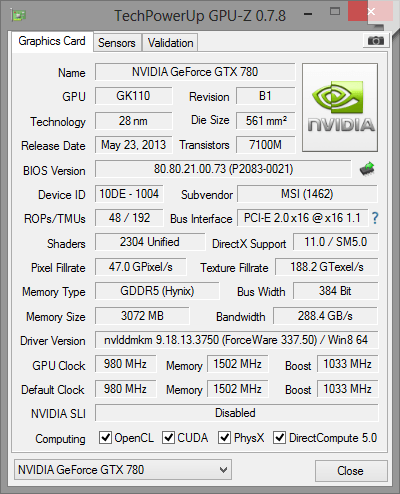
Very much happy with my replacement card. Considering I bought an open box for $455, +$20 shipping got me a brand new card. Unfortunately, GPUZ shows it as A1-stepping, but without taking off the heatsink not sure what VRAM. Gonna assume Elpida.
 

Fastx

Senior member
Dec 18, 2008
780
0
0
I remember from awhile ago when I was researching this card GPUz wasn't accurate on the stepping and would report a B1 as a A1. I am not sure if this has changed since then with the newer GPUz updates. I believe you can go by the BIOS version number to determine if it is a B1. If I remember correctly it something like 80-80-30 for a B1?

That memory overclock isn't bad, download the latest GPUz 7.7 and it will tell you what memory you have in the memory type box.
 

railven

Diamond Member
Mar 25, 2010
6,604
561
126
I remember from awhile ago when I was researching this card GPUz wasn't accurate on the stepping and would report a B1 as a A1. I am not sure if this has changed since then with the newer GPUz updates. I believe you can go by the BIOS version number to determine if it is a B1. If I remember correctly it something like 80-80-30 for a B1?

That memory overclock isn't bad, download the latest GPUz 7.7 and it will tell you what memory you have in the memory type box.

Wow! Thank you sir, didn't realize my GPUz was so out of date. Downloaded 7.8:

774.png


Seems I got a damn good card. Consider me super happy and satisfied :D