


- May 19, 2011
- 21,351
- 16,564
- 136
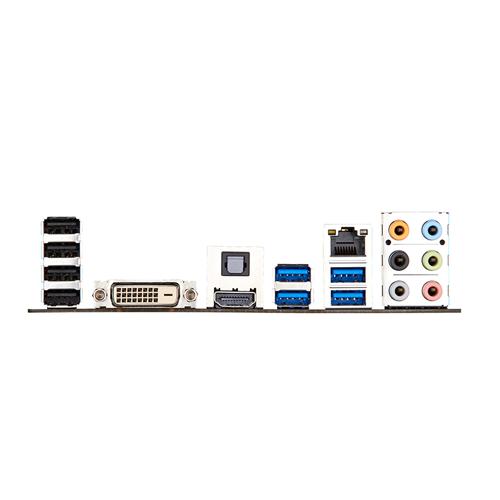
I've recently been setting up a second-hand PC for my parents to replace their ageing AM2 rig running Vista. Everything was OK with it at home; it went through several restarts as well as a few shut downs and one disconnection of power for a few days, and at home I was configuring it with a monitor connected via DVI.
My parents have a TFT monitor that's got to be about ten years old but it's never skipped a beat the whole time, and DVI has been in use on it most (if not all) of that time. I connected it to the replacement PC yesterday, and it didn't even give the faintest glimmer of reaction when the computer was switched on, not even a temporary monitor resume then 'no signal', just nothing at all. The computer evidently booted up fine as I heard the Windows startup sound and was getting caps lock responses as well as an appreciable length of time before it shut itself down after I pressed the power button for less than a second.
I tried pulling the power out of the monitor in the hope that it might get whatever glitch it might have out of its system, and I tried a CMOS reset, nothing helped. I tried plugging the old PC back in, the monitor worked fine. I also tried having nothing connected except monitor and power, still nothing.
In the end I pulled the graphics card from the old PC and put it in the replacement PC, and it worked straight away.
I've never heard of any DVI revision issue before, but it was the only possibility that sprang to mind after everything else I tried. The board has the latest BIOS update.
Board: ASUS GRYPHON Z87
Graphics card: GeForce 8400GS
If I'm at a loose end at some point, I might try factory-resetting the monitor, disconnecting the graphics card and try the onboard graphics again, but I would be surprised if that helped. I'm stumped by this one.
My parents have a TFT monitor that's got to be about ten years old but it's never skipped a beat the whole time, and DVI has been in use on it most (if not all) of that time. I connected it to the replacement PC yesterday, and it didn't even give the faintest glimmer of reaction when the computer was switched on, not even a temporary monitor resume then 'no signal', just nothing at all. The computer evidently booted up fine as I heard the Windows startup sound and was getting caps lock responses as well as an appreciable length of time before it shut itself down after I pressed the power button for less than a second.
I tried pulling the power out of the monitor in the hope that it might get whatever glitch it might have out of its system, and I tried a CMOS reset, nothing helped. I tried plugging the old PC back in, the monitor worked fine. I also tried having nothing connected except monitor and power, still nothing.
In the end I pulled the graphics card from the old PC and put it in the replacement PC, and it worked straight away.
I've never heard of any DVI revision issue before, but it was the only possibility that sprang to mind after everything else I tried. The board has the latest BIOS update.
Board: ASUS GRYPHON Z87
Graphics card: GeForce 8400GS
If I'm at a loose end at some point, I might try factory-resetting the monitor, disconnecting the graphics card and try the onboard graphics again, but I would be surprised if that helped. I'm stumped by this one.




 Facebook
 Twitter