

Question best way to beam internet to a garage 80 feet away?

luv2liv

Diamond Member
Dec 27, 2001
3,506
95
91
i have a garage that's about 80 feet away. tried a wifi extender to be fast n cheap but that did not work...
running a cat 6 is not feasible.
i believe all i need is two Ubiquiti NanoBeam ac Gen2, correct? and off course 2 poe injector to power those beams.
here's a rough diagram. can you pls confirm?
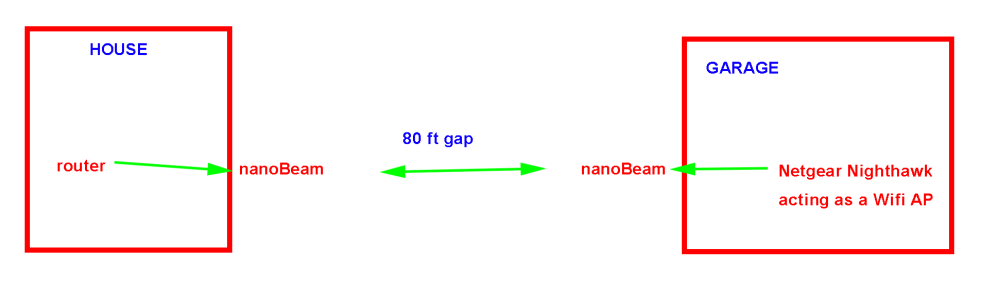
1688606765998.png
 

GodisanAtheist

Diamond Member
Nov 16, 2006
8,439
9,847
136
Garage powered and running off a household circuit? Can use a power line injector to get the internet to the garage, then use an access point to broadcast from there...
 

cellarnoise

Senior member
Mar 22, 2017
858
450
136
If you don't need more bandwidth than 54 mbs, the https://dl.ubnt.com/loco_m2_datasheet.pdf one nanostation loco m2 can be tried solo as an access point. I use several of these in this mode to send wifi easily up to 400 feet away.

In one of my uses I beam wifi to a metal sided pole barn construction garage about 50'. Works great.
 
  • Like
Reactions: skyking

WilliamM2

Diamond Member
Jun 14, 2012
3,013
892
136
i have a garage that's about 80 feet away. tried a wifi extender to be fast n cheap but that did not work...
running a cat 6 is not feasible.
i believe all i need is two Ubiquiti NanoBeam ac Gen2, correct? and off course 2 poe injector to power those beams.
here's a rough diagram. can you pls confirm?
View attachment 82676

I use an old TPLink router as an extender to my neighbors garage. It's 90 ft+ and goes through 5 walls to get there. Then it's another 30 ft and down one floor to his laptop.

Placement in his garage was critical, and 2.4 will travel farther than 5Ghz, so I just got one of these:

You may just need to try a different extender. I find routers with an extender function gnerally work better than plain extenders.
 

WilliamM2

Diamond Member
Jun 14, 2012
3,013
892
136
Really? Old TPLink will travel 90ft+ thru 5 walls? WOW
Are you SURE about this?
We can't even get wifi, using TPLink or any home use routers, 30ft away (between two adjacent rooms, doors closed)
We must live on different universe? LOL

Yes, I'm sure. If you can't get a router to work between two adjacent rooms, you might want to hire someone to show how to set it up.
 

mxnerd

Diamond Member
Jul 6, 2007
6,799
1,103
126
NanoBeam ac Gen2 looks big too.

As mentioned above, direct burial ethernet cable is the best if you can dig a trench and bury it in the ground.

Or see if an outdoor AP (https://www.tp-link.com/us/business-networking/omada-sdn-access-point/eap225-outdoor/ for example) outside of the house and your existing wifi extender put in a weather proof box outside of the garage works.

wifi bridge from a brand that never heard of
==
Well, sorry for this one again. The spec say 900Mbps, but several users said it's only 100Mbps.
 
Last edited:

WilliamM2

Diamond Member
Jun 14, 2012
3,013
892
136
I think we are missing something here. maybe my poor choice of words. BUT If you know how home routers work then you would have known what I was trying to say.

Namely, when I said can't get TPLink work, I assumed EVERYBODY know that these home router wifi range is MAYBE 15m(40ft?), That's why even some adjacent rooms can't get wifi (with (2)doors(room with router and next room) CLOSED)

I did NOT mean to communicate that I need "help" with wifi setup. I was just stating the OBVIOUS how poor range these home routers are designed for.

Anyway let's forgeet it and move on, getting off OP's subject here. LOL

I'm not sure you understand how an extender works. I have a router and access point at each end of my home (55ft. BTW). From my access point (Asus) the signal goes 90+ ft to the extender (TPLink) in the garage next door, after passing through 3 walls in my home and garage, and two in the neighbors garage. I get 70% signal strength, easily achieved with most home routers on the 2.4Ghz band. It won't work with 5Ghz, probably due to the walls.

I'm not off his topic at all, I told him how I do it. You went off topic with the comment that home routers don't work? Maybe you need to try different routers.
 
Last edited:

aigomorla

CPU, Cases&Cooling Mod PC Gaming Mod Elite Member
Super Moderator
Sep 28, 2005
21,111
3,637
126
That's copper clad aluminum, which is garbage
Its still better then any non wired solution.

How important is the bandwidth?
I would second the Power over Ethernet extender option as second, if the house wiring is not too old, and latency + bandwidth is not too high on the tier.

But ultimately, running a wire direct is the best solution period.
I would for failsafe run two wires if your going to bury it.
Or if geography allows just run it over ground around obstacles, and with the intension of replacing it every year or two.
 

Red Squirrel

No Lifer
May 24, 2003
70,930
13,927
126
www.anyf.ca
Cheaper than $20?

I had to reread the replies since I could not believe any wifi solution could be that cheap... I don't know how they are even selling a router for that cheap or if that's even legit (and not some chinese rip off). Either way since this is a point to point solution you'd probably need one at both ends and appropriate mounting hardware and UPS battery protection etc so it would still end up more once you factor all that. I'd still lean towards wired either way as it's just a simpler less error prone setup.
 

WilliamM2

Diamond Member
Jun 14, 2012
3,013
892
136
I had to reread the replies since I could not believe any wifi solution could be that cheap... I don't know how they are even selling a router for that cheap or if that's even legit (and not some chinese rip off). Either way since this is a point to point solution you'd probably need one at both ends and appropriate mounting hardware and UPS battery protection etc so it would still end up more once you factor all that. I'd still lean towards wired either way as it's just a simpler less error prone setup.

It's legit, I bought it in June to replace the Engenious model we used for the last ten years (it died). Took a whole 10 minutes to set up, it doesn't get any simpler. He already stated running a wire isn't feasable.

OP already has a router in his house. not sure why he would need a UPS for wi-fi to an outbuilding. Or "appropriate mounting hardware".

Man, people sure like to overcomplicate things.
 

mxnerd

Diamond Member
Jul 6, 2007
6,799
1,103
126
Everyone's house/garage is different. What if OP has metal shelf/sidewall in the garage blocking the signal? OP already said he tried (indoor) wifi extender and it didn't work, why are you so sure that another indoor wifi router/extender will work?

OP also should explain why it's not feasible to lay an ethernet cable.
 
Last edited:

WilliamM2

Diamond Member
Jun 14, 2012
3,013
892
136
He tried ONE extender. I have bought extenders, and had issues with them, most don't even have external antennas. My suggestion was a router, with extender function. For $20 it's worth a shot. Maybe it won't work, but saves a ton of effort, with free returns.

My issue was people saying home routers only go 40 ft? 2.4 GHZ easily goes 150 ft or more (look it up). Or saying he needs the router on a UPS, ridiculous, and overcomplicating it.

If it's a metal building, we have used the outdoor mount units like you linked to. Worked great. But he said garage, so I assumed wood, we usually call steel buildings pole barns.

Would be nice to get clarification, but looks like the OP bailed.
 

skyking

Lifer
Nov 21, 2001
22,820
5,984
146
what I have found over the years is if you can use windows on either or both ends, it increases your performance greatly. Glass is just about transparent to wifi too.
I have also set up a half dozen pairs of loco M2s over the years to extend networks. They just work.
 
Last edited:
