• We’re currently investigating an issue related to the forum theme and styling that is impacting page layout and visual formatting. The problem has been identified, and we are actively working on a resolution. There is no impact to user data or functionality, this is strictly a front-end display issue. We’ll post an update once the fix has been deployed. Thanks for your patience while we get this sorted.

Best temp monitoring tool?

spdfreak

Senior member
It occurred to me that I never put any kind of temp monitoring software on my computer after I updated it to Win 7. Which is the best/most accurate tool out now? I'm runnig a slightly OC'ed (2.8) Q6600 on a MSI P6N SLI board and I want to squeeze a bit more out of it without getting the temps too high.
 
I am currently using Everest Ultimate - an all in one tool so I don't need to use a second program to monitor the GPU.

However I would also like to know what is the de facto monitoring tool among the avid overclockers.
 
my favorite on newer cpus is realtemp. on pre-c2d intels and older amd's I use coretemp. this is no idle project for me, either, because I'm running DC 24/7 and need to know when/if my temps get out of whack.

if you're feeling bored, here's 101 pages about it.
 
Last edited:
for an intel cpu.

Real Temp is the first go i usually give.

followed by:

Core temp.
 
This thread can go for pages.

Try Everest, RealTemp, CoreTemp and SpeedFan.

Pick the one you like and set it to start up. Personally, i stick with coretemp because of the windows gadget and temps seem to be very accurate.

SpeedFan gives you Fan RPM, GPU, HDD and Core temps along with voltages, although voltage reading are bad for all softwares. Stick with your BIOS or buy a tester.

I've never tried Everest but i've heard good things about it, it is ShareWare if i'm not wrong. The other 3 are free.
 
for an intel cpu.

Real Temp is the first go i usually give.

followed by:

Core temp.
I second this. You want something where you can see the distance to TJMax directly. Programs like Everest and HWMonitor have been known to be off by a full 10*C
 
speaking of which, is there a way to monitor temps on core unlocked ph II / athlon IIs without extra hardware/effort?
 
RealTemp for Intel or Coretemp(which works with both amd and intel), although I have both on my system.
 
Last edited:
Dang, just when I was getting used to the pretty CoreTemp gadget, I find that it may be misleading me?

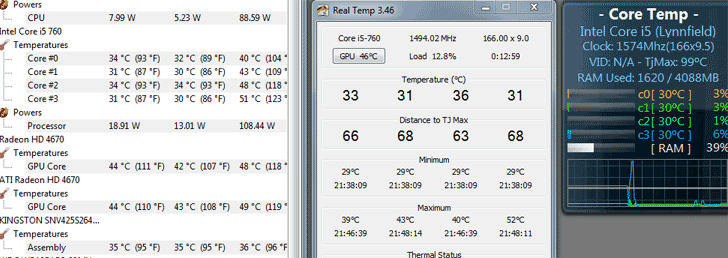
cpu_temps.png

(The window on the left is CPU-ID's Hardware Monitor.)

Although HM and RT don't report identical numbers, at least they show a variation on temps on different cores in similar proportion to each other. CoreTemp's display of identical 30° seems a bit suspect, no?
 
direct contact thermocouple

LOL. It's only funny because you might not be joking. 😱

I use CoreTemp, but I've never checked accuracy. DL'ing realtemp now.

edit: RealTemp looks pretty intense. I don't think I want to sink an hour into calibrating a temp monitoring program. Did anyone else do this?
 
Last edited:
speaking of which, is there a way to monitor temps on core unlocked ph II / athlon IIs without extra hardware/effort?

AMD Overdrive should give u core temps on the new AMD's.

edit: RealTemp looks pretty intense. I don't think I want to sink an hour into calibrating a temp monitoring program. Did anyone else do this?

No calibration needed unless u have a truely messed up sensor which some people have.
 
Try Speedfan - it allows you to quickly and selectively control the temp when running multiple applications, allowing the processing to get done faster.
 
Back
Top