Benchmark comparisons of Tri-SLI scaling on X58 1366 vs X79 2011

Grooveriding

Diamond Member
Dec 25, 2008
9,147
1,330
126
Howdy.

I wanted to do some benchmark comparisons of GTX 480 Tri-SLI clocked at 850/2000 on my i7 920 1366 platform @ 4.2 vs my new i7 3930K @ whatever I get it to. Not necessarily maximum possible overclock, but comfortable in terms of temps and what I will run daily. I am assuming 4.5 will be easy enough at a minimum. My 480 speeds put them on an equal footing with stock 580 Tri-SLi.

I am interested to see if I can replicate the pretty impressive scaling boosts seen in this [H] review comparing Bloomfield to SB http://www.hardocp.com/article/2011/05/03/nvidia_3way_sli_amd_trifire_redux/ The results were very interesting because they were seen at super high resolutions where you'd assume CPU limitation.

I have to wait on an adapter for my NH-D14 to arrive from Austria so I will be using a CM Hyper Evo for now on the 3930K. Not sure how this cooler performs, it was all I could find available for 2011, hopefully it will not be a big difference from the NH-D14's performance.

Was looking for advice on what settings I should run. I am thinking maybe I should do the benches at 1920x1200, but would also like to do some at 2560x1600. I just don't want to get too over the top because it takes a lot of time to do them all and I tend to be lazy.

For games, I want to do Crysis, Crysis 2, BF3, Skyrim, BFBC2, World of Warcraft and an older source engine game, maybe Portal 2 or L4D2, I have all the source games. Not sure if there are some others that would make more sense to use for this comparison ?

My first X79-UD5 was FUBAR in shipping and came with a noticeable crack down the PCB and I sent it back for a refund. I have a replacement coming from newegg hopefully tomorrow for the weekend, but maybe Monday since my order says it has to come from the California warehouse rather than New Jersey.

Curious if anyone thinks there are some settings or games I have not thought of to try ? Part of the reason for the purchase was I am really curious to see if I get performance improvements on the new platform in gaming.

Edit: I also think it would be a good idea to just plain wipe and reinstall windows on my current system, install drivers and the games and run the benches. I have a lot of programs that run in the background on this computer and it has been a long while since I have ever reinstalled. Likewise I will bench the X79 the same way before I start to setup Windows to my liking.
 
Last edited:

Jacky60

Golden Member
Jan 3, 2010
1,123
0
0
Howdy.

I wanted to do some benchmark comparisons of GTX 480 Tri-SLI clocked at 850/2000 on my i7 920 1366 platform @ 4.2 vs my new i7 3930K @ whatever I get it to. Not necessarily maximum possible overclock, but comfortable in terms of temps and what I will run daily. I am assuming 4.5 will be easy enough at a minimum. My 480 speeds put them on an equal footing with stock 580 Tri-SLi.

I am interested to see if I can replicate the pretty impressive scaling boosts seen in this [H] review comparing Bloomfield to SB http://www.hardocp.com/article/2011/05/03/nvidia_3way_sli_amd_trifire_redux/ The results were very interesting because they were seen at super high resolutions where you'd assume CPU limitation.


I have to wait on an adapter for my NH-D14 to arrive from Austria so I will be using a CM Hyper Evo for now on the 3930K. Not sure how this cooler performs, it was all I could find available for 2011, hopefully it will not be a big difference from the NH-D14's performance.

Was looking for advice on what settings I should run. I am thinking maybe I should do the benches at 1920x1200, but would also like to do some at 2560x1600. I just don't want to get too over the top because it takes a lot of time to do them all and I tend to be lazy.

For games, I want to do Crysis, Crysis 2, BF3, Skyrim, BFBC2, World of Warcraft and an older source engine game, maybe Portal 2 or L4D2, I have all the source games. Not sure if there are some others that would make more sense to use for this comparison ?

My first X79-UD5 was FUBAR in shipping and came with a noticeable crack down the PCB and I sent it back for a refund. I have a replacement coming from newegg hopefully tomorrow for the weekend, but maybe Monday since my order says it has to come from the California warehouse rather than New Jersey.

Curious if anyone thinks there are some settings or games I have not thought of to try ? Part of the reason for the purchase was I am really curious to see if I get performance improvements on the new platform in gaming.

Edit: I also think it would be a good idea to just plain wipe and reinstall windows on my current system, install drivers and the games and run the benches. I have a lot of programs that run in the background on this computer and it has been a long while since I have ever reinstalled. Likewise I will bench the X79 the same way before I start to setup Windows to my liking.

Hey Groove can you get a copy of arma 2? Its really CPU limited and comparison between 'my' cpu and 3930 would be amazing. You can buy it second hand in the UK for £3-4 and once patched its bug free. I know its probs a pain but its one of the few games that really (and I do mean really) tax a cpu.
 

thilanliyan

Lifer
Jun 21, 2005
12,085
2,281
126
he results were very interesting because they were seen at super high resolutions where you'd assume CPU limitation.

Wouldn't you assume a GPU limitation at super high resolutions? :confused:

Oh and thank you for doing the testing. More information is like this is always good.
 

Grooveriding

Diamond Member
Dec 25, 2008
9,147
1,330
126
Hey Groove can you get a copy of arma 2? Its really CPU limited and comparison between 'my' cpu and 3930 would be amazing. You can buy it second hand in the UK for £3-4 and once patched its bug free. I know its probs a pain but its one of the few games that really (and I do mean really) tax a cpu.

I have ARMA 2 and OA as well. I would have to come up with a consistent way to benchmark it. I don't think it has an in-game bench. That is a good one though, because it is massively dependent on CPU.

I will do that one, maybe I can find a server I can do something consistent on.
 

Jacky60

Golden Member
Jan 3, 2010
1,123
0
0
I have ARMA 2 and OA as well. I would have to come up with a consistent way to benchmark it. I don't think it has an in-game bench. That is a good one though, because it is massively dependent on CPU.

I will do that one, maybe I can find a server I can do something consistent on.

There are in game benchmarks for A2 and OA-go single player then there are benchmarks in the menu. Its a fly through with essentially the same elements each time so not nearly as demanding as when you get loads of AI in multiplayer but it is a reasonable indicator of performance. Perhaps you could do a screen grab of your video settings in-game as there are a lot of variables and draw distance in particular seems to crush frame rates. Thanks in advance dude!
 
Last edited:

boxleitnerb

Platinum Member
Nov 1, 2011
2,605
6
81
Please make absolutely sure that you are using the latest drivers and that you are not limited by the CPU or by the VRAM amount. To assume a GPU limitation is not enough, you have to test it.

If it's not scaling 100%, you're probably CPU-limited, even with your CPUs. If you only bench at 1920x1200 with 3-way SLI, SGSSAA is an absolute must to put the GPUs to work properly. Otherwise you can forget the whole thing.
 
Last edited:
Feb 19, 2009
10,457
10
76
1600p, 4xMSAA/off.

Add F1 2011, pretty demanding and CPU reliant game.
Shogun 2 (RTS) is both GPU and CPU reliant and very taxing on hardware.

That's about it, a good mix of genres.

Don't waste your time with Portal 2 or Source games, 300 vs 350 fps is pretty meaningless.
 

RussianSensation

Elite Member
Sep 5, 2003
19,458
765
126
I think you should ONLY do 2560x1600 resolution. I think it's not common for someone who has 3x GTX480s/580s to be running at a lower resolution. I don't think you should be doing 1920x1200 since your results will be ridiculous > 60 fps in every game I imagine (Unless you add Metro 2033).

It'd probably skip Portal 2 and L4D2 because those games can be maxed out on a GTX280. Also, your list doesn't have a single racing game - Dirt 3 or F1 2010/2011 would be cool. The rest of the games in your list look great (although I have a feeling Crysis, Crysis 2, BF3 will be more or less GPU limited).

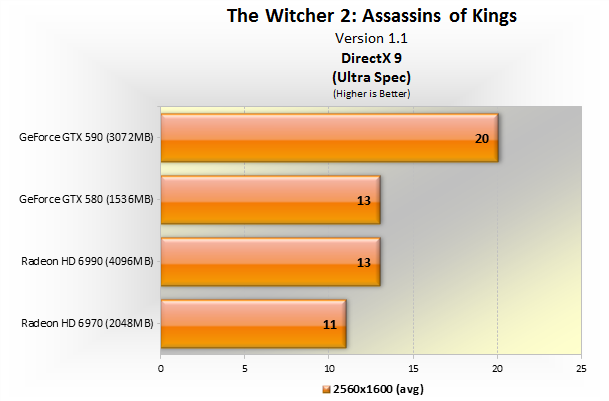
Personally, I don't think you should be running all these benchmarks with Super-Sampling because the GPU performance hit is so extreme, it's almost a foregone conclusion as to what the results would be. Just look at what happens with super-sampling in Witcher 2 at 1920x1200....Even GTX580 SLI takes a dive to 33 fps.

Games like Portal 2 and L4D2 might actually be good test-bed for Super-Sampling, but I really can't see even 3x GTX480s getting good frames in BF3, Crysis 1/2 with SSAA.
 
Last edited:

blackened23

Diamond Member
Jul 26, 2011
8,548
2
0
of the games in your list look great (although I have a feeling Crysis, Crysis 2, BF3 will be more or less GPU limited).

I don't think you should be running with Super-Sampling because the GPU performance hit is so extreme, it's almost a foregone conclusion as to what the results would be. Just look at what happens with super-sampling in Witcher 2....Even GTX580 SLI takes a dive.

Is super sampling the "uber" sampling option in witcher 2? Just curious. One dislike I have about nvidia control panel is that 1) the override image quality setting only works maybe 35% of the time, most games completely ignore it. So if you want to override an AA setting in a game , good luck because most of the time you can't unless you go into nvidia inspector, and even then it ususally doesn't work. This is different than AMD, where ccc settings always work --- and 2) There is no SSAA option in the nv control panel. Instead you get SS transparency which is not the same thing, and pretty much a joke.

I've brought this up at the geforce.com forums, hopefully nvidia will create a SSAA option in their control panel that actually works in a future release. All of that aside,

Anyway, just curious on how one gets super sampling in W2, is that the uber sampling option in the launcher?
 

RussianSensation

Elite Member
Sep 5, 2003
19,458
765
126
Is super sampling the "uber" sampling option in witcher 2? Just curious.

Yes it is. When you select Ultra quality / UberSampling in the game's menu, the developer says that it renders entire scenes numerous times in order to deliver the best possible textures, object details and anti-aliasing (i.e., SSAA).

The resulting image quality actually blurs textures imho while taking an enormous performance hit.

SSAA isn't like HDR or soft shadows or bokeh depth of field or dynamic physics. It doesn't actually add any more detail to the game, it just makes objects such as leaves on palm tress in Crysis 1 shimmer less (less aliased). Super Sampling can probably be used in older games like Doom 3 or Half Life 2 or less shader demanding games such as Portal 1/2, L4D series, but there is no way you can use it in Metro 2033, or BF3 and get 60 fps.

2560_Ultra.png


Are you really going to spend $1500 on graphics cards and play a game at 15-25 fps just to escape aliasing on textures? I think most of us would choose 50-60 fps with conventional AA modes. I really can't see more than 1% of gamers even caring for SuperSampling given the ridiculous performance hit.

13 fps on a $700 HD6990....insane.
 
Last edited:

Grooveriding

Diamond Member
Dec 25, 2008
9,147
1,330
126
I think I am going to go with only 2560x1600 out of laziness and it does seem appropriate for the setup. I felt 1920x1200 would be super-high frames, but would also allow me to see how much more the new CPU was opening up the cards.

As far as using super-sampling I'm not going to mess around with that.

I'll do these games:

Crysis
Crysis 2
BF3 - two separate benches for SP and MP, I have some ideas of how I can bench 64 player MP in a close to consistent way
BFBC2
Skyrim
Arma 2
WoW
Starcraft 2
F1 2010 - I don't have 2011, are they very different engine wise ? I have Dirt 2, but don't have Dirt 3.
Metro 2033

I'm going to run all the games on their highest possible in game settings without using mods or external ini tweaks, the exception being Starcraft 2, where I'll force 4xAA in the NV control panel. I'll actually also reduce some settings on BF3, most likely I'll use 2xMSAA and disable HBAO/SSAO for multiplayer.

I think that is about all I can handle. I have to figure out how to bench some of the games with no in-game benchmark. I'll be using FRAPS to get FPS.

I think for WoW I may do a long flight route, but I don't think that will really push it hard enough like a major city does. For Starcraft 2, I think I can use a replay of a multiplayer game ? For Skyrim, I am going to play through from after you leave that first scripted on rails intro up until you reach the first small town.

Hopefully F1 has some sort of bench. Will load it up to see. If not I guess I can just drive the same track a couple times.

Thanks for the input.
 

blackened23

Diamond Member
Jul 26, 2011
8,548
2
0
Yes it is. When you select Ultra quality / UberSampling in the game's menu, the developer says that it renders entire scenes numerous times in order to deliver the best possible textures, object details and anti-aliasing (i.e., SSAA).

The resulting image quality actually blurs textures imho while taking an enormous performance hit.

SSAA isn't like HDR or soft shadows or bokeh depth of field or dynamic physics. It doesn't actually add any more detail to the game, it just makes objects such as leaves on palm tress in Crysis 1 shimmer less (less aliased). Super Sampling can probably be used in older games like Doom 3 or Half Life 2 or less shader demanding games such as Portal 1/2, L4D series, but there is no way you can use it in Metro 2033, or BF3 and get 60 fps.
.

Ah, I see. I wasn't sure if uber sampling was SS. Yeah, mainly I like using SSAA in older games like Dead Space 1 (among others) I have a crossfire rig that lets me use SSAA in dead space and it completely eliminates jaggies and looks surprisingly good. But you're right, the performance hit is too high for modern games.
 

OVerLoRDI

Diamond Member
Jan 22, 2006
5,490
4
81
The difference might be not that impressive in any game that is vram limited. Just keep that limitation in mind when writing your conclusions.
 

Grooveriding

Diamond Member
Dec 25, 2008
9,147
1,330
126
There are in game benchmarks for A2 and OA-go single player then there are benchmarks in the menu. Its a fly through with essentially the same elements each time so not nearly as demanding as when you get loads of AI in multiplayer but it is a reasonable indicator of performance. Perhaps you could do a screen grab of your video settings in-game as there are a lot of variables and draw distance in particular seems to crush frame rates. Thanks in advance dude!

Jacky, I did the ARMA 2 benches in vanilla Arma 2 using benchmark 1 and benchmark 2. Can you give me some input as you asked earlier on my video settings ? I am getting very low results and GPU usage is quite low, it's extremely low in benchmark 2; 10% across all three cards. In benchmark 1 it's around 30-50%.

I don't want to be running the benches on settings that are not feasible. I don't play the game much and have never tweaked it, so I'm not familiar with what settings are reasonable. I did the benches using these settings:

SU7xQ.jpg


For reference I got 22FPS on Bench 1 and 13FPS on Bench 2 :eek:


Should I be using different settings, or will this give a good indication of performance ? I got the impression bench 2 was all about the CPU, but man it was performing poorly. Also, should I use the benches from OA, ARMA 2 or both ?
 
Last edited:

Grooveriding

Diamond Member
Dec 25, 2008
9,147
1,330
126
So I managed to get a few benches done. I'm going to repeat these and do the games I didn't get to with these ones once I get another motherboard in. The X79-UD5 is a pretty horrible board in its current state, whether it is by design or BIOS I don't know, but it's been a huge PITA to work with.

The board constantly gets corrupted BIOS/checksum errors and hits a MhZ wall, as well as needing copious amounts of voltage to get overclocks other boards are doing with less. Found similar reported issues from other people stuck with this turd. Going to replace it with a R4E.

Anyways, here is what I have thus far comparing an i7 920 @ 4.0 to a 3930K @ 4.4. The one major gain was BF3 Multiplayer, which is awesome as that is the one I was counting on. There are gains elsewhere, but not really needed and in some cases, no gains at all.

BF3 Singleplayer, settings used: http://i.imgur.com/n6Y1u.jpg

1V6Pt.jpg


BF3 Multiplayer, both benches were done on Caspian Border 64 player full server. I drove the same loop through the map/ongoing battle with a tank in 3rd person view from the Russian spawn area. Settings used : http://i.imgur.com/4ayYQ.jpg

69Syz.jpg


F1 2010, settings used : http://i.imgur.com/s7sX0.jpg

ep4h5.jpg


World of Warcraft, settings used : http://i.imgur.com/FpNj4.jpg

ZQvaj.jpg


Now the flipside

Metro 2033, settings used : http://i.imgur.com/eVpgn.jpg

AIZXv.jpg


Skyrim, settings used : http://i.imgur.com/gjqIY.jpg

uASHI.jpg


I was really expecting more gains in Skyrim :| Oh well.
 

nitromullet

Diamond Member
Jan 7, 2004
9,031
36
91
This is good stuff. Thanks for taking the time to do these.

Now someone needs to lend you their Z68 board and a 2500K. That's the real question for someone running an overclocked i7 920: Can I replace it with a $500 setup, or do I need to spend $1k?
 

Carfax83

Diamond Member
Nov 1, 2010
6,841
1,536
136
The board constantly gets corrupted BIOS/checksum errors and hits a MhZ wall, as well as needing copious amounts of voltage to get overclocks other boards are doing with less. Found similar reported issues from other people stuck with this turd. Going to replace it with a R4E.

I have the X58 UD5, and it has a mhz wall as well, and needs copious amounts of voltage to overclock my 920 to just 4.2ghz.. This is the last Gigabyte board I'll ever own.. I usually go with Asus, so I guess this is my punishment for being adventurous and trying something new :rolleyes:

Nice benches though. I'm deciding whether to upgrade to a 3930K set up as well, since Ivy Bridge doesn't really have much that I want. If I do get a 3930K motherboard, then getting an extra 580 would be in order I suppose.

Although Tri SLi 580 is really overkill for damn near every game at 2560x1600.
 

schneiderguy

Lifer
Jun 26, 2006
10,801
91
91
Jacky, I did the ARMA 2 benches in vanilla Arma 2 using benchmark 1 and benchmark 2. Can you give me some input as you asked earlier on my video settings ? I am getting very low results and GPU usage is quite low, it's extremely low in benchmark 2; 10% across all three cards. In benchmark 1 it's around 30-50%.

I don't want to be running the benches on settings that are not feasible. I don't play the game much and have never tweaked it, so I'm not familiar with what settings are reasonable. I did the benches using these settings:

SU7xQ.jpg


For reference I got 22FPS on Bench 1 and 13FPS on Bench 2 :eek:


Should I be using different settings, or will this give a good indication of performance ? I got the impression bench 2 was all about the CPU, but man it was performing poorly. Also, should I use the benches from OA, ARMA 2 or both ?

Turn down the view distance to something like 3000.
 

Grooveriding

Diamond Member
Dec 25, 2008
9,147
1,330
126
I have the X58 UD5, and it has a mhz wall as well, and needs copious amounts of voltage to overclock my 920 to just 4.2ghz.. This is the last Gigabyte board I'll ever own.. I usually go with Asus, so I guess this is my punishment for being adventurous and trying something new :rolleyes:

Nice benches though. I'm deciding whether to upgrade to a 3930K set up as well, since Ivy Bridge doesn't really have much that I want. If I do get a 3930K motherboard, then getting an extra 580 would be in order I suppose.

Although Tri SLi 580 is really overkill for damn near every game at 2560x1600.

I went with the X79-UD5 because I had a X58-UD5 that was amazing, this X79 version is just awful though. I am trying to get newegg to do a refund for credit/exchange for a R4E and pay the difference.

Haven't dealt with newegg much, but I have heard they have good service, so hopefully they will allow it.
 

ArchAngel777

Diamond Member
Dec 24, 2000
5,223
61
91
BF3 Multiplayer results are unreliable. Not because of anything you did, just because the numerious variables. You'd have to run each one several times (thinking 10 each for a start) back and forth before I'd give that kind of delta any stock. It would be interesting to see just how variable the 10 runs would be.
 

Grooveriding

Diamond Member
Dec 25, 2008
9,147
1,330
126
BF3 Multiplayer results are unreliable. Not because of anything you did, just because the numerious variables. You'd have to run each one several times (thinking 10 each for a start) back and forth before I'd give that kind of delta any stock. It would be interesting to see just how variable the 10 runs would be.

I felt the same way and went out of my way to try to get it to a state where it was as near to repeatable as possible.

I repeated the bench 5+ times on my i7 920 and 3 times on my 3930K. I have Fraps records from them all. Every time I made sure the server was full or near full (55+ players) I also start the bench at the start of a fresh round to eliminate differences to the calculated physics or terrain that has been destroyed. I find just being on a server with a 64 player count causes strain.

Fortunately I was able to sort of do these with ease as I run a 64 player BF3 server that is highly populated and always full, so I could change or repeat the map when I wanted to do a bench ():)

I did not compile all the runs and then average them for each CPU, but each run was the same followed loop, camera angle and length of time. Again, with the same player count, map, start/end location etc.

It's impossible to get a completely unhampered bench, but I did go out of my way to try. Subjectively I also know there is a difference as the gameplay is smooth now, whereas before it was erratic and jerky at times on a big server.

I did my best! I was pretty confident going in that there would be some good gains on 64 player BF3. On my i7 920, just playing on a 32 player server would give me much better performance - same map and game mode. 64 player BF3 is very CPU intensive.
 

ArchAngel777

Diamond Member
Dec 24, 2000
5,223
61
91
I felt the same way and went out of my way to try to get it to a state where it was as near to repeatable as possible.

I repeated the bench 5+ times on my i7 920 and 3 times on my 3930K. I have Fraps records from them all. Every time I made sure the server was full or near full (55+ players) I also start the bench at the start of a fresh round to eliminate differences to the calculated physics or terrain that has been destroyed. I find just being on a server with a 64 player count causes strain.

Fortunately I was able to sort of do these with ease as I run a 64 player BF3 server that is highly populated and always full, so I could change or repeat the map when I wanted to do a bench ():)

I did not compile all the runs and then average them for each CPU, but each run was the same followed loop, camera angle and length of time. Again, with the same player count, map, start/end location etc.

It's impossible to get a completely unhampered bench, but I did go out of my way to try. Subjectively I also know there is a difference as the gameplay is smooth now, whereas before it was erratic and jerky at times on a big server.

I did my best! I was pretty confident going in that there would be some good gains on 64 player BF3. On my i7 920, just playing on a 32 player server would give me much better performance - same map and game mode. 64 player BF3 is very CPU intensive.


Interesting. Does BF3 use more than 4 cores? I have not really tested it. Curious to know if IPC is the reason, or possibly using more cores. I believe the IPC of SB-E over Bloomfield was around 10-15%, depending on the application. Assuming 15%, and adjusting for the clock speed difference, I could see a 26% perfomance gain from Bloomfield 4Ghz to SB-E 4.4Ghz assume 4+4... The extra two cores would further enhance this, if something were to take advantage of it.
 

RussianSensation

Elite Member
Sep 5, 2003
19,458
765
126
Some nice gains in WOW, F1 2010 and BF3 multiplayer. Since you play BF3 a lot, I think the upgrade was worth it for you. It would be interesting to see how a 2500k / 2600k / 2700k @ 4.5ghz did in the same benches. I think the 2500k-2700k system may actually be better for 1-2 GPUs since those CPUs can clock to 4.7-5.0ghz in some instances. For 3 GPUs, the X79 platform is better due to the ability to use 3 GPUs and PCIe SSD drives, PCIe sound card, etc.

I still expect as soon as IVB launches that X79 platform will once again become more suitable for workstation use. I can't really see a gamer choosing a 3930/3960 @ 4.5-4.6ghz over an IVB that will likely shoot past 5.2ghz and have about a 6% IPC gain over SB.

Nice work!