• We’re currently investigating an issue related to the forum theme and styling that is impacting page layout and visual formatting. The problem has been identified, and we are actively working on a resolution. There is no impact to user data or functionality, this is strictly a front-end display issue. We’ll post an update once the fix has been deployed. Thanks for your patience while we get this sorted.

Question ASUS WS x570 ACE unbearable pch fan noise

damenmofa

Junior Member
I just recently upgraded my hardware and got me one of these x570 boards (which might have been a mistake as it turns out).

The high pitched noise coming from the chipset fan is very annoying and it is pretty much always on, even in bios with a reported motherboard temperature of 27°C i saw it do as much as 2000rpm.

The BIOS (latest version) does not have any option to control this thing nor can i control it via AI suite 3.

What are my option aside from returning it? I have read about BIOS mods or physical mods but i have no idea where i would even start and i cannot find any reports of this specific board.

Any ideas would be greatly appreciated.
 
Last edited:
If you don't want to return it, (best option IMO), then open a support ticket with MSI. Odds are they will want to send you a replacement motherboard though. While I don't have a MSI board, I do have an Asrock x570, and my chipset fan is silent. It concerned me so I turned the speed up to the max speed. To my surprize, it was still silent, so I opened my case so I could put my ear near the fan. It was still nearly silent.
 
Yeah. This is one of the reasons I didnt want a x570 board. From what I understand, the MSI chipset fans are supposed to only come on when they are needed so either your cooling is bad or the chipset fan is bad. I would do an RMA maybe. I run a silent or close to silent system myself so...that would be an issue for me too.
 
Last edited:
In that case, Asus chipset fans do stay on 24/7 from what ive read. They havnt figured that out yet. And if you have to RMA, GL with Asus.
 
Eh, ASUS isn't that bad. I once got a replacement board in under 3 months one time.

'course the replacement board was no better but lessons learned y'know
 
return not rma and purchase a new board, it shouldn't be making so much noise, a mod would work but im not sure about clearance with your gfx etc. (i used to love modding my 939 dfi boards that had chipset fans to large heatsinks with no moving parts. nowdays not so much into modding my heatsinks 😛
 
return not rma and purchase a new board, it shouldn't be making so much noise, a mod would work but im not sure about clearance with your gfx etc. (i used to love modding my 939 dfi boards that had chipset fans to large heatsinks with no moving parts. nowdays not so much into modding my heatsinks 😛
Entered thread to make the same comment. We just replaced the fans with big, passive, heatsinks, and that was that. Artic Silver adhesive was something I always kept on hand.
 
I manned up and jammed it, have yet to see the temperatures go over 30°C while using Photoshop or Blender
I might remove it entirely if the temperature stays like this until they add some sort of pch fan control to the bios
I also moved the GPU to the second slot so that might contribute to the low temperatures
 
Last edited:
I manned up and jammed it, have yet to see the temperatures go over 30°C while using Photoshop or Blender
I might remove it entirely if the temperature stays like this until they add some sort of pch fan control to the bios
I also moved the GPU to the second slot so that might contribute to the low temperatures
that was my first thought to jam a straw in it but there was no way i was going to suggest that. i suppose if the temps ever go up you can worry about modding / replacing the fan or pointing a clip on 120mm fan in its direction. 30C is great, but we are still in the winter months here 🙂
 
I have not, but I have seen it done to x570. For example: Thermalright still makes chipset heatsinks Link
Depending on which graphics card/s are used, one of those would get the job done.

I actually didn't realize they were still selling those. Thanks for the link!

I'm wondering what you would put that HR22 heatsink on - looks more like a CPU cooler than a chipset fan...

EDIT: I guess it is actually an ITX CPU heatsink.
 
A little update:
I managed to unlplug the fan by removing the heatsink which is screwed onto the mainboard from the backside. The plastic grille that covers the sink is very cheap and fragile and the small pins that held it in place broke by merely lifting it. The fan is only plugged into the mainboard and not glued. I replaced the paste and screwed the sink back onto the board. Temperature remain the same.
 
The PCH fan of the Pro WS X570 ACE is indeed really annoying.
As some have done, I have also removed the fan. I kept the plastic shroud off, as this will allow more air to just move over the pretty wimpy heatsink.


Even a cute Zalman chipset heatsink would do better, but I don't seem to have issues with the thermals as it is, so for now the stock heat sink without the fan will do.
 
I also tried to remove the plastic grille.. A few points to consider:

1. Any permanent modifications to the motherboard may result in voiding your warranty.
2. The plastic grille is attached to the heatsink using three small screws, which can be only accessed from the rear.
3. Avoid pulling at the plastic grille! It can be removed safely once you unscrew the whole piece (heatsink + plastic grille + the fan is one piece).
 
I just recently upgraded my hardware and got me one of these x570 boards (which might have been a mistake as it turns out).

The high pitched noise coming from the chipset fan is very annoying and it is pretty much always on, even in bios with a reported motherboard temperature of 27°C i saw it do as much as 2000rpm.

The BIOS (latest version) does not have any option to control this thing nor can i control it via AI suite 3.

What are my option aside from returning it? I have read about BIOS mods or physical mods but i have no idea where i would even start and i cannot find any reports of this specific board.

Any ideas would be greatly appreciated.

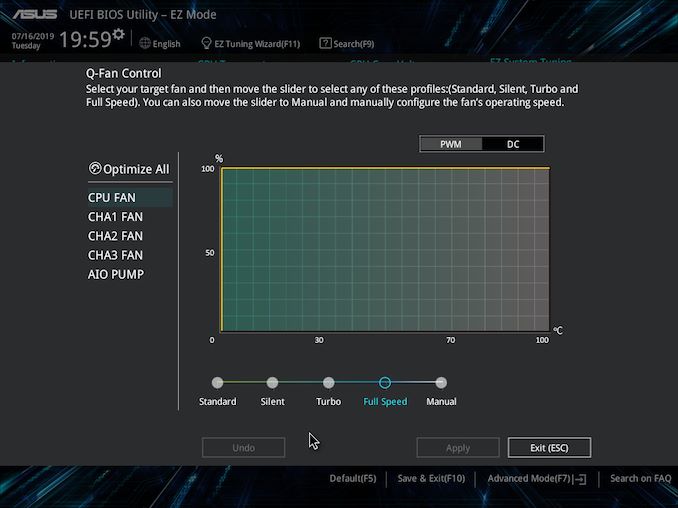
190716195916_575px.jpg


Can't you adjust the speed in the qfan control? Set it to manual and just have it kick on a certain temps?


oops scratch that. I see it doesn't list the PCH fan


That sucks.
 
It is what it is..

The PCH fan is needed when the chip is under significant IO load from all the peripherals that can be connected to it (third PCI-E slot, M.2 and U.2 drives, a few other peripherals).
If you're not using any of that, then it should be safe to disable it physically. The manufacturer has to put it there, to ensure safe operation under any IO scenarios.

In my case, the PCH fan would pull in warm air from the GPU radiator, heating the chipset a bit instead of cooling it. Fun stuff.

In the long run, I would consider periodic temperature checks, especially when adding new hardware which may use the chipset PCI-E lanes.
 
Peak temperature 33°C so far
Why is that fan there in the first place

If you're running PCIe 4.0 devices in a case with poor airflow, it could get kinda hot. Otherwise, meh. Asus is a bit stupid not to implement fan controls in their UEFI. MSI had fan controls from the start, and Gigabyte patched them in not long after product launch.
 
I have a similar problem with an Asus X570-P Prime motherboard. What are the chances that Asus would add PCH fan control in a future uefi update?
 
I have a similar problem with an Asus X570-P Prime motherboard. What are the chances that Asus would add PCH fan control in a future uefi update?

If they haven't done so by now, I would not be confident, though if you can find a community thread somewhere where Asus reps are active, you might be able to request the feature. OCN had a Gigabyte rep in their Aorus megathread, and people requested PCH fan controls there (and go them!).
 
The easiest solution so far has been to simply remove the shroud and cheap fan, and put a Noctua NF-A4x10 FLX on the stock PCH heatsink. Running inaudibly, environment temp is 20C, the results are:

PCH idle temp is around 54C and with Furmark running (GTX980ti SC, 102% TDP) max PCH temp is now no more than 80C.

 
Last edited:
Back
Top