


- Feb 14, 2021
- 2
- 0
- 6
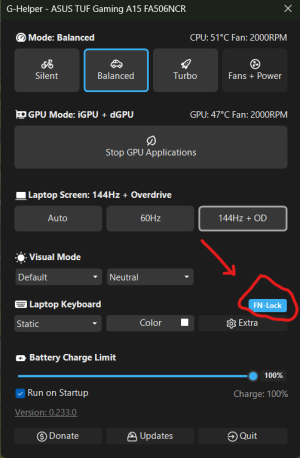
I have tried Fn + Esc and Fn + Caps but both do not work.
I have found the "Asus keyboard hotkeys" in Windows search but it's just showing me a message. Also I did a Windows search for MyAsus, there's no option to switch between Fn functionality.
I'm really out of ideas of how to solve, I can't play games properly without having to always have the Fn pressed.
I have found the "Asus keyboard hotkeys" in Windows search but it's just showing me a message. Also I did a Windows search for MyAsus, there's no option to switch between Fn functionality.
I'm really out of ideas of how to solve, I can't play games properly without having to always have the Fn pressed.





 Facebook
 Twitter