

I'm having issues with my new video card and I think it may be a problem with the motherboard.
I initially thought the video card might be defective, but after taking it out and trying it in a different system, I discovered that the card itself was not defective at all.
According to most reviews and benchmarks, this card (Gigabyte GTX 670) should score around 8000-9000 on 3DMark11 Performance preset. However, when I run the Performance benchmark, I only get a score of around 2000-3000.
Additionally, Unigine Heaven 3.0 on moderate settings only runs at around 20-30fps... this card should be getting 70+ fps in that program.
I've also been experiencing framerate drops and freezing/stuttering issues in Diablo 3, Skyrim, and Crysis 2. They will run at 50-60fps most of the time, but every now and then the sound will start clicking and the game will drop down to 2-3fps.
PC Parts:
CPU: Intel i5-3570K @ 3.4GHz
Motherboard: Asus P8Z77-V PRO
GPU: Gigabyte GeForce GTX 670 OC Windforce 3X
RAM: 12GB Corsair Vengeance DDR3-1600MHz
PSU: Corsair TX750M 750W
SSD: OCZ Vertex 3 90GB
HDD: Seagate Barracuda 1TB 7200rpm
I have reinstalled Windows.
I have updated to the latest nVidia drivers (301.42 WHQL).
I have updated my motherboard BIOS to the latest revision (Rev. 1015)
The card is in a PCIe 3.0 x16 slot.
The card runs at 1175MHz during benchmarks and games.
Temperature hovers around 50 degrees Celsius.
Power usage maxes out around 70%.
In the nVidia control panel, all settings are on Default; Ambient Occlusion is turned off, Power management mode is set to 'Prefer Maximum Performance' instead of 'Adaptive'.
Screenshot of benchmark + Afterburner + GPU-Z:
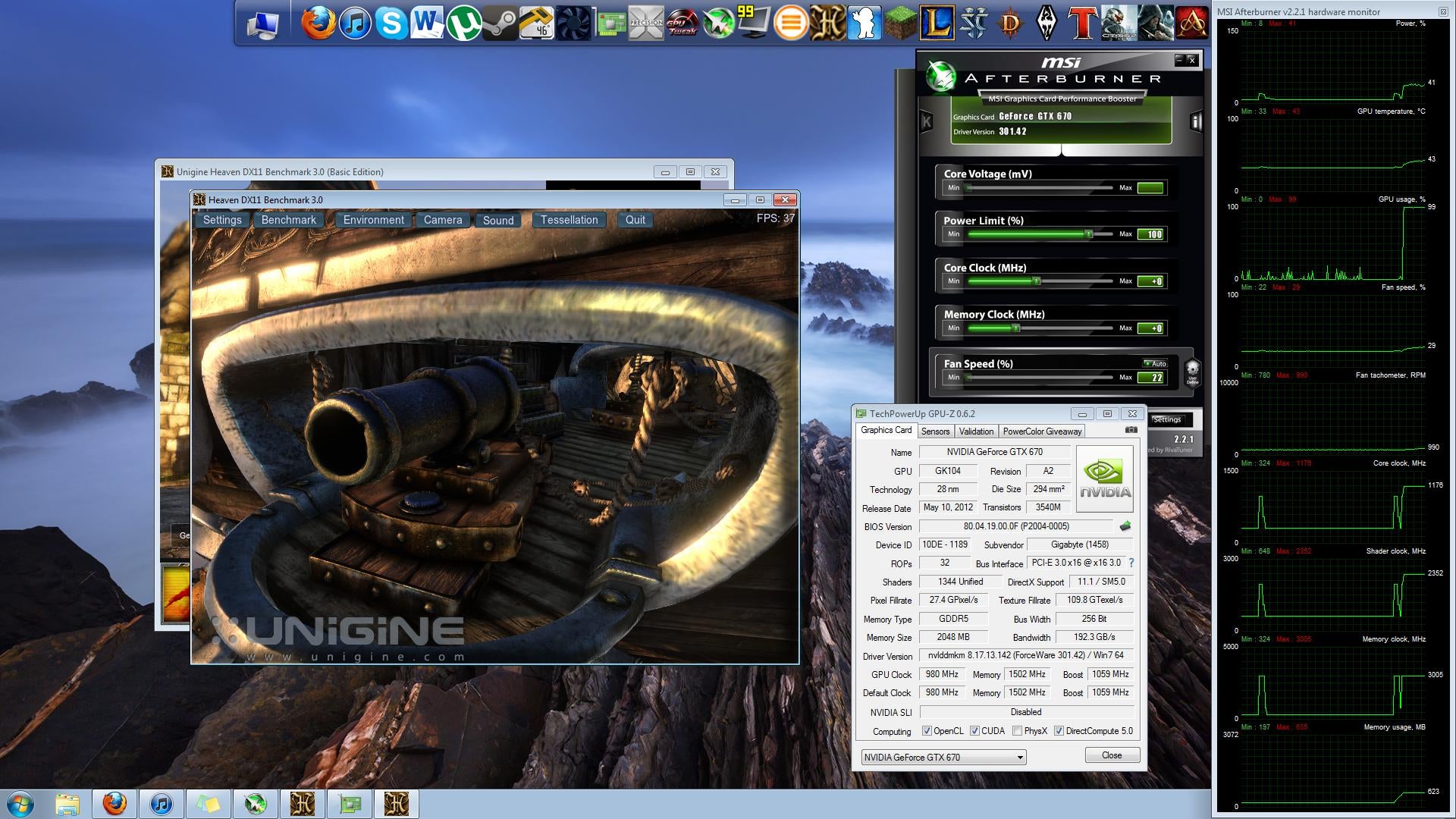
Any help is appreciated!
I initially thought the video card might be defective, but after taking it out and trying it in a different system, I discovered that the card itself was not defective at all.
According to most reviews and benchmarks, this card (Gigabyte GTX 670) should score around 8000-9000 on 3DMark11 Performance preset. However, when I run the Performance benchmark, I only get a score of around 2000-3000.
Additionally, Unigine Heaven 3.0 on moderate settings only runs at around 20-30fps... this card should be getting 70+ fps in that program.
I've also been experiencing framerate drops and freezing/stuttering issues in Diablo 3, Skyrim, and Crysis 2. They will run at 50-60fps most of the time, but every now and then the sound will start clicking and the game will drop down to 2-3fps.
PC Parts:
CPU: Intel i5-3570K @ 3.4GHz
Motherboard: Asus P8Z77-V PRO
GPU: Gigabyte GeForce GTX 670 OC Windforce 3X
RAM: 12GB Corsair Vengeance DDR3-1600MHz
PSU: Corsair TX750M 750W
SSD: OCZ Vertex 3 90GB
HDD: Seagate Barracuda 1TB 7200rpm
I have reinstalled Windows.
I have updated to the latest nVidia drivers (301.42 WHQL).
I have updated my motherboard BIOS to the latest revision (Rev. 1015)
The card is in a PCIe 3.0 x16 slot.
The card runs at 1175MHz during benchmarks and games.
Temperature hovers around 50 degrees Celsius.
Power usage maxes out around 70%.
In the nVidia control panel, all settings are on Default; Ambient Occlusion is turned off, Power management mode is set to 'Prefer Maximum Performance' instead of 'Adaptive'.
Screenshot of benchmark + Afterburner + GPU-Z:
Any help is appreciated!



 Facebook
 Twitter