
I'm having some trouble updating the bios.
I'm currently running P3.40 version, which needs P3.50 version installed, before updating to the latest version.
I am on this page from ASRock - https://www.asrock.com/mb/AMD/X370 Killer SLI/index.asp#BIOS
And I've downloaded the 3.50 Instant Flash Bios File. I've put in on a USB Drive that I've formatted as Fat32. I have it in both the .zip and unzipped on the flash drive and I'm not getting any hits when I click on "instant flash" within the bios.
Any suggestions to help flash? When I click on the 'internet flash'.. the system tells me that there are no available updates to be made...
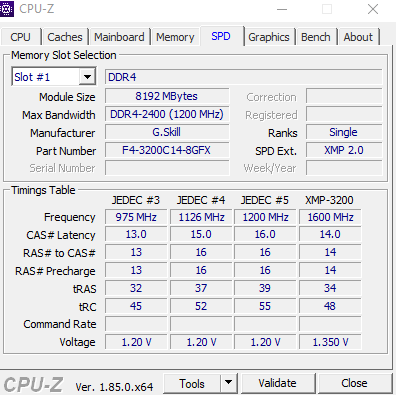
Please help me decipher this - am I only currently running at 931mhz? Or should I be multiplying this by 3 or 4 for the total true speed? Clocks and voltage way off? If I set to XMP2 the system will crash upon booting up - even if selecting the 2933mhz setting.

I'm currently running P3.40 version, which needs P3.50 version installed, before updating to the latest version.
I am on this page from ASRock - https://www.asrock.com/mb/AMD/X370 Killer SLI/index.asp#BIOS
And I've downloaded the 3.50 Instant Flash Bios File. I've put in on a USB Drive that I've formatted as Fat32. I have it in both the .zip and unzipped on the flash drive and I'm not getting any hits when I click on "instant flash" within the bios.
Any suggestions to help flash? When I click on the 'internet flash'.. the system tells me that there are no available updates to be made...
Please help me decipher this - am I only currently running at 931mhz? Or should I be multiplying this by 3 or 4 for the total true speed? Clocks and voltage way off? If I set to XMP2 the system will crash upon booting up - even if selecting the 2933mhz setting.


