
-
We’re currently investigating an issue related to the forum theme and styling that is impacting page layout and visual formatting. The problem has been identified, and we are actively working on a resolution. There is no impact to user data or functionality, this is strictly a front-end display issue. We’ll post an update once the fix has been deployed. Thanks for your patience while we get this sorted.
You are using an out of date browser. It may not display this or other websites correctly.
You should upgrade or use an alternative browser.
You should upgrade or use an alternative browser.
Anyone here moved from XP -> Win7?
- Thread starter Ns1
- Start date


postmortemIA
Diamond Member
My thoughts, do dual boot. There's no reason to not use Win XP anymore.

lxskllr
No Lifer
My thoughts, do dual boot. There's no reason to not use Win XP anymore.
Well, except for the wasted drive space, inferior hardware support, and inferior security ;^)

Red Squirrel
No Lifer
I'm happy with XP but I might upgrade to 7 eventually, or maybe even ubuntu. I can't decide. Either way i have to learn a whole new interface and find apps that will work so if I want to jump to linux it seems like a good time once I decide I need a change.

dualsmp
Golden Member
I've been dual booting with XP and Win7, and I'm usually using XP a little more and still testing Win7 out. So far the performance of Win7 is pretty comparable to XP. If you have 2 GB of ram and a decent video card that can run Aero then Win7 runs smooth. I'm using Win7 on an old P4 3.0GHz and it runs fine, however my video card is fairly powerful which rates a 7.0 under the Windows 7 benchmark. I'm using a Radeon HD 3850 which is about as fast as there is for AGP.


Kyanzes
Golden Member
Well, I bought a W7 Pro 64 bit for like $30 through univ. I couldn't resist for that price. Anyways, I had no problems except for Avira which just wouldn't work. Aside from that, not a problem. Well, obvious first step for me was to turn off UAC.
You can also download an XP for the PRO version. It runs inside of the good old MS virtual machine.
You can also download an XP for the PRO version. It runs inside of the good old MS virtual machine.


Capt Caveman
Lifer
Currently in process. Reinstalling drivers now.

shortylickens
No Lifer
I just did it a few months ago. I was not super impressed. Lost use of many of my favorite programs. The cute little bonus features like fancy windows and taskbars didnt make the switch any better.
But, I didnt feel like going back to WinXP and reinstalling all my old programs again.
My gaming machine will not get it until I see some games I like which require a 64 bit OS and Direct X 10.
But, I didnt feel like going back to WinXP and reinstalling all my old programs again.
My gaming machine will not get it until I see some games I like which require a 64 bit OS and Direct X 10.
Capt Caveman
Lifer
Update - I thought I resolved an issue but still have it. I'm not able to boot my system without the Win 7 DVD.
Keep getting the below message:
"Windows could not start because the following file is missing or corrupt:
C:\Windows\system32\ntoskrnl.exe. Please re-install a copy of the above file. "
Seems like a lot of people get this. I've tried a couple of workarounds without any success. Try again tomorrow.
Keep getting the below message:
"Windows could not start because the following file is missing or corrupt:
C:\Windows\system32\ntoskrnl.exe. Please re-install a copy of the above file. "
Seems like a lot of people get this. I've tried a couple of workarounds without any success. Try again tomorrow.

Thor86
Diamond Member
Update - I thought I resolved an issue but still have it. I'm not able to boot my system without the Win 7 DVD.
Keep getting the below message:
"Windows could not start because the following file is missing or corrupt:
C:\Windows\system32\ntoskrnl.exe. Please re-install a copy of the above file. "
Seems like a lot of people get this. I've tried a couple of workarounds without any success. Try again tomorrow.
Looks like you have disk sub-system issues.

GaryJohnson
Senior member
My thoughts:
Backup all data.
Install Win7.
Even MS says to do it that way:
http://windows.microsoft.com/en-US/windows7/help/upgrading-from-windows-xp-to-windows-7What you need: An external hard disk. You'll need to move your files off of your PC before you install Windows 7.
Or, I would recommend: buy a new internal HDD and an external USB enclosure. Move your existing drive to the enclosure and put the new drive in its place in the system. Install W7 to the new drive.
Soundmanred
Lifer
Update - I thought I resolved an issue but still have it. I'm not able to boot my system without the Win 7 DVD.
Keep getting the below message:
"Windows could not start because the following file is missing or corrupt:
C:\Windows\system32\ntoskrnl.exe. Please re-install a copy of the above file. "
Seems like a lot of people get this. I've tried a couple of workarounds without any success. Try again tomorrow.
I had the same problem. The problem turned out to be that it installed parts to another internal HD and still kept XP files and it just gets confused.
I unplugged all the drives except the one I wanted to install to and reinstalled Win 7.

Microsoft allows using the less expensive upgrade from XP to Win 7, but it is Not in-place installation like it is from Vista.
When upgrading from Win XP you cannot keep the Applications and Data directly to the installation of Win 7.
You can use this process. Make a virtual backup of Win XP, http://technet.microsoft.com/en-us/sysinternals/ee656415.aspx
Store the VHD file elsewhere.
Install Win 7 and let it wipe the Win XP.
You can mount the saves VHD file as a virtual drive on Win 7.

You can copy your data files, and applications that do not rely heavy on the registry,
Other applications need to be reinstalled from the original CD/DVD.
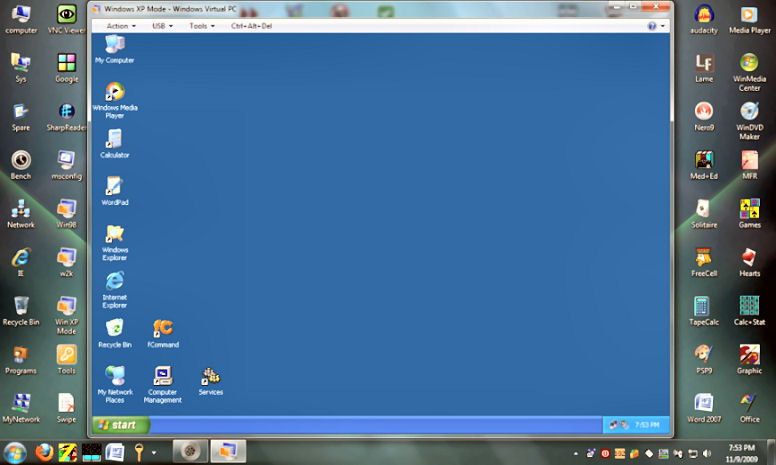
If you want to Run an XP computer too you can download the free WinXP Mode and use it seamless with win 7.
http://www.microsoft.com/windows/virtual-pc/download.aspx
After installation, the XP mode would present a clean virtual computer with activated Win XP SP3.
You can use the VHD file that was save before to copy whatever is possible to the new Win XP.
.
When upgrading from Win XP you cannot keep the Applications and Data directly to the installation of Win 7.
You can use this process. Make a virtual backup of Win XP, http://technet.microsoft.com/en-us/sysinternals/ee656415.aspx
Store the VHD file elsewhere.
Install Win 7 and let it wipe the Win XP.
You can mount the saves VHD file as a virtual drive on Win 7.
You can copy your data files, and applications that do not rely heavy on the registry,
Other applications need to be reinstalled from the original CD/DVD.
If you want to Run an XP computer too you can download the free WinXP Mode and use it seamless with win 7.
http://www.microsoft.com/windows/virtual-pc/download.aspx
After installation, the XP mode would present a clean virtual computer with activated Win XP SP3.
You can use the VHD file that was save before to copy whatever is possible to the new Win XP.
.

Marinski
Golden Member
i just switched to Windows 7 from XP last week and its nice. I got the 32 bit version professional. I dont have the greatest hardware, 2 gb ram, celeron 430, basic Intel board w/ onboard video, older hard drives and it runs pretty smooth for basic computing tasks. Well see how it is when I start doing more with it but as of right now its pretty good, better than XP.
Capt Caveman
Lifer
I had the same problem. The problem turned out to be that it installed parts to another internal HD and still kept XP files and it just gets confused.
I unplugged all the drives except the one I wanted to install to and reinstalled Win 7.
Thanks! That was the issue. I could have sworn that I didn't have any other drives connected when I did the initial install.

Spydermag68
Platinum Member
I just moved from XP Pro to W7 Pro 64-bit.
So far so good. W7 upgrade so I had to install twice on the new hard drive.
So far so good. W7 upgrade so I had to install twice on the new hard drive.
TRENDING THREADS
-
 Discussion Zen 5 Speculation (EPYC Turin and Strix Point/Granite Ridge - Ryzen 9000)
- Started by DisEnchantment
- Replies: 25K
-
Discussion Intel Meteor, Arrow, Lunar & Panther Lakes + WCL Discussion Threads
- Started by Tigerick
- Replies: 25K
-
 Discussion Intel current and future Lakes & Rapids thread
- Started by TheF34RChannel
- Replies: 24K
-

-
