• We’re currently investigating an issue related to the forum theme and styling that is impacting page layout and visual formatting. The problem has been identified, and we are actively working on a resolution. There is no impact to user data or functionality, this is strictly a front-end display issue. We’ll post an update once the fix has been deployed. Thanks for your patience while we get this sorted.

Question any chance to recover this old drive?

luv2liv

Diamond Member
it was working fine a month ago. now Windows want to format it whenever i insert the usb drive. i tried another USB adapter and still the same result...
is there any way to recover some data off it?
i see some people recommend using Linux and DD the bad drive A to another drive B. then insert B back into Windows to copy whatever data that's needed. will try this very soon....

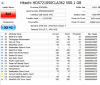
Crystal Disk Info shows:
1662124366158.png
 
I use testdisk to do copies of dying drives and recover data. It takes awhile to do because it's going to scan each sector to recover data but, it manages to do a good job.

Since it's only 500GB do you have room on your system drive to just keep the data there for the time being?
Do you need this data to be portable?

You can get SSD speeds from USB drives like the SanDisk Extreme Pro which can hit ~400MB/s and be bootable. You can get a 1TB NVME for $100 or less these days which would be 5X faster and more reliable due to no moving parts.
 
I use testdisk to do copies of dying drives and recover data. It takes awhile to do because it's going to scan each sector to recover data but, it manages to do a good job.

Since it's only 500GB do you have room on your system drive to just keep the data there for the time being?
Do you need this data to be portable?

You can get SSD speeds from USB drives like the SanDisk Extreme Pro which can hit ~400MB/s and be bootable. You can get a 1TB NVME for $100 or less these days which would be 5X faster and more reliable due to no moving parts.
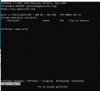
trying your TD now. so far, not good....
it is doing a Quick Search for the past 30 minutes

1662140153410.png
 
Hmm, it leaves you with trying Linux to see what's possible. TD worked for most instances when needed. It's possible it's completely toasted though as well.
 
Looks like you need to submit it to a recovery service.

I would go with one of the four WD approves for their warranty.

Drivesavers
Ontrack
Securedatarecovery
And one other.
 
yeah, i think my drive is done.
tried it with DDrescue in Linux but the drive keeps disconnecting itself or something. will have to send to a recovery service you recommended. thanks!
 
HDD regenerator. You would be surprised at what it can do.

Once HDDregen shows it has "fixed" all bad sectors, run GetDataBack on the hdd.
 
Depending on the exact failure mode, putting the drive in the freezer might work. Double bag it in freezer bags, and put it in the freezer for at least 24hr. Plug it up to the computer, and hope for the best. You can optionally pack it in ice for the recovery attempt to keep it cold. It's worked for me. I think the theory is the cold frees seized bearings/bushings. I'd consider this a last ditch attempt at a free solution, and the drive will be done if/when the process is completed. IOW, you get one chance to do it, so if it fails the first time, or you're impatient with the process, you likely won't get a retry.
 
One thing to look into, if you want to recover data yourself. If this is an external drive, depending on how the USB bridge is made, you could shuck it and then use a direct SATA connection. Direct SATA connections are better. Problem with some external drives though, is that USB enclosure attaches itself in a non standard way the internal drive, and there aren't actually regular SATA data and SATA power connections on the drive. So do your research before busting the enclosure open.

Now, if the drive is an internal drive connected with a USB adapter, don't do that. Plug in the drive with a direct SATA connection.

In general though, the more you try to read it, the worse it can get, so if you really need the data, send it to professional data recovery before it gets too bad.
 
Back
Top