Well, if you get a SN850 and have a Gen4 slot for it then yo don't really need to worry about this cache drive option. The SN850 flies as do most drives in the same class. I'm running them on both my laptop and server. The only bottleneck would be the SW itself in how it functions with the CPU / RAM.
The benchmarks are one thing but real world performance is different. Not all systems or tasks will push drives to the max performance levels. On my server I originally put 2 SN850's in it to do a Raid 1 for backup but, since changed the backup to point to the Raid array instead and stole one to put into the laptop.
The most I've seen the disk consume for bandwidth outside of testing is somewhere around the 1GB/s mark during a game cache. Compared to the 9750H laptop and the new 12700H the load time is drastically cut in time. Now if it's the CPU or the GPU influencing this it's a toss up. The 9750 used a GTX1650 and the new one is a RTX3060. Both had 32GB of RAM in them so, I'm more inclined to say it's the CPU making the difference since the CS3030 drive was what I was using as the primary before and I could hit copy speeds with that at 1.5GB/s between drives.
I think speed is going to be more dependent on the overall mix of components rather than the drive itself. Caching makes more sense in a server where you're doing a lot of transactional data processing like a DB.
I use mine with 100GB allocated to W11 and then use the rest for storage in a separate partition of the remaining space. I have the 2nd drive as a storage backup of the primary storage space locally if I need to wipe the primary and reinstall the OS to copy things back.
The big sell on 1TB drives though is they tend to run faster and have better TBW wear assigned to them than their lower capacity models. Most TB or higher drives also come with a better warranty of 5 years vs 1-3 with the lower options. Similar to the SMR-gate issue observed with HDD's recently the likely hood of fishy specs / performance with higher end drives is less. With the SMR issue anything under 8TB seemed the likely target of companies to skimp on using CMR which has better write speeds.
Anyway... here's a 15GB folder of mixed files moving from one drive to the other
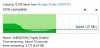
Once the cache runs out or the copy runs into smaller files you see a dip in the speeds. This happens with any drive though. It still only took ~15 seconds to move them from one location to another. Now the move from one of these drives back to a HDD would be significantly slower in comparison as SATA maxes out at ~200MB/s due to it being 6gbps on the interface and the controller + platters. Now a SATA SSD would see a max of ~500MB/s which is 1/2 the speed of the NVME's.
Different tiers of storage have different performance when it comes to real world application of data.


 Discussion Zen 5 Speculation (EPYC Turin and Strix Point/Granite Ridge - Ryzen 9000)
 Discussion Intel current and future Lakes & Rapids thread
