
• We’re currently investigating an issue related to the forum theme and styling that is impacting page layout and visual formatting. The problem has been identified, and we are actively working on a resolution. There is no impact to user data or functionality, this is strictly a front-end display issue. We’ll post an update once the fix has been deployed. Thanks for your patience while we get this sorted.

Question AdGuard Home Setup is this correct?

pete6032

Diamond Member
I installed AdGuardHome (AGH) on a raspberry pi. I then connected the pi to my router and gave the Pi a static IP of 192.168.0.241. AGH is telling me to complete setup I need to set my router to use the Pi as the DNS (I think?). The instructions were very vague but it told me to go into my router's DHCP settings and use the Pi's IP address. Is this correct? The Default Gateway field was already populated so I put the Pi's IP in the Primary DNS field.
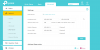
1645310944187.png
 
Last edited:
Correct. Just add Google DNS 8.8.8.8 as secondary DNS.

In case your Pi is down for a long time, devices on your LAN can still use 8.8.8.8 as DNS.

==

DHCP pool should not include static IP addresses. Make DHCP ending IP address 192.168.0.240
 
Last edited:
Back
Top