• We’re currently investigating an issue related to the forum theme and styling that is impacting page layout and visual formatting. The problem has been identified, and we are actively working on a resolution. There is no impact to user data or functionality, this is strictly a front-end display issue. We’ll post an update once the fix has been deployed. Thanks for your patience while we get this sorted.

9500GT fried

shywho

Junior Member
I bought a new 9500GT card and loaded the 197.13 WHQL Driver. The card worked fine for a couple of hours. I then loaded the 195.36.15 Linux Binary Driver and the card fried up.

Anyone seen this before?
Any suggestions or thoughts on what might be the problem?
 
Last edited:
I don't see how a driver could fry a video card. Are you sure it is "fried"? Have you tried uninstalling the drivers and reinstalling the original drivers? Have you completely uninstalled the device from the system? Have you tried installing the video card in another system? It could be coincidence, too. Besides, drivers lie between the operating system and the hardware. I would go as far to say it is middleware... a translator. You didn't do anything to the card's BIOS did you?

What are your system specifications (software and hardware)?
 
I don't see how a driver could fry a video card. Are you sure it is "fried"? Have you tried uninstalling the drivers and reinstalling the original drivers? Have you completely uninstalled the device from the system? Have you tried installing the video card in another system? It could be coincidence, too. Besides, drivers lie between the operating system and the hardware. I would go as far to say it is middleware... a translator. You didn't do anything to the card's BIOS did you?

What are your system specifications (software and hardware)?

Guess you missed nvidia pulling 196.75 drivers for killing cards with custom fans...

Either OP got a bad card and putting a load on it killed it, there was a bad driver set for linux that kills cards much like the 196.75 drivers, or OP just isn't tell us something...
 
I must have. I don't have an nVidia card and when I did, it was for a very short time. Pretty horrible if they coded their drivers in such a horrible way that it did something with the voltage on the card or something. I was under the impression that unless there is a separate utility (like ATI Overdrive that is manually controlled unless you use AutoTune and such), that drivers wouldn't automatically change any voltages or clockspeeds and such. Oh well, I guess I was wrong.
 
Ive learned over time to use the latest WHQL ,, not a beta and what not even tho I post it here and there lol
 
Ive learned over time to use the latest WHQL ,, not a beta and what not even tho I post it here and there lol

Yes, I've also learned to ONLY use Linux drivers blessed and annointed by Microsoft. And only on computers containing green PCBs. kthx
 
Ive learned over time to use the latest WHQL ,, not a beta and what not even tho I post it here and there lol
do you ever say anything logical? it was the official WHQL 196.21 drivers that messed up overclocking and it was the WHQL 196.75 drivers that screwed up fan speeds causing cards to overheat. if anything the beta drivers have been much better as of late.
 
Thanks for the responses.

My hardware configuration is MicroStar 7379 Motherboard, Intel G31 Chipset, Intel Core2 Duo processor. I used Windows XP - SP2 where it worked fine for some time. I was running Ubuntu 8.0 when the card "burnt".

Should I ask for a replacement or try a different card or try different drivers? AFAIK, I was using released drivers and not beta releases.

Cheers.
 
OP: please could you describe the symptoms in more detail.
How do you know the card was "burnt"? (Smell? Temperature?)
Is it a passively or actively/fan cooled GPU? Even if fan-cooled, a 9500GT is unlikely to have variable fan-speed control. If it has a fan, does it still spin up?
 
I could feel the card had heated up quite a lot. I did not get any burnt smell though. The card is fan-cooled. The fans do not spin anymore. In fact, as soon as I put the card into my mobo, the power gets switched off, immediately after I power it on.I do not know if it is actively/passively fan cooled. How can I find that out?

Thanks.
 
I could feel the card had heated up quite a lot. I did not get any burnt smell though. The card is fan-cooled. The fans do not spin anymore. In fact, as soon as I put the card into my mobo, the power gets switched off, immediately after I power it on.I do not know if it is actively/passively fan cooled. How can I find that out?

Thanks.
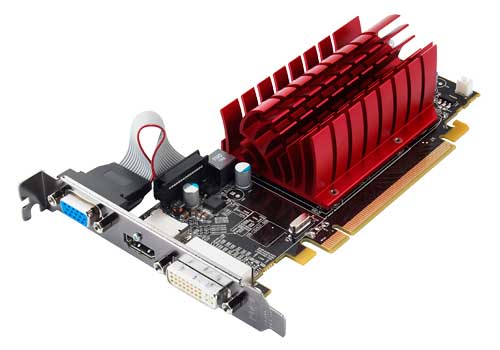
If it has a fan on it, it's actively cooled. If there's just a heatsink, it's passive.

Active:
5570.jpg


Passive:
5450Q.jpg
 
Back
Top