• We’re currently investigating an issue related to the forum theme and styling that is impacting page layout and visual formatting. The problem has been identified, and we are actively working on a resolution. There is no impact to user data or functionality, this is strictly a front-end display issue. We’ll post an update once the fix has been deployed. Thanks for your patience while we get this sorted.

Question 3 Pictures Folders

Geos54

Member
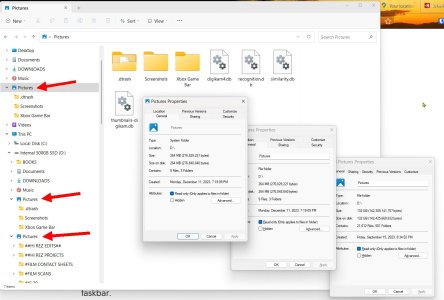
Why do I have 3 Pictures folders? Win11 is on the C: Drive and I moved all my media folders (Pictures, Music, Video) onto the D: Drive. Two of the Picture folders just have XBox crap which I never use. How do I get rid of them? Thanks.
 

Attachments

  • 3 Picture Folders.jpg
    3 Picture Folders.jpg
    155.2 KB · Views: 9
Technically you have 2 folders, not 3. The "folder" at the top of your screenshot is the same as the second folder in your screenshot. The top one is just shown in the "Quick Access" area of File Explorer.

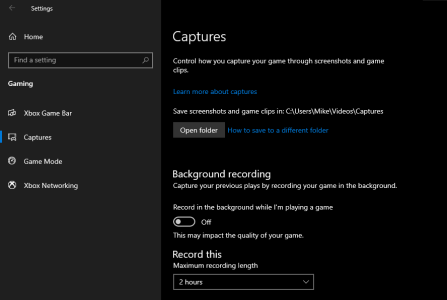
The third folder may have something to do with the Gaming Captures settings in Windows. Open settings and navigate to the Gaming section or type Gaming in the search box. Under Captures try turning off Background Recording. Also, what is the file location of the screenshots and game clips? Screenshot below is from Windows 10, but should be similar to 11.

Screenshot 2023-12-26 090828.png
 
Technically you have 2 folders, not 3. The "folder" at the top of your screenshot is the same as the second folder in your screenshot. The top one is just shown in the "Quick Access" area of File Explorer.

The third folder may have something to do with the Gaming Captures settings in Windows. Open settings and navigate to the Gaming section or type Gaming in the search box. Under Captures try turning off Background Recording. Also, what is the file location of the screenshots and game clips? Screenshot below is from Windows 10, but should be similar to 11.

View attachment 91002
Thank you.
 
Back
Top