• We’re currently investigating an issue related to the forum theme and styling that is impacting page layout and visual formatting. The problem has been identified, and we are actively working on a resolution. There is no impact to user data or functionality, this is strictly a front-end display issue. We’ll post an update once the fix has been deployed. Thanks for your patience while we get this sorted.

2700x hitting 80c in load

I finally got my Ryzen 2700X rig built but I'm worried about the temperatures that seem very high!

In bios the CPU temp seems to variate all the time between 44-52c. HWMonitor shows idle temperature around ~40c but when I tried Prime95 it reached 80c!

I got a rather big Thermalright Macho Rev.B CPU cooler so I would assume it would keep the temperatures decent? Do you think I have made some mistake applying the thermal paste or are these temperatures normal?

Also the fractal case should have decent airflow. Here is a photo of the setup:
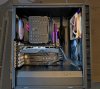

2019-officepc.jpg

- Fractal Design Define C ATX
- Asus ROG STRIX X470-F GAMING
- AMD Ryzen 7 2700X
- Thermalright Macho Rev.B CPU
- G.Skill TridentZ RGB DDR4-3200 C14 DC 32GB (2x16GB)
- Samsung 970 EVO Plus SSD 1 Tt M.2
- Corsair RM750x 80 PLUS Gold 750W

Any advice?
 

Attachments

  • 2700x-idle.png
    2700x-idle.png
    660 KB · Views: 25
  • 2700x-load.png
    2700x-load.png
    625.4 KB · Views: 28
iirc the 2700X can hit 1.5v out of the box, but only for brief moments. Is 1.55v vs 1.525v a big difference at stock for a 2700X? I doubt either 2700X stays at that voltage very long.
 
Is the fan profile set to compensate for higher temps to run at a higher RPM?

From those attached HWinfo screens I can see that all the fans do spin faster when the CPU is under load (CPU fan 750rpm -> 1250rpm).
The fans are connected to the X-470F and I haven't changed the settings for fans yet.

I can try to change the settings, but even with those RPM's it seems very high to me.
 
From those attached HWinfo screens I can see that all the fans do spin faster when the CPU is under load (CPU fan 750rpm -> 1250rpm).
The fans are connected to the X-470F and I haven't changed the settings for fans yet.

I can try to change the settings, but even with those RPM's it seems very high to me.

I use a deepcool gammax 400. I have it set in bios to 60% base with 100% after temp rises to 60C.

Under aida 64, the max temps I've seen after an hour or so are 75ish (occasional spikes) but most of the time if I look at current they are 65-68ish iirc. Been a while since I did a stress test to see if stable.
 
CPU has only ~105W TDP. On that heatsink, yes 80C is too high. I'd try remounting it with less thermal paste and of course set the fans to run at max above 60-ish C.
 
iirc the 2700X can hit 1.5v out of the box, but only for brief moments. Is 1.55v vs 1.525v a big difference at stock for a 2700X? I doubt either 2700X stays at that voltage very long.

Those would be very high voltages for the 2700x. I would only expect those voltages during boosts to 4.3 GHz or so.

@imported_mlt your BIOS temps seem very high. I suspect a bad mount of the HSF.
 
@imported_mlt your BIOS temps seem very high. I suspect a bad mount of the HSF.

Yeah I think so too. I'll go and buy some better thermal paste and reinstall the cooler tomorrow. I've never had to redo it before so at least I need to learn how to clean the old paste and maybe check some tutorial on what's the best way to apply the paste.
 
Yeah I think so too. I'll go and buy some better thermal paste and reinstall the cooler tomorrow. I've never had to redo it before so at least I need to learn how to clean the old paste and maybe check some tutorial on what's the best way to apply the paste.

For most TIM, you can use coffee filters and 91-99% isopropyl alcohol.
 
For most TIM, you can use coffee filters and 91-99% isopropyl alcohol.
Thanks DrMrLordX!

I bought Arctic Cooling MX-4 paste, isopropyl to clean the CPU and already reinstalled the cooler.

Now the temperatures are:
Bios 44c
HWMonitor idle low 35c (for some reason it still keeps pumping between 35-45c)
HWMonitor load high 73c

Not sure if I 100% nailed applying the paste, but at least it seemed to make a difference. I still havent touched the fan settings at all so I'll experiment on those next.

EDIT: I noticed that quite many people recommended using only Ryzen Master to check temperatures, and it show's my idle temperature as 31.75c and the load the same 73c.
 
Last edited:
What does your power usage look like?

I don't have Prime95, but when using the Ryzen Master test, my package power is topping out at 98.25 W (according to HWMonitor).

I have a Noctua NH-u14 cooler, and the temps on that short test max out @ 57C (CPU fan gets to ~900 RPM).

Your heatsink looks pretty beefy, so you might double check how high your power usage gets, and that should give you an idea of whether the motherboard is giving some extra voltage or if the heatsink isn't fully seated.

I do think your latest test showing temps of 73C might indicate that things are fine.

-AG
 
What does your power usage look like?

I don't have Prime95, but when using the Ryzen Master test, my package power is topping out at 98.25 W (according to HWMonitor).

I have a Noctua NH-u14 cooler, and the temps on that short test max out @ 57C (CPU fan gets to ~900 RPM).

Your heatsink looks pretty beefy, so you might double check how high your power usage gets, and that should give you an idea of whether the motherboard is giving some extra voltage or if the heatsink isn't fully seated.

I do think your latest test showing temps of 73C might indicate that things are fine.

-AG

I'm new to the Ryzen world and did not even know that Ryzen Master had a test 🙂

My Powers Package (according to HWMonitor) shows:
With Prime95: 110 - 140 W (Max temp 73c)
With Ryzen Master test: ~105 W (Max temp 60c)
 
Back
Top